20 March 2014

My Creations

My story: During school days, when friends were merely playing computer games, I was creating games. That's how much I loved programming. My story has a lot of twists though. In 1998, schools had few computers, so my school devised a logic test. Only those who passed could study computer science (CS). I passed easily but classmates said CS is tough so I opted for commerce. My parents said that CS is the future and forced me to choose CS. My teacher said my math and physics score aren't good enough, so I may struggle with CS, and recommended commerce. Overjoyed, I told my parents this but they insisted on CS. After almost failing my first CS test, my CS teacher motivated me, realizing my struggle was just a lack of practical experience with computers. I used an old abandoned computer to practice. A classmate shared a book containing BASIC game program listings and I understood how games were made. I accidentally discovered the MS-DOS manual and discovered various OS commands. Soon I started building my own games and was among the top programmers in class. My math and physics scores also improved, and I was among the top 6 rankers in class. When the dot com bubble burst, software engineers were losing their jobs and the scare (similar to how engineers are being laid off in 2025 due to AI) made parents and relatives force me to take up the '"safer" mechanical engineering. Even while studying mech I continued programming, and seniors were surprised to find me in the library reading CS books. I became a mech engineer, but took up a software programming job, loved it and decided to study software formally at CDAC. Due to MGPT's, only I passed the tough course in a class full of CS students. Got a job in a defence company as software engineer, eventually wrote CS GATE, got rejected by colleges due to my mech degree and finally MSRUAS which rejected me initially, called back saying that I could join the multidisciplinary AI course. I completed my MTech in AI, becoming the first ranker in my class and publishing research papers in the field of AI. I finally officially became a CS engineer and had a dream fulfilled. Eventually the long hours of work and lack of proper sleep crippled me with chronic eye strain and I figured out how to solve it, but my screen time is seriously limited now as I can't afford to slip back into a state of chronic eye strain.

 
Hobby projects created during school/college

Most of my initial programs were created on a 286 computer which didn't have Windows installed. Only MS-DOS. Black and white monitor (so I had to imagine the colors when creating programs). Max speed of the computer: 20MHz. Hard disk capacity: 30MB :-) It was only after my engineering course that I got an internet connection at home, so the below programs are a result of hard-work and self-study of API's and documentation.

Jump-up: 
https://github.com/nav9/JumpUp
Some neighbour kids in 3rd and 4th grade used to enjoy this game (circa 1998-1999, when not many people had computers here). I guess it's because of the simplicity and the funny sounds I programmed into it. This was the first game I programmed (in GW-BASIC) when I was in 9th grade, and my little brother was crazy after it. He even beat my highscore! (he was too young to know that it was partly dependent on chance). The game was originally meant to have a scrolling screen like Google's dino game, but at that time my programming skills were very basic.


Bricks
https://github.com/nav9/Bricks
A game with ten levels of increasing difficulty and challenges. Created when in 10th grade. Was introduced to the term "cheat codes" at this point of time, and introduced this into the game. At times it gets hard to hit the last few bricks, so I recommend just using the cheat codes to see all the levels :-)


Maze
https://github.com/nav9/Maze
I used to create mazes on paper, and decided to program one too. It was a daunting task, setting up the arrays on large sheets of paper that I stuck together and then replicating the same on the computer. The maze was programmed with portals and wells (which you might fall into and die). It was also divided into 4 sections which made it very difficult to solve, because you had to remember the previous screens to find your way. My classmate tried it for three hours, and said he couldn't solve it (to date, I'm the only one who has solved it).


Digger
https://github.com/nav9/Digger
This was one game I really wanted to program. Had played it many years back on a cousin's computer, and wanted to play it at home too, so just created it myself. Wasn't familiar with Q-BASIC graphics at that time, so I used ASCII characters. It's a game with a digger machine digging through mud, collecting diamonds. Monsters try to destroy the machine and the machine is able to shoot at the monsters or drop sacks of money on them to kill them. The collapsed sacks can be collected to get more ammo. I created an initial version and then improved upon it. You can play the original retro digger game here: http://www.futrega.org/digger/


Calculator program
https://github.com/nav9/Calculator
Okay, this one was simple, but it was programmed to be user friendly by allowing the user to navigate from one key to another using the arrow keys and by providing a square root option (which I'm surprised that many calculators strangely still don't provide).


Mock antivirus program
https://github.com/nav9/MockAntiviruses
You'd recollect I was using my uncle's computer (which was infected with the NYB virus which we couldn't remove because the computer couldn't run any of the newer antiviruses), and I thought of pulling a prank on him. I created an antivirus interface which was pretty similar to the real MSAV antivirus interface of those days. The program pretends to scan the computer and pops up an alert that it found a boot sector virus which can't be removed. My uncle and my dad actually believed it! :-)
Apart from games, the annoying viruses were another reason I wanted to be a computer science engineer. For a short period of time in 9th or 10th grade, I planned to eventually join an antivirus company to help rid the world of these viruses.


Vein: An MS-DOS OS interface, like Windows
https://github.com/nav9/Vein---MS-DOS-OS-Interface
Since the commandline required a lot of typing and since the computer didn't have Windows, I created an interface (while in 11th grade) for interacting with MS-DOS. Pretty much like how the Windows graphical interface was created by Microsoft. This was a period of time when I discovered the MS-DOS help manual (similar to the Linux man pages) and spent quite some time learning a lot of new functionality.


Digger forever
https://github.com/nav9/Digger
Yes, the name is based on "Batman Forever" and the "forever" meant that I didn't intend to create another version of Digger after this. I wanted to make my Digger game closer to the actual game I had played at my cousin's house (now available here), so while doing my engineering, when the ISTE student chapter organized a state level hobby project competition, I borrowed my room-mate's computer for two weeks and created Digger with BASIC graphics (presented it along with my other games). And guess what? I won the competition with a Rs.2000 cash prize! Roommate got a generous treat and seniors were all-praise :-)  
[update] Just found the original of the printout my very-happy-seniors had put up on the college and hostel notice board after I won the prize. S.R.C is the abbreviation for Standout Recreation Club. I thought it meant "Outstanding Recreation Club", but a senior recently clarified that the club was created when their seniors were sent out of class and made to stand in the corridor :-)


My game received a kind review from Sparcie, who had similarly tried making a Digger game during his childhood.


Message decoder program
https://github.com/nav9/Decoder
Converting text from English to a cryptic language and vice versa being slow, I wrote a program for it. Also kept it flexible for it to be able to accept a new code sequence too.


Mechanical force visualization software
https://github.com/nav9/Unipar
A Civil engineering lecturer at my college asked me if I could create for him, a program which would show a 2D representation of the normal and tangential forces on a beam. He also wanted a simple graph to show the force distribution. By this time, I had derived 3D projection equations on my own (I didn't know this would be available on the internet, so I had actually drawn projections on paper and derived the equation by using whatever I learnt in trigonometry), so I took my lecturer completely by surprise by using the graphics of C (using the Turbo C compiler) and created the beam in 3D, as an application with full-fledged menus and an interactive graph. You can actually rotate the beam in 3D using arrow keys, feed in various values using textfields (all UI elements were manually programmed) and also load/save the values. When I look at the program today, I find it hard to believe that I actually programmed it at that age!


I now know the colours are atrocious. Engineers aren't taught about how to use colours well. However, now I've learnt the right use of colours from interaction designers.


Ben
https://github.com/nav9/Ben
I wanted to make a game like Dangerous Dave, and I began with Ben. But this program was left incomplete, since BASIC does not have the concept of threads. So on adding a monster in the second screen, gameplay became too slow (could have also been due to some other issue, but I didn't have the time to look into it back then). Was able to get over the tough part of programming multi-key input to make Ben jump around.


Robot arm project

I wanted to build a robot, but there was not a soul who was willing to help us or sponsor it. So my enterprising team members and I decided to build it from scratch. We designed the robot arm in AutoCAD, created prototypes with thermocol, did the filing, drilling and cutting on our own in the workshop and built a working model which could be controlled with conducting copper strips on gloves. The arm was designed to be a stand-alone detachable arm which could be removed from the main structure and wrapped onto a human arm using velcro, becoming a bionic arm. Using just wrist movements, the 'jaw' would open and close. This was designed to be used by persons affected with leprosy. Our college appreciated the hard work and our applications for sponsorship were the first in our college to be accepted by the Karnataka State Council for Science and Technology. They fully funded our project and invited us to exhibit our project in Gulbarga at the KSCST exhibition.


Evolutionary algorithms

Examples I built, to showcase how evolutionary algorithms can solve highly multidimensional problems in a very short amount of time. Some of these videos were found by the creator of PyMunk, and he decided to add it to the PyMunk showcase page.


A simple Galton board 


Greasemonkey for auto-clicking a web-page

A certain page required clicking a link every time I visited the page. So I thought I'd automate the process with this code snippet. 

var element = document.getElementsByTagName("a"); // get element by tag namevar theEvent = document.createEvent("MouseEvent");
theEvent.initMouseEvent("click", true, true, window, 0, 0, 0, 30, 79, false, false, false, false, 0, null);
//var element = document.getElementById('link');
element[0].dispatchEvent(theEvent);

Recursing directories
https://github.com/nav9/recursor

 
I wanted to be able to move recursively through directories to automatically delete those annoying Thumbs.db and desktop.ini files, so wrote a small python script for it. After writing it, I discovered that the functionality was already available in Python via the walk command ... *sigh* ... anyway at least there's the joy of creating a program on my own and being able to tweak it as I wish!
UPDATE: This functionality is now available in the file duplicate deletion program I built (mentioned below).
 
File duplicate removal

A handy program that finds duplicate files based on size and binary chunks. It then moves the duplicates to a separate folder. The program is also capable of recursing directories and deleting unnecessary files that the User specifies. There's also a feature to recognize duplicate images, irrespective of the file format or size of the image. I've also recently added a feature to undo actions performed.

Resting my eyes
https://github.com/nav9/System-Tray-Program
https://github.com/nav9/iRest


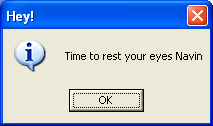
What's the point of knowing VC++ if you aren't using it to your advantage? I borrowed some open source code for a program which sits in the system tray in Windows, and modified it to start at logon and pop up a message at a specified interval of time, alerting a person to rest their eyes for 5 min. Strained-eyed friends and I found this program to be a boon. Of course when I found Eye Leo, I switched to it immediately.
Also created a Python program as a cross-platform solution.

Popup Destroyer
https://github.com/nav9/PopupDestroyer


A poor security setting created by someone, made an "Authentication required" popup appear whenever I opened a new page on my browser. The user just had to press Esc to make the popup go away and it was very annoying. So I wrote a sentinel program in VC++ to run in the background, scanning all window titles for the "Authentication required" string. When it found one, it'd immediately issue the Esc keypress command to the window automatically and the window would get closed. I used to enjoy watching those windows disappear while I continued with my work happily :-).


Volunteering website
See it working here: https://nav9.github.io/EmployeeVolunteeringWebsite/index.html
https://github.com/nav9/EmployeeVolunteeringWebsite

Our volunteering team in Tata Power SED needed a website and we decided to create it ourselves. I created an interactive prototype in 3 days and soon other volunteers pitched in to improve it further. We made good use of free and open source code available on the internet.


hashCSV
https://github.com/nav9/hashCSV
This I created for a friend in the field of data analytics, who needed to hash specific columns in CSV files. More about it here.


Snacker
https://github.com/nav9/snacker

At one of my previous workplaces, they decided to buy evening snacks everyday. Our office assistant used to go around asking a different employee everyday what snack to buy. Since this became a bit annoying for employees to choose (and others to grumble about the choice), I decided to automate it :-) I created a Java program which our office assistant could use, which would randomly select a snack and display it on the screen. A 'recent snacks' list avoided redundancy and if he rejected a snack, he'd be shown another random option. After a while, I noticed he wasn't so keen on using it. I investigated and found that he didn't understand the concept of brackets and commas in the JSON file which contained the snacks list :-) So I converted it into a CSV which he could open and edit in MS Excel. Obviously everyone was amused at an "AI" selecting their snacks for them. The COO said "...when we write a book about our startup, this is going to be one of the anecdotes in it...when we had trouble selecting snacks, one of our engineers wrote a program for it".


Groot GPT
Without writing any code, I used ChatGPT to generate the entire code for a chatbot which responded like Groot. Although it may be trivial now, it was a big deal in the early days of discovering ChatGPT. More about it and Prompt Engineering, here.

One of my clients needed some work done with FFMPEG, for their auto-video recording feature, and to save disk space they needed to reduce video quality too. Since video comparison tools were scarce, I spent some time and created this handy video comparison tool which allows you to compare multiple videos of even varied dimensions.


Auto-correcting audio-video async
https://github.com/nav9/audio_video_synchronizerThis is just a demo that needs a lot more work to be production-worthy. One of my clients had a problem with Zoom and Google Meet network traffic causing audio-video async in the recorded meeting videos. We couldn't fix the issue even using timestamps, since the async happened within Zoom's server/apps itself. So on a long weekend, I created this program as a demo to show that with a bit more work, we could indeed use AI to auto-fix the audio-video async. MediaPipe detected lip motion, and speech recognition was used to match the pauses in speech. The client couldn't proceed with it unfortunately, because of their compute budget being tight.


VCF files merger

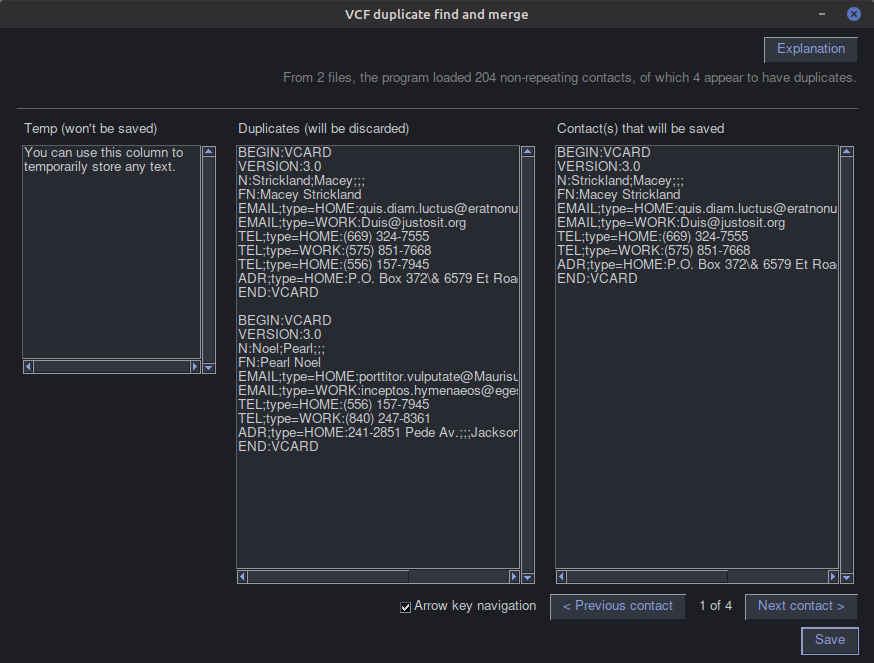
A simple tool to help merge multiple Virtual Contact File (VCF) files. These are the vCard files used in smartphones. It automatically finds unique contacts and displays duplicate contacts for you to inspect. Contacts are analyzed for similarity based on the last few characters in the rows that store phone numbers.

Private Chat
Alt text
 
I noticed that I sometimes received advertisements based on the content of the messages I sent to my contacts. If chats were not really private and some algorithm was analyzing them, I wanted to make it private. So I prompted Google's Gemini and created Private Chat which allows encrypting messages before sending/receiving them across any other messaging platform.
 

Imager helps find image enhancement combinations and settings you may have never imagined. It also helps because there are so many settings that can be tweaked in so many ways that it gets exhausting to go through those permutations. Imager reduces the search to a simple selection of the best image and clicking "Evolve" to allow the algorithm to find the settings that bring the final result closer to how you wanted to enhance the image. Google's Gemini Pro generated a lot of the code for me.
 
 
Multi Recorder
Often when recording a video meeting, the screen recorder chooses the wrong audio channel and the audio does not get recorded, or the audio from one channel gets recorded and does not record the audio from the microphone. So to avoid having to make the User choose the correct channels, I created an application which can automatically detect all available channels for webcam, video, audio, microphone and also capture the screen. All these will automatically be saved to a folder and the User can later choose to merge them. (this project is still under development)
 
Linux AppImage Builder
Linux applications can be created as a standalone AppImage. The process to create it is unnecessarily complex and error prone, so I prompted Grok to build a GUI to automate the creation for Flutter apps that need to run on Linux, and requested the community to provide simpler options.

 
Food Contaminant Visualizer
A simple d3.js application I created to easily visualize which contaminants cause what issues, which foods may have such contaminants, how they are detected, and what their remedies are. I initially wished to build this as a full-fledged app which could display the human body in 3D and even recommend safe sources of food.


Android Apps

I've built many more apps for Android (by vibe-coding) than what is shown below, but it'll be a while until they can be published in Playstore.
 
Simple Notes
Some default android notes apps did not have the features I wanted. To be able to encrypt notes, export them and also be able to open the encrypted notes in Linux, changing the theme to dark, inserting the current time, merging notes, being able to search and replace and the obvious trust issue of whether the apps built by someone else could be siphoning away my private data. So I built one for myself by prompting ChatGPT.
https://github.com/nav9/simple_notes   (I made this repository private now)
 

Automatic Slideshow
I could not find any good slideshow app that showed the slideshow in the way I wanted, with the duration I wanted for each photo, scrolling the way I wanted, and with options to pause and play the way I wanted. So I built one for myself by prompting ChatGPT.
https://github.com/nav9/automatic_slideshow (I made this repository private now)


10 March 2014

Setting the fastdial page as your homepage

I've always found it more productive to have the fastdial (it's a Firefox addon like speeddial of Opera) page open for me whenever I open my browser.

The latest version though, didn't show fastdial as the homepage. So a bit of digging up got me this:

chrome://fastdial/content/fastdial.html

Use the above link as your homepage, set Firefox to open the homepage when you open the browser and set Fastdial to show up when you open a new tab, and you'll have your most-used websites at your fingertips with fastdial.


02 March 2014

A minimalist interface

Downloaded and started using the GitHub client for Windows today and noticed that they had designed the application to have a minimalist interface. So beautifully designed!

Creating a minimalist interface isn't easy though. Takes a lot of planning and guts to put on the screen nothing more than what is actually required. I'm a fan already :)

Here's Martin Fowler's views on it and the KISS principle which support it. GitHub client's interface also reminded me of the clever no-click interface created by the institute for interactive research.


Unite. A hobby project

Unite, is a project I began working on, when I wanted to re-learn web app programming. The project is designed to have a highly customizable front-end, a robust back-end and either a relational or a graph database. The project is hosted on GitHub under GPL v3. This is also meant to serve as a project that will give me a deeper understanding of using Git, continuous integration (Jenkins), Issue tracking (Trac), automated testing, automated code coverage checking, build scripting (Gradle), automated bug finding and deployment (Phew! Big target to achieve with the limited time I get everyday). This page captures the progress of the project.

Setting up the basics

Setting up a new project on GitHub was a breeze. Once done, I cloned the repository onto my local machine and using SmartGit, created an authentication token, the folder structures, spent an awful lot of time learning Gradle by myself and decided to use Gradle with Netbeans (which has Gradle support built-in) because the Eclipse plugin ended up giving me some errors during build. Setting up a continuous integration build right from the start was a practice I wanted to follow, so after installing Jenkins (tried Hudson too. It's good, but I liked Jenkins' interface better), it's plugins and successfully figuring out how to trigger a build on Git commit (this is a better approach than making Jenkins poll to check for code changes), the project was ready for some real coding.

D3.js as a general purpose data visualization library on the web

What would one do when one wants to use JavaScript to graphically display some data or statistics on a web-page? Use a library of course. I saw a lot of libraries, but was shocked at what d3.js had to offer. Just have a look at these:


Amazing! The initiators are Michael Bostock, Jeffrey Heer, Vadim Ogievetsky, who created d3.js (BSD license) based on the experience they had from the stepping stones of other similar projects that didn't work out very well.

It takes a while to figure out how to use d3. If you have a good understanding of JavaScript, you can start off right away. If not, the concepts of anonymous functions and closures will help you learn. Most of the impressive functionality can be implemented with just the d3.js file (319kB). A more compressed version of the file d3.min.js (144kB) is also available. More advanced functions are available in the supporting script files of d3.

A novice would find it surprising, the way d3.js works. By selecting elements of the DOM before they're even created. By passing variables like "d" and "i" internally, which don't seem to be declared anywhere.

But that's the challenge that makes it worth learning! D3 is a tool with which you can use on any area of the DOM. You can create any kind of visualization you want.

To make d3.js simpler, there are encapsulating libraries like nvd3, c3, cubism and rickshaw.

Went through the source code of d3 as usual, and was completely taken aback when I saw they've used the actual pi, phi and lambda symbols as variable names! Decided to ask my community, and here's what they had to say about it. Although it looks fancy, it's better to stick to variable names rather than symbols. Psst...if you want to generate pi on your screen, make sure the num lock on your keyboard is on; then keep the alt key pressed and type 227 on the num pad and you'll get the pi symbol like this ( π ). I pasted it in notepad, and it didn't turn into a junk character. Cool, isn't it?!
Jeff Atwood had an article on the use of unicode too (the 'entity' word is to be replaced by a heart symbol).

After dabbling with d3.js for about a week, I created an ajax program to query a servlet for data and display the retrieved data on a d3 graph. Worked like a charm!

A nice source for learning are the tutorials from the main website, practically trying it out a little, a free book and if that isn't enough, more than a thousand examples with sources, for you to refer. Definitely a work of art!

01 March 2014

Keeping those wires all neatly wrapped up (and a point on wireless electricity)

Well, as software people, we also have to deal with hardware issues :)
One of them, is getting wires in place. While there are various clever ways to do it, the one that solves the problem of keeping earphones nicely and inexpensively wrapped up, is this one.

This could have been a time and age where we would not have had to deal with wires. It'd have been a reality if Tesla's Tower of Power wasn't pulled down by economic problems and a short-cut, cost-effective solution to communication by Marconi.
More on the Wardenclyffe Tower here: http://en.wikipedia.org/wiki/Wardenclyffe_Tower
Same story told in a damn-interesting way :-)  http://www.damninteresting.com/teslas-tower-of-power/

It intrigues me, the way some people develop an intuitive understanding of a subject. Tesla understanding the working of electricity, in this case. Einstein, understanding the concept of relativity. Newton and gravity.

What also intrigues me is the way commerce isn't designed to produce the best possible outcome. Corporates always go for the short-term approach which makes money (and hence sustains life), rather than the long-term approach which could have sustained life in a much better way. A concept called Hyperbolic Discounting.

Looking forward to a truly wireless future.

08 February 2014

How to trigger a Jenkins build on git commit

I spent quite some time figuring this out, but was happy when it worked. This is for Windows. In Linux, the process is the same, but it's far easier.

First, you have to know that if you've installed Git in Windows, it comes with curl pre-installed. So just open the Git bash prompt and start typing your commands.


Let's say you have a Jenkins job setup on localhost, named "someJob". To initiate a build, just type the following command in the Git Bash prompt:

curl http://localhost:8080/job/someJob/build?delay=0sec

That's it. Once you've typed the command, just have a look at your Jenkins dashboard and you'll see your project building. (you might also want to know about this)

Now to make a Git commit trigger the build, you have to navigate to the hidden ".git" directory in your git repository. Enter the "hooks" directory and you'll see there, a "post-commit.sample" file. You can open it with Notepad++ to see the contents of it.

Make a copy of the file and name it "post-commit". It does not need an extension. This is the file that Git will invoke whenever you do a commit to this particular Git repository. Don't worry about the fact that it looks like a Linux bash script. When Git triggers it, it will run even in Windows. If the file has a line ": Nothing", you can remove that line and insert this new line:

curl http://localhost:8080/job/someJob/build?delay=0sec

Now save the file, make some changes to your git repository and commit the changes. The moment you commit, you'll see the build being triggered in Jenkins! Awesome! :)


-----------------------------------------------------------------

Additional note: Many people reach this page via a StackOverflow answer. One such person (see comment below answer) mentioned being confused about what "someJob" was and also had faced an issue with his project name having a space in between, so he had to substitute "%20" in place of a space "codecept%20tests". Hope his response would be of help to anyone else who faces a similar situation. Thank you Paul.


07 February 2014

Access GitHub with an authentication token instead of your Github password

I'm currently using the SmartGit client, as it's good and crossplatform. When I wanted to connect to my GitHub repository for a hobby project I was working on, I was a bit uncomfortable sharing my Github password with the application. Good thing is, Github allows you to also create a token which SmartGit can use to authenticate.

Click on settings on the top of the page:
Select "Applications" and "Create a new token". Use the hash value that gets generated (and treat this token like you would treat a password)


05 February 2014

Contributing to the open source community

How many developers actually help out in the open source community? The numerous software we get to use for free are a result of people willingly putting in effort to create good quality software. I believe that if we are using such software, we can also help the community by contributing back.

Some ways you can contribute:

1. Be a part of the forums / mailing-lists and answer queries of people struggling with learning / implementing the software. I've been a member of some forums and mailing lists under various usernames (Actionscript, Intel TBB, Processing, OSG, OGRE, Stackoverflow and it's sister sites, linuxforums, ffmpeg, netsnmp, SDL and many others).
2. Join the development of the software and contribute patches. Websites like OpenHatch can help you get up to speed with the process.
3. Allow the software to report back crashes and anonymous usage statistics. The latter helps the dev's to improve the UI and interactivity by having authentic user journeys. I've allowed these for Fedora, Netbeans and a few other software.
4. When you find a bug, report it on their issue tracking system. I filed an issue today.
5. Sponsor them. Jenkins allows you to sponsor a particular issue. Other projects allow you to donate to the overall development effort. These people really do deserve sponsorship for the great work they're doing.
6. Add to the Wiki. Most projects have a Wiki page which you can add useful information to.
7. Create tutorials. Many users have a tough time learning how to use a software. You can create video tutorials and post them on youtube or post tutorials on your blog. I used to create tutorials on Stackoverflow too: my Mutex tutorial becoming the highest ranked in Google searches.

Doing all this not just makes you a good contributor to the community, it also expands your skills. It makes you a better developer, as you get exposure to international best-practices, standards, technologies. It improves your communication and hones your technical skills. I'd encourage every software developer to participate. All the best!

Say thank you or donate

04 February 2014

How to install plugins for Jenkins?

I wanted to install the plugin for Gradle and was perplexed that there was no download button on this page: https://wiki.jenkins-ci.org/display/JENKINS/Gradle+Plugin

A bit more searching led me to: https://wiki.jenkins-ci.org/display/JENKINS/Plugins#Plugins-Howtoinstallplugins

Start Jenkins on your browser, go to "Manage Jenkins" and you'll see the option for "Plugin manager".

Select which plugins you want, and install them. It'll take a while for it to download and install. As the how-to page says, you can also install the plugins manually.

I chose the following, as there was quite a bit of experimentation I wanted to do with a lot of tools. A pity there wasn't any ready plugin for graph databases:

  • Git Client Plugin
  • SCM API Plugin   
  • Git Plugin   
  • Git Server Plugin   
  • Git userContent plugin   
  • Git Chooser Alternative Plugin   
  • ruby-runtime   
  • git-notes Plugin   
  • Static Code Analysis Plug-ins   
  • Task Scanner Plugin   
  • Database Plugin   
  • PostgreSQL Database Plugin   
  • LDAP Email Plugin   
  • MSBuild Plugin   
  • Cobertura Plugin   
  • EasyAnt Plugin   
  • GitBucket Plugin   
  • SSH Agent Plugin   
  • The Continuous Integration Game plugin   
  • jQuery Plugin   
  • jQuery UI Plugin   
  • Terminal Plugin   
  • ClearCase Plugin   
  • ClearCase Release Plugin   
  • Gitlab Merge Request Builder Plugin   
  • Gitlab Hook Plugin   
  • JUnit Attachments Plugin   
  • xUnit Plugin   
  • JSUnit plugin   
  • GitHub API Plugin   
  • AnsiColor Plugin   
  • JSGames Plugin   
  • Mercurial Plugin   
  • Git Parameter Plugin   
  • Github OAuth Plugin   
  • Build Monitor Plugin   
  • CodeCover Plugin   
  • NUnit Plugin   
  • ClearCase UCM Plugin   
  • jQuery UI Plugin   
  • Valgrind Plugin   
  • MySQL Database Plugin   
  • Eclipse Update Site Plugin   
  • jQuery Plugin   
  • Parameterized Trigger Plugin   
  • Build Pipeline Plugin   
  • HTML5 Notifier Plugin   
  • Gitorious Plugin   
  • Git Plugin   
  • Trac Plugin   
  • ClearCase UCM Baseline Plugin   
  • Python Plugin   
  • Checkstyle Plugin   
  • Gradle Plugin   
  • JDK Parameter Plugin   
  • cmakebuilder Plugin   
  • ClearCase Plugin   
  • Active Directory plugin   
  • Signal killer   
  • MySQL Authentication Plugin   
  • Metadata plugin   
  • Git Client Plugin   
  • Git Server Plugin 
  •  Parallel Test Executor Plugin

Did you notice that there's a The Continuous Integration Game plugin? I felt it was pretty cool of them to have brought in Gamification into CI.

03 February 2014

Getting Gradle integrated into Eclipse

It was nice learning Gradle, but I felt it'd be a bit more convenient to have Gradle inside the Eclipse IDE. Gradle is already present in the Netbeans IDE, but for Eclipse you have to install it like so:

This project at Github is what you need: https://github.com/spring-projects/eclipse-integration-gradle

From the documentation on the website, just follow the same steps:
  • Open the Eclipse IDE
  • Select Help > Install new software
  • Paste a Gradle update site link (http://dist.springsource.com/release/TOOLS/gradle) into the "Work with" text box. 
  • Ensure that the option "Group Items by Category" is enabled.
  • Select the top-level node 'Extensions / Gradle Integration'.
  • Click "Next".
  • Review the list of software that will be installed. Click "Next" again.
  • Review and accept licence agreements and Click "Finish".
It'll take a while to install:


Now in Project Explorer, right click on your project, go to Run As > 2. Gradle... to run the project under whichever tasks you want to select.


You don't always have to return to this dialog box. The next time, you can simply run the selected tasks using Run As > 1. Gradle.
If you add any tasks externally, click the refresh button to view that task.

It's that simple. Happy building! :)

01 February 2014

How to add the path of the JDK to JAVA_HOME in Linux?


If you've already installed the JDK, it's as simple as this:
type locate jdk and search for the path.

Mine was in /usr/local/jdk1.7.0_45/

So I opened up bash_profile with
vim ~/.bash_profile

and added the following line into it.
JAVA_HOME=/usr/local/jdk1.7.0_45
export JAVA_HOME


Also add :
PATH=$PATH:$HOME/.local/bin:$HOME/bin:/usr/local/gradle-1.10/bin:/usr/local/jdk1.7.0_45/bin
 

So that when you execute commands like jar -xf somejar.jar, the executables will be recognized.


Then type source ~/.bash_profile to activate the changes you made (basically the whole of bash_profile will be executed again).

That's it! all programs will recognize JAVA_HOME. I had to do this for Gradle to recognize the path. Without the path, it didn't compile Java programs.