09 August 2021

Understanding and helping people who have eye strain

People experiencing severe eye strain often find themselves grappling for help in a world that does not even begin understanding what they are going through. Moreover, some inexperienced doctors end up thinking that the person is exaggerating, when certain methods aren’t able to cure the person.

The need to protect the eyes does not depend on the severity of eye strain. Everyone needs to be protected. Here’s how:

Think of the eye strain like a fractured leg

Do you motivate people with a fractured leg to run a little everyday to recover? Unfortunately, that’s what well-wishers do, when they tell eye strain patients to “do eye exercises everyday”. It’s what employers do when they think that all the employee needs is a little nudge and motivation to “just try working a little longer and get the work completed”. It’s what institutions do when they give short deadlines for assignments. It’s what family members and neighbors do, when they (often unknowingly) create situations that disallow people from getting eight hours of uninterrupted sleep each night.

Strained eyes need sleep and rest for recovery. A lot of rest.

Don’t ask for medical proof

Even during my chronic stages of strain, my eyes were not red. There were no physical manifestations of the severity of the strain (well, perhaps dark circles under the eye would count). Those were years when my extraocular muscles were sore and paining everyday, throughout the day. Doctors couldn’t quantify the strain or even identify the cause, and there’s insufficient research on how sleep and rest can cure fatigue-related strain (probably because it’s hard to measure strain of the extraocular muscles and probably because people don’t see the point of researching something so obvious as rest being the cure for fatigue). Everyone who uses the computer excessively faces eye strain. You don’t need medical proof that sleep and rest are necessary.

Be kind

All of us have been entertained with stories of heroic deeds of people who overcame adversity, people who went through sleep loss and pain and emerged victorious. All of us have had someone lecture us on how important it is to work hard. Often, these words reach us as uncompromising, patronizing, sharp criticism and sarcasm. This mode of speech gets passed on from person to person. Not surprisingly, when someone with eye strain asks for proper sleep and rest, the harsh response gets auto-activated and pours out…in an effort to quell what is perceived as laziness. Be kind to people who are suffering. Allow them to get the rest they need. If there’s urgent work to be done, assign the work to someone else and allow the person suffering from eye strain to switch over to tasks that do not involve too much strain on their eyes. Eye strain does not affect people’s intellect. There are a lot of other skilled tasks they can do.

It’s important to create a culture that allows people to heal.

Rest has to make up for sleep loss

Eye muscles get strained faster when a person has not got sufficient uninterrupted sleep (see the table below to know how much sleep one needs at various age groups). So when a person hasn’t had enough sleep, they should be allowed to take a short nap when sleepy or take more frequent breaks by closing their eyes to rest. It also helps lower their workload for the day.

Don’t force people to eat bad food

If someone wishes to avoid food at an office party or celebratory sweets or cakes and snacks at a birthday celebration or even at a canteen or restaurant or nearby bakery, don’t nudge or force the person to eat the food. The food from many sources are not fully cooked or poorly baked/fried. It results in digestive problems that result in sleep loss and cascades into eye strain.

Avoid unnecessary nudging

When I told an engineering director that I could use the computer only for a certain number of hours everyday, his conclusion was that I could be persuaded to do so for two extra hours. An ex-employer told me they’d do everything they could to accommodate my eye strain, and ended up giving me enough work that it’d take three people to do it. Many companies that claim to have work-life balance, don’t have it. Good companies will have managers who are competent enough to plan proper timelines, ask for the right budget, assess skills, manpower requirements, create buffers and manage client expectations. When projects get messy, they know to allow for time to pause and make fixes so that errors and stop-gap solutions don’t add up to eventually become the last straw on a camel’s back. This is the value that managers add, and this is why they are paid well. Good managers don’t need to overwork people.

Create a healthy work culture

“Please, sir, I want some more”. The master was a fat, healthy man; but he turned very pale. He gazed in stupefied astonishment on the small rebel for some seconds, and then clung for support to the copper. The assistants were paralyzed with wonder; the boys with fear. — an excerpt from Oliver Twist’s story, where he “dares” to ask for more gruel.

The astonishment of the “master” mentioned in the quote above, is what I saw on the face of an interviewer when I “dared” to tell her that I would not be able to work for longer than the stipulated time even if there’s a deadline. Somehow, most companies take it for granted that they can just make people work long hours. On top of that, there’s the bell curve that’s designed to motivate people, but ends up pitting team members against each other and ruining camaraderie. It’s time we acknowledged the pointlessness of such a work culture. It’s time we said no to overtime. There’s more to life than this. Work can be done with goodwill and greater efficiency in a healthy, sensible work culture.

Officially recognize RSI as a health hazard

Repetitive Stress/Strain Injury (RSI) is an injury that can have temporary or permanent effect on the body. In the same way that companies draw yellow safety lines on the floor, have “hard hat” areas and create various policies for safety, it’s necessary to create safety policies to protect people from eye strain, back pain, wrist pain, sleep-loss and any other such RSI’s. Without an official policy, the managers and employees won’t really be able to do much to protect themselves when deadlines approach. Policies also need to be created for schools. Unhealthy practices begin at school and home, eventually cascading into workplaces.

Start early

The problem begins from childhood, when children go to sleep late and are woken early for school. This continues with late-night study during exams, excessive computer use, lack of a well-balanced diet and other dietary problems that result in sleep loss.

Hours of sleep required, as discovered by the National Sleep Foundation. Image attribution: Wikipedia.


It would help to create a culture where right from childhood, the need for sleep, periodic rest and proper nutrition is emphasized and followed. At workplaces, ergonomics, periodic rest, proper planning, avoiding overwork and hiring people with an inclination to do the job well, would help.

It’s possible to have a sensible, kind, caring, healthy world. We just aren’t cooperating hard enough to create a heaven on Earth. Some countries are creating such a culture and it’s working well. Let us try too.

04 August 2021

Sharing a folder between users on the same Linux machine

This method creates a group named sharedFolder, and a folder on root, which can be used by user1 and user2, for sharing files.

First create the group and folder:

sudo groupadd sharedFolder
sudo mkdir /sharedFolder


Now set permissions:

sudo chgrp sharedFolder /sharedFolder
sudo chmod 770 /sharedFolder

Ensure that even subdirectories will have the permissions.
sudo chmod +s /sharedFolder

Add the users to the group:
sudo usermod -a -G sharedFolder user1
sudo usermod -a -G sharedFolder user2


This is especially useful after you've got rid of Windows (really, I've given up on Windows now) and need a way to share files without creating a separate NTFS partition which needs to be mounted to be used.

14 July 2021

What to do when Ubuntu's boot time is higher than it should be?

 I've always liked watching the Linux boot messages. So first, we can get rid of the "curtain" or the splash screen that hides those messages.

Execute:

sudo apt install -y gksu

gksudo gedit /etc/default/grub

In this file, remove the words "quiet splash", but leave the quotes intact.


From this:

GRUB_CMDLINE_LINUX_DEFAULT="quiet splash"

To this:

GRUB_CMDLINE_LINUX_DEFAULT=""

Save and exit.


While you are at it, you could also remove the distasteful pink background:

sudo -H gedit /usr/share/plymouth/themes/default.grub


Change the color to something like 10,10,10,0.

Save and exit.


sudo update-grub


Now restart the system. In my case, there was a delay of one minute and thirty seconds. I noticed a message "A start job is running for dev-disk-by". 


This happens because one of the partitions on the disk has a unique id that does not match the unique id stored in fstab.


On opening fstab (sudo -H gedit /etc/fstab), I noticed that it mentioned a certain UUID for the swap partition. I ran sudo blkid and noticed that the actual UUID mentioned here for the swap partition was different.

So it was a simple matter of taking the UUID from blkid and replacing the UUID mentioned in fstab

Once this was done, the system booted without the long delay.

29 June 2021

Fixing pyaudio installation errors in Ubuntu and Raspberry Pi

I don't understand why developers can't just write a script to automatically detect the OS and install dependencies automatically. When installing pyaudio, there's this error that shows up on Ubuntu:

ERROR: Command errored out with exit status 1:

...blah blah...

src/_portaudiomodule.c:29:23: fatal error: portaudio.h: No such file or directory
    compilation terminated.
    error: command '/usr/bin/gcc' failed with exit code 1

The solution is to install the dependencies. Not all of the below dependencies are required, but it's safe to just copy-paste these one by one to get them installed...just to be sure.

sudo apt-get install -y libasound-dev portaudio19-dev libportaudio2 libportaudiocpp0
sudo apt-get install -y ffmpeg libav-tools

And finally...

sudo apt-get install -y python-pyaudio python3-pyaudio

or
sudo pip install pyaudio 

or 

sudo apt-get install -y python3-pyaudio 

or 

sudo apt-get install -y python-pyaudio

or
sudo -s
pip install pyaudio

Sources: source1, source2.

If the problem happens in Raspberry Pi, these are the steps:
Remove the directory PyAudio which is already present in /home/pi and then try these steps:
sudo apt-get install git
sudo git clone http://people.csail.mit.edu/hubert/git/pyaudio.git
sudo apt-get install -y libportaudio0 libportaudio2 libportaudiocpp0 portaudio19-dev
sudo apt-get install -y python-dev
cd pyaudio
sudo python setup.py install

Thats it! Have fun.

24 June 2021

How to use Jupyter notebook locally (and an intro to Fast AI)

When refreshing my knowledge about which Deep Learning library is currently most popular, I came across a blog which listed PyTorch at the top. Theano was apparently on its way to oblivion, and libraries like Neural Magic and Caffe claimed to offer better performance than TensorFlow. However, Fast AI was a library which had an accompanying course that was gaining popularity quite fast. Their book is available as a free Jupyter notebook, but I wanted to try it offline. Here's how:

You don't need to install Anaconda. Just do:

pip install jupyter

To get Fast AI's book, do:

git clone https://github.com/fastai/fastbook.git

Open a terminal in the cloned folder and type:

jupyter notebook


Your default web browser will open up and the Jupyter environment will be available on localhost as http://localhost:8888/tree.


It's that simple. Now just click on the hyperlinks on the page, and the ipynb notebook will be visible. You'll have to wait a few seconds for the notebook to load though. 

Do have a look at Fast AI's course too. Quite good. Although I prefer watching it directly on YouTube, since there are additional video controls there. Lesson 0, lesson1, lesson 2, lesson 3, lesson 4, lesson 5, lesson 6 and lesson 7.


01 June 2021

Using DosBox in Ubuntu

When an Australian who goes by the internet name "Sparcie" decided to review some of my games (I guess he found it via a GitHub search), I noticed he did it on an MS-DOS emulator named DosBox. 

(Sparcie has a treasure of awesome videos on various BASIC programs, games and legacy hardware. Check out his channel and blog)


I thought I'd give it a try too, and although it was a bit hard to understand at first, it's easy once you understand why it was created as such. 

Installing dosbox

To run it on Ubuntu, first install it using:

sudo apt-get install -y dosbox

Then start it by typing "dosbox" (without the quotes) in a terminal. That'll create a config file that you can find in a hidden folder in your home folder, named ".dosbox". 

ls -altrh will show you the folder. In Nautilus (the graphical file manager that's the equivalent of Windows Explorer), you can press Ctrl+H to see the file, since it's a hidden file.

Initial configuration

To be able to access files from Ubuntu on dosbox, you can create a shared folder named DOS. I'll assume you've created the folder in the home folder ~/DOS. The tilde (~) is a shortcut for the home folder in Ubuntu.

The hidden folder is in Ubuntu's home folder, and contains a configuration file named dosbox-<version>.conf.

Similar to the autoexec.bat file in MS-DOS which used to be run on startup (same as startup scripts for Ubuntu), the dosbox conf file has an autoexec section where you can type DOS commands to execute when dosbox starts. So search at the bottom of the conf file to find "[autoexec]", and below it you can type your commands. I typed the following:

[autoexec]

mount C ~/DOS

echo "~/DOS is mounted onto the C drive"

C:


Remember that the folder names are case sensitive. This ensured that the DOS folder was mounted onto the C drive and the current drive was automatically shifted from the default dosbox Z drive to the C drive. 

Now, once you start dosbox from the Ubuntu terminal, you'll see an emulated MS-DOS command prompt from where you can run "dir" and you'll see the files you've placed in the ~/DOS folder. 

Adjusting program execution speed:

If your plan was to run DOS games, you can do so. However, you'll notice that some games run slower than they are supposed to, and some run too fast. To adjust this, you can search the conf file for the line containing "cycles=auto", and do some trial and error with various values like:

cycles=normal 1000

or 

cycles=normal 5000

For a more specific value, see these tables which show which CPU type the values represent.


The conf file shows there are a lot of other settings that can be emulated. See the FAQ for more info on dosbox. Wish you a happy trip down the memory lane.


Update:

As Sparcie mentioned in the comments, you can use Ctrl+F11 to reduce the cycles while dosbox is running (the cycle value will be shown at the top of the window. Ctrl+F12 speeds it up). However, if dosbox is using just one core, taking the cycle count too high will simply put one CPU core at 100% and slow down the program in dosbox. Adjusting the core's setting might help, but I haven't tried that yet. Perhaps a simpler option would be to just use a virtualbox with an older version of Windows installed. Or, use one of the modern QBasic interpreters.

Turns out there's an official QBasic for Windows 10, from Microsoft, there's a QBasic64 for Windows, Linux and Mac! (with source code). Nice to see people maintaing QBasic even after all these decades. Similarly, there's even a modern Logo.


13 May 2021

The real cure for eye strain: More experiences


The Real Cure for Eye Strain : More Experiences from People Around the World

This article lists experiences of other people with severe eye pain. This is a followup on my earlier article about the cure for eye strain (including the need to check with a capable ophthalmologist, since myopia and eye strain can have various other causes).

Note: Many people earn money via the number of claps they receive on their Medium posts. My Medium account has not, is not and will never be monetized.
A healthy break by closing the eyes, taking a nap when sleepy, ensuring 8 hours of uninterrupted sleep each night and getting a well balanced diet of properly cooked food, can do wonders. [Image attribution: Pexels.com]

1. Sanjeev’s experience

[Clicking the rectangle above, will take you to the website]

Sanjeev’s doctors were unable to figure out the cause of his eye pain. He theorizes that his problem arose from poor posture, and he developed a set of exercises to overcome the problem. Without knowing more about his condition and his lack of response to my communication, I’m not quite sure if his assumptions were accurate. I would assume he may have automatically reduced his computer use, which may have been the real reason for recovery.

2. Dmitriy’s experience

His experience seemed similar to mine, where he lost sleep and used the computer too much. The doctor had no clue about how to solve it (as he mentions in the end). He found my article useful. Hoping to hear from him once he gets cured.

3. Jack’s experience

Same problem. No doctor could help. Sadly, he suffered much longer than me. He mentions the strain began after he got a programming job, but he also believes that a neck injury may be another reason. I’d vouch for the excess hours of programming being the reason. The comments on his blog show a sad pattern of severe eye pain being faced by many…and inexperienced doctors sometimes thinking that the patient is lying.

4. Neil and Perry’s experience

These highlight other causes of excruciating eye pain and the danger of constantly using some kinds of eye drops. It also hints at severely affected nerves being a cause of the pain. What’s heart-wrenching here, is the same problem I’ve been through: dismissive doctors thinking that the patient is lying.

5. My experience

My experiments and process of getting cured led me to the commonsense solution of obtaining proper uninterrupted sleep for 8 hours, taking breaks by closing my eyes after 20 minutes of strenuous eye involvement and obtaining a well balanced diet of properly cooked food (proteins in particular). So far, this has been the only solution that worked. The fact that my eye power reduced a little, gave me more assurance of its efficacy.

Note to Employers

Some employers create an illusion by telling people that “the workload you take on is completely dependent on you”. Then they proceed to dole out work that ends up in a lot of overtime.

Dear employers, please make sure employees get the rest they need. Burnt out employees are only going to inadvertently reduce productivity and end up causing more errors. Every experienced manager knows that overworking people is not always going to guarantee project success. Rather than use tactics of nudging people to work longer, improve the way you plan timelines and buffers. No matter how urgent work is, let employees take periodic rest by allowing them to close their eyes or take a nap to rest. Shun overtime. There’s already decades of research on productivity, which shows that long working hours are neither helpful for the employee nor the organization.

We have a short life…a mere blink in the annals of time…on a planet that’s less than a speck of dust in the expanse of the universe.

The gift of normal vision

The number of people facing eye strain appears to be increasing. However, certain solutions/cures being provided to them and the constant pressure of school/college/work and digital-screens/sleep-loss/bad-food does not seem to allow them to heal. We need come together to do more to build a healthy planet with healthy people. The gift of normal vision is especially too precious to ruin. It’s sad that people are being prescribed spectacles and eye drops and are made to work longer instead of being advised and allowed to get rest and recover. How many people’s eyesight needs to be ruined to make a living?

All this being said, one shouldn’t rely solely on self-diagnosis. Periodic checks by a capable doctor is necessary. If the strain is being caused by some other reason, even if the doctor couldn’t figure out the problem immediately, the diagnostic procedures may help eventually figure it out. But no matter what the doctor prescribes, never forget to do the three fundamental things:
1. Eight hours of uninterrupted sleep every night.
2. Closing the eyes after 20 minutes of strenuous eye involvement (also relax the face & neck muscles), and waiting till the strain subsides.
3. Getting a well balanced diet of properly cooked food.
Any responsible, sensible, competent doctor will prescribe these three things too.

I’d love to hear your opinions and experiences in the comments. Also, please tell more people about the cure. Not enough doctors are telling eye strain patients to get proper rest and sleep.

A case for the single password field

We often spend our lives accepting the status quo. There are times however, when it helps to ask what can be done differently. For example, whenever we are asked to create a new password, we are asked to type the password into two fields.

When joining the snapcraft forum however, I noticed that they asked for entering the password only once.


Then it struck me...it makes perfect sense! Even if there's a typo in my password, this is a platform that allows sending an email to reset the password. 

If it was a desktop application or an OS login, it'd make sense to request entering the password twice. Web apps like these can do just fine with a single password field.

Good to see the Snap team being thoughtful and unafraid of creating a new path instead of following convention.


12 May 2021

Pushing to GitHub without needing to type the username and password each time

I've already written about doing this on Windows. Here's the Ubuntu version.

In a terminal, type:
ssh-keygen -t rsa (this is no longer accepted by GitHub)
ssh-keygen -t ed25519 -C "your_email@example.com" (also see this if ED25519 is not supported on your system)

When it asks "Enter file in which to save the key ", just press Enter and type a password. You'll be asked for this password later, so don't forget it.

Go to the ~/.ssh folder and open the id_rsa.pub id_ed25519.pub file with a text editor.
Select the entire contents of the file to copy the key.

In your GitHub account, go to the GitHub profile settings (your account's profile setting page. Not a specific project's settings page; go to the GitHub account's settings page).
Select SSH and GPG keys option in the menu on the left.
Click the green "New SSH key" button and paste the key that you copied.

On your local system, type:
git clone git@github.com:yourUserName/yourRepositoryName.git

You may be asked for entering the private key. Type the password you had recently created.

Add these commands to your ~/.bash_aliases file.
alias pushall="git push --all origin"
alias pullall="git pull --all"
alias commit='git add -A && git commit -m '

Save and exit the bash_aliases file.

Type:
source ~/.bash_aliases
to enable the commands you just entered.

Now simply go to the repository you cloned, make some changes to the files, do a commit with:
commit "a small change was made"

and push:
pushall

Tadaaah! Pushing and pulling becomes so much simpler.

23 April 2021

The open sourcing continues...

When most people talk about "contributions to open source", what they mean is that you join an open source project and contribute code to it. However, that's not the only way to contribute to open source.

In 2014, I had written about seven other ways in which you can contribute to open source...to which Noah Slater replied, encouraging people to also promote the spirit of contributing to open source.

Each time you report bugs, help people on the internet and create your own open sourced software, you are indeed an open source contributor. 

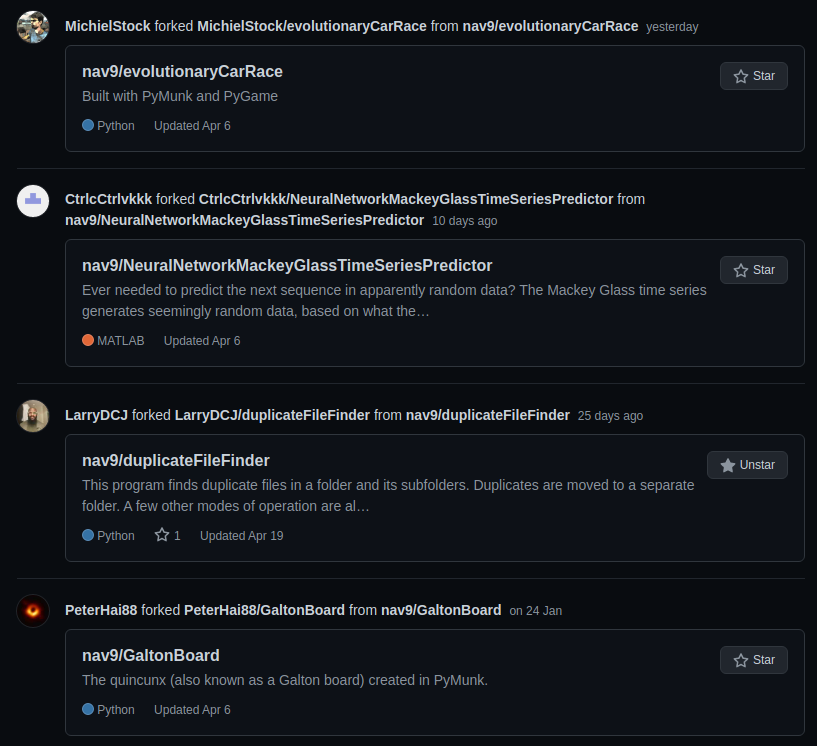
Yesterday, I noticed that some of my repositories were being forked. Happy that the programs I developed are of use to the community. 


The file duplicate finder is a program I'd encourage people to use (and from the fact that an issue was reported, it looks like people are finding the project and hopefully finding it useful). Sometimes we have a lot of duplicate files and images lying around in various devices. This program helps identify and consolidate them. 


When looking at how often people contribute code:

I just noticed, that my public view of GitHub commits, does not show what is going on in the private repositories (which show a lot more commits). This is something recruiters would benefit from keeping in mind.

Public View

Private View (the actual number of commits)


22 April 2021

WindowsXP image resizer powertoy equivalent for Linux

Windows XP's powertoy for resizing images was so convenient and popular, that people demanded it for future versions of Windows too. Linux however, seemed to lack such a feature, and people used to suggest using a bash script or GIMP to perform batch conversions.

There's a far simpler way now. Bitron software created Nautilus Image Converter which when installed, gives you image resize and rotate options in the right click menu itself. Really handy.


For Ubuntu, install it using:

sudo apt install imagemagick
sudo apt-get install nautilus-image-converter
nautilus -q

For Linux Mint, install it using:

sudo apt install imagemagick
sudo apt-get install nemo-image-converter
nemo -q


The "-q" is to stop nautilus (the file manager for Ubuntu that's the equivalent of Windows Explorer) or nemo (the file manager for Mint). You can restart the file manager by just clicking on any folder or the "Files" icon or by opening a terminal with Ctrl+Alt+T and typing "nautilus". 

Now when you right-click on images, you'll see a "Resize images" option. So simply select all images and resize them.

24 March 2021

How to show the commands being executed during Ubuntu startup?

There are times when while booting Ubuntu, it may take a rather long time to boot, and you'd wonder what's holding it up, but the purple splash screen that acts like a curtain, does not show you what's going on in the background.

Here's how you remove it:

sudo gedit /etc/default/grub

Comment out the line which has "quiet splash" and create a new line with an empty string.

#GRUB_CMDLINE_LINUX_DEFAULT="quiet splash"
GRUB_CMDLINE_LINUX_DEFAULT=""

Save and exit.

And it's necessary to update grub to retain the changes, else when you restart the system, the changes you made will disappear.

sudo update-grub2

02 February 2021

Changing the colors in Pandas boxplot

 Normally, it's just one Google search that gets you to a good example for plotting any graph using Pandas or Matplotlib. Not so for boxplots. Every example I saw was ordinary and didn't show the advanced options for colouring the plot. So here's a quick demo:


import math
import pandas as pd
import matplotlib
import matplotlib.pyplot as plt
#Named colors: https://matplotlib.org/3.1.0/gallery/color/named_colors.html

data = {"A": [1,2,3,4,10,56,32], "B": [2,4,6,3,2.4,0,0], "C": [1,4,0,10,20,5,2], "D": [2,3,6,2,3,40,-1]}
for k in data.keys():#convert the zeroes to NaN, so that it does not mess up the boxplot
    data[k] = [x if x != 0 else math.nan for x in data[k]]
figWidth = 4; figHeight = 4.1;
boxproperties = dict(linestyle='-', linewidth=1.5)
medianproperties = dict(linestyle='-', linewidth=1.5)
flierproperties = dict(markerfacecolor = 'lightgrey', markeredgecolor = 'lightgrey')
colors = dict(boxes='dimgrey', whiskers='darkgray', medians='yellowgreen', caps='dimgrey')
df = pd.DataFrame(data, columns=list(sorted(data.keys())))
df.plot.box(grid=False, patch_artist=True, showmeans = False,
            sym='.', color = colors, boxprops=boxproperties,
            medianprops=medianproperties, flierprops = flierproperties,
            figsize=(figWidth, figHeight))
plt.title("values")
plt.ylabel("y label")
plt.xlabel("x label")               
plt.savefig('myPlot.eps', format='eps', dpi=1200)
plt.show()   


There are of course more styles that could be presented.


Say thank you or donate

01 January 2021

What technical pre print repositories accept unpublished research?

In academia, it is very important to be ethical and to ensure your ideas are not copied or scooped before you can prove that you came up with the idea first. To enable this, pre-print repositories like ArXiv were setup to give research work a timestamp when submitted. This could help any researcher prove that they came up with an idea first. Any work found on a pre-print repository is not a credible source of information, since it has not yet been peer-reviewed. However, since ArXiv has a very strict moderation policy that results even in experienced scholars having their papers rejected, ArXiv does not fulfill the purpose of being a pre-print archive. The delay in moderation, the need for endorsement from somebody else and the rejection can just end up allowing time delays that can result in work getting scooped. Many other pre-print repositories have come up, and it's considered ok to upload your research paper to multiple repositories.


Some of these free repositories are:
  • ViXra: This pre-print repository is far more accepting than ArXiv, and was created as a means of allowing genuine research work to get a timestamp. I found their FAQ to be far more insightful and enlightening than any other pre-print's FAQ. I encourage reading their FAQ. It mentions a lot of useful information about what you should and should not do with your pre-prints. I feel ViXra is one of the only pre-print repositories that actually honors the purpose of being a pre-print repository. Hence, this is the only repository I would trust, because I know that when I submit a genuine paper to them, they will give me a timestamp for my work instead of delaying it or rejecting it.
  • TechRxiv: A pre-print repository setup by IEEE. I've found them to be good, but there are chances of a reviewer not accepting a paper and having to appeal to the editor until they allow a re-upload. The whole process can take a few weeks...enough time for getting scooped in some fields.
  • IndiaRxiv: I was pleasantly surprised to find one for India. It's part of OSF, which accepts papers from multiple disciplines.
  • HAL: This is a well known repository with moderation and it is said that they also allow you to transfer your paper from HAL to ArXiv.
  • EngrXiv: This is also part of OSF, and has been gaining traction with researchers.

Some precautions before submitting to a pre-print
 
Remember that there are some journals and conferences that do a double-blind review of your paper, and they will not accept a paper that is uploaded to a pre-print repository. so if you plan to submit to a certain journal or conference, first check their website or write to them asking if they allow papers that are on a pre-print repository.
A quick way to search is by using Google's tools:
site:journalWebsiteName.com arxiv

Careful of predatory journals or conferences

Some journals will offer to get your paper published for free without any peer review process. Avoid such journals. It can lower your academic standing. I was contacted by one such journal which quoted an ISSN number on their website. When I searched, I realized that such an ISSN number didn't even exist!!! Always make sure your work is properly peer reviewed by reputable journals. In the tech world, journals with a Scopus index are safe.


In conclusion
 
Writing research papers is a time-consuming and cumbersome process. All that hard-work should not go for a waste. Pre-print repositories are a very useful means of proving precedence of your idea. They are also meant for inviting comments from colleagues, before you decide to submit it to a conference or journal. Websites like ResearchGate will automatically detect your work on pre-print repositories and link it to your ResearchGate account, making it easy to share your work and to invite comments on ResearchGate, because it automatically notifies the authors you have cited in your paper.
To simplify people's research process and to make available information on research and publications, I've curated a small collection of helpful documents from multiple people.


ps: On a more personal note, I feel that researchers who advance the knowledge of mankind and who are the backbone of the technological capability of society, need more respect and recognition in society. The level of detail they go into, the expertise they acquire in each subject and the rigor of research makes them an elite force. It's unfair that companies and publishers make profits form their ideas but the researchers don't profit from it. How did researchers even agree to such a raw deal? Publish or perish? I dearly wish that the world figures out a way to ensure that researchers are able to monetize their contributions much better than they currently are. If not that, then at least provide them privileges and conveniences that make life easier for them. All the benefits of technology we enjoy are because of them. We must never forget the shoulders we stand on.

24 December 2020

The better way to calculate permutations programmatically

When wanting to calculate factorials and permutations, I was surprised that C++ didn't have a built-in function to do it. Sure, it's a simple function, but cmath could have had one instead of expecting users to write their own function. Anyway, I created a class for it and soon realized that even unsigned long long was unable to hold the large numbers that I was calculating permutations for.

This led me to the online calculators, which did ok for conditions like 81 numbers taken 81 at a time (which gives a huge result: 5797126020747367985879734231578109105412357244731625958745865049716390179693892056256184534249745940480000000000000000000).

However, calculations like 129600 taken 2 at a time, were not supported, so when I searched for which programming language could help, I found that Python was just perfect for this. Turns out, numbers in Python are only limited by the amount of RAM you have. Intelligent people, these people who maintain Python. 

Python does have a limit on how deep your recursion can go, so rather than use recursion to calculate factorials, it's better to use the humble for loop. Here's how it's done:

def factorial(n):
    fac = 1
    if n == 0:
        fac = 1
    else:
        for i in range(n,0,-1):
            fac = fac * i
    return fac

print("To calculate permutations:")
print("n!/(n-r)!")
n = int(input("Enter number of possibilities (n): "))
r = int(input("Enter how many at a time (r): "))
print("Permutations: ", factorial(n)/factorial(n-r))