13 June 2015

LOL


Continued from the previous LOL page

Cars for heroes
Share with this link


Festivals
Share with this link


Will be continued in the next LOL page 


Interpreting the disk usage analyzer of Linux

For anyone who has used Windows, it's just a matter of seeing the properties of a drive, and you're shown what percentage of the disk is used and which isn't. In Linux though, the sunburst is a seemingly weird representation of disk usage. It's basically a multi-level pie chart.


Thankfully, Ubuntu has the Windows style representation too...


and right-clicking nautilus to see properties also shows you disk usage.


Interpreting the sunburst

This representation isn't much good at showing you how much free space is remaining on your disk. What it's good at showing is which folders are taking up a lot of your space.

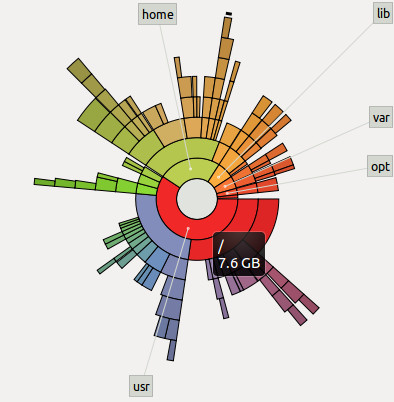
The grey circle in the middle represents the root folder of Linux. What you know as "/". The place you reach when you do "cd /". On hovering the mouse pointer over it, it shows me the root folder has 7.6GB of files in it.


The amount of space taken up by the files in root is considered 100%. This does not mean that the disk is 100% full. It means that we are just representing 7.6GB = 100%, so that if any folder in root takes up 4.6GB of space, we can say that the folder is = 4.6/7.6 = 60% of the 100%.

Reds = Folders taking up most space
Purples = Takes up lesser space than reds
Greens = Takes up lesser space than purples
Yellows = Takes up lesser space than greens

You are also shown labels of the next level of folders so that you can narrow down on which of the folders in root is taking up the most space. Hover the mouse pointer over those red spaces (I'll be hovering over the "usr" folder) and you'll see how much of space the folder is taking up.


Let's go deeper than the root folder

Now click on the red "usr" folder, and suddenly, "usr" will be shown as the root folder of the sunburst, and all other coloured semi-circles around "usr", are the child folders of "usr" and the grandchild and great-grandchild and so on....All belonging to "usr" only. No information of the "home" folder or "lib" folder etc. are shown. This is purely for "usr" and the folders contained within it.


But why are only the first few circles forming a full circle? The outer ones are just tiny circle segments. What do they mean?


Notice that the purple folder "share" appears to have 7 folders in it (app-install, pyzy, netbeans etc.) which occupy almost all of the purple space, and there's a bit of empty white space too near the app-install folder. The empty space, is not actually empty. It's full of 342 tiny little files which the disk usage analyzer isn't showing because they are too tiny, and labelling them would clutter up the screen.


Go into "share" which is the subfolder of "usr"

Click on "share", and you'll see some of those files. Also, you'll notice that "doc" is taking up the most space in "share".


See the diagram below to understand the positioning.


Red sector 2 (I'm calling it '2' from now on) is a subfolder of red sector 1 (called as '1' from now on). See how 2 is positioned on top of 1's circumference. 2 only has relevance with respect to 1. Sector 2 is not at all related to the green sector. So the amount of 1's circumference that 2 takes up, shows that 2 takes up approximately 35% space of all the subfolders of 1. The other subfolders of 1 aren't shown because there are plenty of them, but all of them are very tiny compared to 2.

So this is how the disk space usage analyzer (named "Baobab") is interpreted. Hope it's clear to you now. Finally! :-) Phew!


Say thank you or donate

07 June 2015

Pass an array to a function when you're allowed to pass only one parameter?

A colleague asked me this, and from my experience, if you pass an array to a function, there's no way for the function to know the array size because it does not know at which point of memory the array ends. So the only way seemed to be to do this:

#include<iostream>

void func(int arr[], int s)
{
    for(int i=0; i<s; ++i)
    {
        std::cout<<arr[i]<<"\n";
    }
}

int main()
{
    int a[10] = {1,2,3,4,5,6,7,8,9,0};
    func(a, 10);
}

You'd ask then how does the compiler know where an array ends when you create:
int* myArray = new myArray[10];

and then delete it with:
delete[] myArray;

Apparently, when the memory is allocated with new myArray[10], the compiler will allocate space to store the size of the array + memory to store the array itself. What is returned, is the position where the array begins.
So when it's time to delete, the compiler searches for the array size in array position - 1. This is one way to implement it.


So for ordinary arrays being passed as parameters to a function, one way is to create an array of size 11 if you actually wanted to create an array of size 10. Then use the first cell to store the array size.

#include<iostream>

void func(int arr[])
{
    int s = arr[0];
    for(int i=1; i<s+1; ++i)
    {
        std::cout<<arr[i]<<"\n";
    }
}

int main()
{
    int a[11] = {10, 1,2,3,4,5,6,7,8,9,0};
    func(a);
}


Yet another way I recently found out, is to use a template.

#include<iostream>

template <typename T, int s>
void func(T (&a) [s])
{
    for (int i = 0; i < s; ++i)
    {
        std::cout<< a[i] << "\n";
    }
}

int main()
{
    int x[10] = {1,2,3,4,5,6,7,8,9,0};
    func(x);
}

and this is how you'd do it for multiple arrays

#include<iostream>

template <typename T, int s1, int s2>
void func(T (&a) [s1], T (&b) [s2], int c)
{
   std::cout<<"a=";
   for (int i = 0; i < s1; ++i) { std::cout<< a[i]; a[i]=56; }
   std::cout<<"\nb=";
   for (int i = 0; i < s2; ++i) { std::cout<< b[i]; }
   std::cout<<"\nc="<<c<<"\n";
}

int main()
{
   int x[10] = {1,2,3,4,5,6,7,8,9,0};
   int y[5] = {5,4,3,2,1};
   func(x,y,6);
   std::cout<<"\n\n";
   for (int i = 0; i < 10; ++i) { std::cout<< x[i]; }
}


All the best!

Is there a robust mutex for interprocess locking?

This blog post is not something that shows you how to create a robust mutex for shared memory mutexes.
It tells you that if you're searching for one, then there is currently no reliable way to do it crossplatform.

If you're here, you'd already know that when a process acquires a lock and the process is killed by a user, the lock never gets unlocked and another process which is waiting to acquire the same lock, just keeps waiting.

Timed locks aren't reliable. File locking is not the way to go (but see this and this).

I did an extensive search and found that pthreads has the concept of a robust lock to solve the problem, but on trying it, the ordinary locking between processes itself is not working.


In Boost Interprocess:

Mr.Ion Gaztanaga has tried coming up with a crossplatform implementation for robust locking in Boost Interprocess, but still needs to test it fully on Windows.

If you want to take a hint on implementing it yourself, then Ion's code is the way to go.


In due time, this blog post will be outdated. Please do post the solution to the problem in the comments so that others can find it.


Btw, do you know what happens when  a foo walks into a bar? :-)

So why do we need virtual functions anyway?

For most of us, something makes sense only when we know the reason behind it.
So when our textbooks and tutorials show us something like...

class Animal {
    public:
    virtual void sound() = 0;
};

class Dog : public Animal {
    public:
    void sound() { std::cout<<"bark\n"; }
};

It just doesn't make sense. Why would I want to use such an animal class when I can simply create a separate Dog class and a Cat class? Even if the base class was a Shape and derived classes were Rectangle and Triangle, I can override the base class function without using virtual. Then why virtual?

Before proceeding, I'd like to introduce you to Initialization lists.
In C++, you are allowed to initialize values to member variables using the initialization list syntax. See this:

class Abc {
    int a;
    SomeClass* s;
    Abc() : a(10), s(new SomeClass())
    {
         //constructor body
    }
};

The value of a becomes 10 and the pointer to the newly created SomeClass is initialized into s. Note that they are not assigned to a and s. They are initialized into the member variables.


Who needs virtual?

If you're a beginner programmer, you don't really need to worry much about virtual functions. It's unlikely you'd be using much of it anyway. But if you're an intermediate or advanced programmer who has come to realize that creating software takes just 10% of your time and 90% of time will be spent in altering the code and maintaining the software through its lifecycle, then you definitely need to understand why virtual functions can help you write de-coupled, flexible, encapsulated, maintainable code.


An example:

Let's say you've written a very complex Battlefield Software which is being used on a defence truck. The software is capable of monitoring devices on the truck, communicating with the army command control center situated far away and is also capable of doing a lot of other things.

One other function of Battlefield Software is to issue a command to a gun mounted on the truck to fire ammunition. Normally, you'd create a Gun1.fire() function in Battlefield Software which directly invokes the gun's fire() function.


But what will you do when this gun is removed and a missile launcher or a gun from some other company is fitted? Those weapons have different functions for shooting, and those companies refused to change their function names to fire().


You'd have to go into Battlefield Software and change Gun1.fire() to Gun2.shoot() or MissileLauncher.launch(). Then compile everything again and test it all over again.


So what's the problem?

You tell me: "Hey no problem. I don't mind changing the function. It's just one function after all".

But you don't see the full picture here. Gun1.fire() might not be the only command that Battlefield Software uses. There might be many other places in the software where the Gun1 object instance is being invoked. There might be Gun1.calibrateGun() command, Gun1.positionGun() command, Gun1.reload() command and so many more.

Are you going to change all of them? In real-world softwares, the code becomes so complex, that it wastes a huge amount of time making corrections like these. Once such corrections are made, they have to be tested too, because you might have un-knowingly made some change and introduced a bug.


The first part of the solution...

... is to create a separate software module named WeaponController which will purely be in charge of interfacing with the weapon mounted on the truck.


Now, BattlefieldSoftware can be programmed to contain an instance of WeaponController, and to shoot a target, BattlefieldSoftware just has to call WeaponController.shootTarget().

The WeaponController class will decide whether to call fire() or launch() or shoot(). So even if a gun from a new company is brought in, the changes only have to be made to the small WeaponController program. The compilation will be faster and the testing can also be done quickly, because you are only modifying WeaponController, so you are sure there won't be any bugs introduced into the big BattlefieldSoftware program.


Implementation

Now comes the interesting part. How do you propose to implement WeaponController?
One way you'd suggest is this (it's a simple implementation just to keep it short):


class BattlefieldSoftware {
    private: 
    WeaponController* wc;
    public:
    BattlefieldSoftware() : wc(new WeaponController()) {} //initialization list for constructor         
    ~BattlefieldSoftware() { delete wc; }

    void shootTarget() { wc->shootTarget(); }
};

class WeaponController {
    private:
    Gun1* g1;
    //Gun2* g2;
    //MissileLauncher* ml;

    WeaponController() : g1(new Gun1()) /*, g2(new Gun2), ml(new MissileLauncher) */
    {}
    ~WeaponController() { delete g1; /*delete g2; delete ml*/ }

    public:
    void shootTarget() {
         if (g1 != NULL) { g1->fire(); } 
         //if (g2 != NULL) { g2->shoot(); }
         //if (ml != NULL) { ml->launch(); }
    }
};


So this is what you propose to do? Have a bunch of if conditions or switch statements which will decide which weapon to fire? Or to comment out the irrelevant weapons and re-compile?

Well, there's nothing wrong in doing it this way. It'll work without virtual functions and will work a little faster than virtual functions too, because the program won't have to refer a virtual table during runtime to decide which function it should invoke.

But notice that again, you're creating more scope for bugs and will have to repeatedly test your program because the actual program might be much much bigger than this and you can't guarantee that you have commented out all relevant lines or not unknowingly introduced some new bug.


A better way...

The better way to do it, is to create wrapper classes (WeaponGun1, WeaponLauncher, WeaponGun2) for every weapon and interface them with WeaponController.
The wrapper classes help behave like translators. When WeaponController says shootTarget(), the WeaponGun2 wrapper class will help call the shoot() function of Gun2.
Why does that help?
Because when we attach a particular gun or missile launcher to the weapon controller (we can attach only one at a time in this example), we want WeaponController to simply be able to invoke shootTarget(). If we didn't have wrapper functions, WeaponController would have to be re-programmed to invoke shoot(), launch() or fire(), everytime we attach a new weapon. We want to avoid the hassle of re-programming and re-compiling whenever we make a change.


Virtual functions to the rescue

Have a look at the new code first.

#include "iostream"

//This class is created by Gun1's company
class Gun1 {public: void fire() {std::cout<<"gun1 firing now\n";}};
//This class is created by Gun2's company
class Gun2 {public: void shoot() {std::cout<<"gun2 shooting now\n";}};


//We create an abstract class to interface with WeaponController
class WeaponsInterface {
 public:
 virtual void shootTarget() = 0;
};

//A wrapper class to encapsulate Gun1's shooting function
class WeaponGun1 : public WeaponsInterface {
 private:
 Gun1* g;

 public:
 WeaponGun1(): g(new Gun1()) {}
 ~WeaponGun1() { delete g;}
 virtual void shootTarget() { g->fire(); }
};

//A wrapper class to encapsulate Gun2's shooting function
class WeaponGun2 : public WeaponsInterface {
 private:
 Gun2* g;

 public:
 WeaponGun2(): g(new Gun2()) {}
 ~WeaponGun2() { delete g;}
 virtual void shootTarget() { g->shoot(); }
};

class WeaponController {
 private:
 WeaponsInterface* w;
 WeaponGun1* g1;
 WeaponGun2* g2;
 public:
 WeaponController() {g1 = new WeaponGun1(); g2 = new WeaponGun2(); w = g1;}
 ~WeaponController() {delete g1; delete g2;}
 void shootTarget() { w->shootTarget();}
 void changeGunTo(int gunNumber) {
//Virtual functions makes it easy to change guns dynamically
   switch(gunNumber) {
     case 1: w = g1; break;
     case 2: w = g2; break;
   }
 }
};


class BattlefieldSoftware {
 private:
 WeaponController* wc;
 public:
 BattlefieldSoftware() : wc(new WeaponController()) {}
 ~BattlefieldSoftware() { delete wc; }

 void shootTarget() { wc->shootTarget(); }
 void changeGunTo(int gunNumber) {wc->changeGunTo(gunNumber); }
};


int main() {
 BattlefieldSoftware* bf = new BattlefieldSoftware();
 bf->shootTarget();
 for(int i = 2; i > 0; i--) {
     bf->changeGunTo(i);
     bf->shootTarget();
 }
 delete bf;
}


The advantage

Phew! Lengthy way of doing it, right? But see...now that I've created class WeaponGun1, I've completely separated the handling of Gun1 into the class. Whatever changes you do to Gun1, you'll only have to make changes in WeaponGun1, and have the confidence that no other class is affected.

Because of WeaponsInterface class, I can now assign any derived class to the base class pointer WeaponsInterface and because it's functions are virtual, when I call WeaponsInterface's shootTarget, the derived class shootTarget gets invoked.

Best part is, I can change guns during runtime (the code in green). This is the main advantage of virtual functions and this is why we need virtual functions.

So no more necessity to comment out code in various places when changing guns. It's now a simple and clean procedure, and adding more gun classes is also easier because we just have to create a new WeaponGun3 or WeaponGun4 class and we can be confident that it won't mess up BattlefieldSoftware's code or WeaponGun1/WeaponGun2's code.

WeaponsInterface class is the equivalent of Animal class.
WeaponGun1 class is the equivalent of Dog class.

Makes more sense as weapons class, doesn't it? :-)


One more big help:
One more little thing. In this tutorial, did you notice how you learnt something new and useful about how to structure your code so that it will be more maintainable? Well, software architects have identified many such situations and created absolutely awesome ideas for structuring code. These ideas are completely worth learning. You'll actually be impressed about how effective they are. Once you've matured a bit in programming, make sure you get a good book on Design Patterns and learn them. In real-life even if you try to use design patterns, code can get messed up due to tight deadlines, but it still helps to know those concepts.


Say thank you or donate

28 May 2015

Thinking differently

Everything in this universe has a property, a behaviour of its own. We identify these and use it to our advantage. Invention.

Mostly, if something works fine, we continue using it that way. If you want to think differently, all you got to do is search for the properties and behaviours of what you deal with, analyze the environment in which it resides and think of how else it could be used.

Its that simple and that challenging. Nothing beats the thrill of having discovered a new way to do something!

10 May 2015

18 April 2015

Solving xmkmf: Command not found with imake

A couple of colleagues were trying to compile glut unsuccessfully for a couple of days, their tech-lead couldn't figure it out either and they decided to approach me.

Turned out that an error
xmkmf: Command not found
was perplexing everyone. A search showed me that imake had to be installed. I installed it and followed the instructions for compilation and in twenty minutes, the problem was solved.

Imake rpm for CentOS is here.
You can also do yum install imake

On jokingly asking if I'd get a treat for it, the tech lead kept gratefully saying "He deserves it" but the developer didnt seem impressed after seeing the simple solution. Reminds me of the story of the experienced engineer who is called to solve a problem with a machine that a lot of other engineers couldnt. He puts an X with chalk on the faulty part. It is repaired and the machine works fine. He charges $50000 for his consultation. The company is outraged for being charged so much for a tiny job and demand an itemised bill. The engineer writes:
$1 for the chalk mark.
$49999 for knowing where to put it.

As for the treat, it never really is about the treat. It's about friendship.


And about imake

Imake (a build automation system) was created to have a platform independent make. The "i" apparently standing for "independent". 
Imake generates makefiles from a template, a set of C preprocessor macro functions, and a per-directory input file called an Imakefile. This allows machine dependencies (such as compiler options, alternate command names, and special make rules) to be kept separate from the descriptions of the various items to be built.

06 April 2015

The secret of creating a beautiful website

I was in Mumbai for a couple of months, and the volunteering team I had started there has now grown to have a bunch of enthusiastic new software programmers joining the team.
We wanted a website of our own to present our activities and to interact better with our colleagues, but the volunteers weren't very familiar with HTML, CSS, JavaScript or JQuery.
Although I wasn't very familiar with JQuery, I had acquired a good knowledge of HTML, CSS and JavaScript.

To put to ease our volunteer's fears of the new languages, I spent three full days in getting a website prototype ready. Some of my priorities were:

  • It should make use of simple technologies
  • It should look good
  • It should be interactive

Technologies

I chose HTML5, CSS3, D3.js and JQuery.


Looks 

Spent many many many hours in finding out what the secret of a good looking website is. To cut a tree in 8 hours, spend 6 hours sharpening the axe. The secret is in how you use your images. It's the images and the graphics that create that first "wow" impact on your audience. If you don't have good looking images or graphics, create them. If you can't create them, hire someone who can. I've worked with Interaction Designers of international repute, and learnt a lot from them about design.
If you'd like me to create, improve or critique your website, I'd be happy to do so, provided it gives me value for my time and skill.

Do have a look at websites like Awwwards. They showcase a range of well designed websites you can learn from.


Interactivity

There's a huge amount of open source software out there which will allow you to effortlessly add some splendid interactivity to your website. Of these are d3.js, CSS animations and JQuery.
The interactivity in itself adds huge appeal to your website even if you have just a plain white background.


Space

Most importantly, allow a good amount of space in your website. Try your best not to clutter it with information or content. Minimalist designs can help you with these decisions.


I created a little prototype and uploaded it on GitHub: https://github.com/nav9/EmployeeVolunteeringWebsite.

Our volunteers, on seeing the prototype, got inspired and were encouraged to learn and implement the rest of the website. With some further guidance from me, they made use of a lot of openly available knowledge and open source software to build what turned out to be a beautiful and interactive website which got "very very good's" from our HR department and our colleagues! A website by the volunteers, of the volunteers and for everyone! :-)

These are some screenshots of the prototype I created in just 3 days (attributions for open source code are in the readme file of the github project):


When developing a website, you need to have a good command over HTML and CSS. If you think you need Dreamweaver, then you seriously need to consider learning CSS properly, because even with Dreamweaver, you'll find it tough to make changes and understand what is going on under the hood.
My post on CSS will give you links on what to learn.

And oh...once you create the website, softwares like Xenu link sleuth will be indespensible in verifying if all your links work :-)

All the best!

LOL


Continued from the previous LOL page

Six Pack
Share with this link


Keystrokes
Share with this link


Continued in the next LOL page


05 April 2015

Not losing those handy clutter managers

While I've already written about keeping wires neatly wrapped up (ideas of other people), here's one tip that I've created myself:

The little pieces of plastic which have metal wires inside them; the ones with which your electronic item's wires are kept neatly wrapped up with...

They're called Plastic Twist Ties.

Once you untangle the electronic item's cables, you wouldn't want to lose these handy plastic twist ties, as someday you'd need to either pack the item into its box or use the twist tie to hold together a bunch of cables. The best thing to do is to neatly wrap them around the cable itself. As shown in the picture below (it actually looks quite cool!):


Few decades back (and even now in some shops) in Kerala, these plastic twist ties are used to tie up the top of packets of bread. Handy things they are...as much as they're a plastic hazard.

03 March 2015

Solving a funny hardware problem

A couple of days back my brother called up, saying the computer was behaving erratically.

It would boot, go up to the Operating System login screen and stop working. The monitor would go blank and switch off.

On restarting, it would beep three times and the monitor would go off. There was no power surge; no virus or any other possible reason for it to happen. The PC was running fine for more than two and a half years since we purchased it.


Remove the battery and put it back

I happened to remember what a corporate trainer had told me a long time back. He used to fix computer problems in his childhood and went on to become a freelancer and trainer. He said, 90% of computer hardware problems can be fixed just by removing the motherboard battery and putting it back (but his experience of 90% might not actually be the real 90% of problems that can occur).

I told my brother to do it, and he called back saying it worked! :-)

The big question of course was what went wrong? Maybe there was a memory leak in the motherboard software, maybe it was a bug that lay dormant a long time. But whatever it was, it got reset when the battery was removed.


Dust on RAM

Anyway, the problem was solved only temporarily and it recurred. This time, my brother noticed that it happened only when the CPU cabinet cover was kept closed. If kept open, the computer worked fine for a while. Suspecting that it might be a heating problem, I asked him to check if the CPU fan was working. It was, so the next culprit was the RAM. Turned out that the RAM was covered with dust, and removing it, cleaning it and placing it back solved the problem for good! :-)

It's likely that the RAM was getting over-heated because of the dust. Keeping the CPU cabinet cover open was allowing better air circulation.

This is definitely something you could try before calling a computer technician.


Beep sequence

Something I newly found out, is that you can make out what error happened, by listening to the beeps that happen when the computer starts up. For example, this is what Gigabyte listed on their FAQ:


What does BIOS beep sound mean?
       
AWARD BIOS
  • 1 short beep :System normal 
  • 2 short beep :CMOS Error 
  • 1 long beep and 1 short beep:Memory error 
  • 1 long beep and 2 short beep:Graphic card error 
  • 1 long beep and 3 short beep :AGP error
  • 1 long beep and 9 short beep :Memory Error 
  • Continuous long beep :Memory not correctly installed 
  • Continuous short beep :Power supply unit failed 

AMI BIOS
  • 1 short beep :Memory Error 
  • 2 short beep:Memory parity check error. 
  • 3 short beep :basic memory 64K address check error 
  • 4 short beep :Real Time Clock malfunction . 
  • 5 short beep :CPU error 
  • 6 short beep:Keyboard error 
  • 7 short beep :CPU interruption error 
  • 8 short beep:Graphic card error 
  • 9 short beep :Memory error 
  • 10 short beep :CMOS error 
  • 11 short beep :CPU cache memory malfunction

And do we expect a nice lady to say "Please leave a message after the beeps" :-)


14 February 2015

Blood Donation: What went right?

"Donation" sounds like charity, and many want to donate blood to the poor. Organize a blood donation camp with a private hospital, and the questions pour in, as to "Why aren't we donating blood to the poor? Why to a private hospital that's just going to make money out of it?".

Well people, for starters:

I don't see blood donation as charity. It's a rescue. You're saving a fellow human from dying. Why in the world would you want to check if they're rich or poor?

If you're insistent, then I'd ask you: Have you donated blood regularly to a blood bank where you know the blood is given to the poor, free of cost or for a very low price? Have you even found out anything about such a blood bank? Have you encouraged your contacts to donate regularly?

You donated blood for free, and when you needed blood, the hospital charges you for it! It only sounds outrageous until you realize that the plastic pack that holds blood itself costs a little more than Rs.250. Then there's the cost of the other disposables, blood tests, salaries, preservation costs and so on. The expense per unit of blood, comes up to approx. Rs.1800 or more. I got to know this from the best blood donation volunteer group I have ever known: Sankalp India Foundation. You can still get blood for lower than the Rs.1800, when there's a government subsidy. Asking hospitals to give blood for free, is just not fair.


______________________________________________________________


A trend

The graph below shows a trend of blood donated over a period of two years (4 drives at ~6 month intervals) at a certain place. The number of donors went up steadily and suddenly fell. Nobody knew why, and all that people did, was try to guess.


Concern

Although the trend was not too alarming, and could be pictured as an averaging out of the number of donors, a small team of three smart and dedicated volunteers decided to dig deeper. They wanted to know not only what went wrong, but also about what went right the previous occasions, and they were very surprised at what they found.

Knowledge, is one of the foundational corner-stones and surprisingly the most ignored asset in volunteering circles. Knowing people's opinions was the key, and the volunteers didn't have much time to spare on a daily basis. So for the first time in the history of the group, they designed a strategy which would be efficient and wouldn't consume much time:

Strategy decided
  • Each volunteer speaks with a minimum of 30 people in 10 days.
  • Team keeps each other informed so there are no overlaps in people coverage
  • Conversations are restricted to 10 minutes of leisure time.
  • Team could choose to speak to random people or to the donors.
  • Information garnered is anonymous
  • Four common questions asked


Not all volunteers could cover 30 people in 10 days, so the team could cover only 8.5% of the target group of around 600 people. The sample data obtained was small but yet informative.

On reviewing past data, the first surprising piece of info that came up was that people of all walks of life had donated during the drives. The level of education of a person was irrelevant. Everyone knew they had to donate blood. So the target group was expanded from an estimated ~450 people, to ~600 people. Of these, the team spoke with 51 people.


Only 13% of the group on average, had donated blood. That's 87% of potential future donors!


Stats

Click to view the image larger

Some specific observations
  • 35% more people would likely donate if just better awareness is given
  • Although 10% claimed to have a permanent health issue, it's likely some were bluffing and were actually in the "fear of donation" category.
  • 17% (quite high) have concerns/misconceptions about the 'system'. Many of them could still be convinced with facts.
  • Not many people have actually been in a situation where they've seen people struggling to arrange for blood or needed to do it themselves. Showing them this by means of a video, statistics or pictures would help.
  • Low haemoglobin is apparently not a big problem (17% of the 51 were female)
  • As suspected, there were people who were forced / emotionally blackmailed to donate and these people didn't donate the next time. Pushing people doesn't help in the long-run.

If you have any observations, you're welcome to post it in the comments.


Why this data is not good enough
  • Only a small percentage of people were covered (having more volunteers would've helped)
  •  The percentages here would change with a larger sample size
  • Categorization was done only as per gender, education level and a certain other factor. Factors comparing donations across drives, the percentage of the 51 people who came to donate etc., weren't taken into account due to lack of correct past data. (maintaining accurate data during a blood donation drive and asking people who didn't donate for their opinions is required)

Why the data is useful
  •  Although data is less, it gives us hope by showing that in a random sample, there are at least 40% more people who would be likely to donate in future with a bit of convincing.
  • With only 9% or less people refusing to donate, it shows a positive public opinion, goodwill and a spirit of generosity toward helping others.
  • Rather than resorting to guess-work, this data gives volunteers a more solid foundation to work with. Now we know exactly which areas require more effort and what kind of effort. At the grass-root level, you get to hear opinions which help in devising a more realistic strategy of convincing people.


Moving forward
  • As you can see, blood donation is not just about organizing a camp and hoping that people donate. It's also not about pushing or dragging people to donate and boasting of a high number of donors.
  • You need to create a culture where people understand the need to donate blood, and spreading awareness in the right way is a large part of establishing that culture.
  • As a volunteer, it is definitely not enough to just make a few posters and make announcements a few days before the donation drive. 
  • A dedicated team has to work on the data analytics, build a connect with the target group of people and this team needs to have excellent knowledge about blood donation.
  • The management of this target group of people also have to be active participants and encourage the culture of proactive volunteering, because to really help society, you have to plan activities for the long-term and do it genuinely.
  • Never focus only on the number of units of blood donated. It's far more important to create a culture of understanding; and this comes only with a sustained, dedicated effort from volunteers.

I'll be sharing more on these efforts in due time. Meanwhile, I'll be happy to hear your comments.

Remember: A city like Bangalore needs 800 to 1000 units of blood on average everyday!


More:
An open letter to hospitals about blood donation.

07 February 2015