06 March 2015


03 March 2015
Solving a funny hardware problem
A couple of days back my brother called up, saying the computer was behaving erratically.
It would boot, go up to the Operating System login screen and stop working. The monitor would go blank and switch off.
On restarting, it would beep three times and the monitor would go off. There was no power surge; no virus or any other possible reason for it to happen. The PC was running fine for more than two and a half years since we purchased it.
Remove the battery and put it back
I happened to remember what a corporate trainer had told me a long time back. He used to fix computer problems in his childhood and went on to become a freelancer and trainer. He said, 90% of computer hardware problems can be fixed just by removing the motherboard battery and putting it back (but his experience of 90% might not actually be the real 90% of problems that can occur).
I told my brother to do it, and he called back saying it worked! :-)
The big question of course was what went wrong? Maybe there was a memory leak in the motherboard software, maybe it was a bug that lay dormant a long time. But whatever it was, it got reset when the battery was removed.
Dust on RAM
Anyway, the problem was solved only temporarily and it recurred. This time, my brother noticed that it happened only when the CPU cabinet cover was kept closed. If kept open, the computer worked fine for a while. Suspecting that it might be a heating problem, I asked him to check if the CPU fan was working. It was, so the next culprit was the RAM. Turned out that the RAM was covered with dust, and removing it, cleaning it and placing it back solved the problem for good! :-)
It's likely that the RAM was getting over-heated because of the dust. Keeping the CPU cabinet cover open was allowing better air circulation.
This is definitely something you could try before calling a computer technician.
Beep sequence
Something I newly found out, is that you can make out what error happened, by listening to the beeps that happen when the computer starts up. For example, this is what Gigabyte listed on their FAQ:
What does BIOS beep sound mean?
AWARD BIOS
AMI BIOS
And do we expect a nice lady to say "Please leave a message after the beeps" :-)
It would boot, go up to the Operating System login screen and stop working. The monitor would go blank and switch off.
On restarting, it would beep three times and the monitor would go off. There was no power surge; no virus or any other possible reason for it to happen. The PC was running fine for more than two and a half years since we purchased it.
Remove the battery and put it back
I happened to remember what a corporate trainer had told me a long time back. He used to fix computer problems in his childhood and went on to become a freelancer and trainer. He said, 90% of computer hardware problems can be fixed just by removing the motherboard battery and putting it back (but his experience of 90% might not actually be the real 90% of problems that can occur).
I told my brother to do it, and he called back saying it worked! :-)
The big question of course was what went wrong? Maybe there was a memory leak in the motherboard software, maybe it was a bug that lay dormant a long time. But whatever it was, it got reset when the battery was removed.
Dust on RAM
Anyway, the problem was solved only temporarily and it recurred. This time, my brother noticed that it happened only when the CPU cabinet cover was kept closed. If kept open, the computer worked fine for a while. Suspecting that it might be a heating problem, I asked him to check if the CPU fan was working. It was, so the next culprit was the RAM. Turned out that the RAM was covered with dust, and removing it, cleaning it and placing it back solved the problem for good! :-)
It's likely that the RAM was getting over-heated because of the dust. Keeping the CPU cabinet cover open was allowing better air circulation.
This is definitely something you could try before calling a computer technician.
Beep sequence
Something I newly found out, is that you can make out what error happened, by listening to the beeps that happen when the computer starts up. For example, this is what Gigabyte listed on their FAQ:
What does BIOS beep sound mean?
AWARD BIOS
- 1 short beep :System normal
- 2 short beep :CMOS Error
- 1 long beep and 1 short beep:Memory error
- 1 long beep and 2 short beep:Graphic card error
- 1 long beep and 3 short beep :AGP error
- 1 long beep and 9 short beep :Memory Error
- Continuous long beep :Memory not correctly installed
- Continuous short beep :Power supply unit failed
AMI BIOS
- 1 short beep :Memory Error
- 2 short beep:Memory parity check error.
- 3 short beep :basic memory 64K address check error
- 4 short beep :Real Time Clock malfunction .
- 5 short beep :CPU error
- 6 short beep:Keyboard error
- 7 short beep :CPU interruption error
- 8 short beep:Graphic card error
- 9 short beep :Memory error
- 10 short beep :CMOS error
- 11 short beep :CPU cache memory malfunction
And do we expect a nice lady to say "Please leave a message after the beeps" :-)
14 February 2015
Blood Donation: What went right?
"Donation" sounds like charity, and many want to donate blood to the poor. Organize a blood donation camp with a private hospital, and the questions pour in, as to "Why aren't we donating blood to the poor? Why to a private hospital that's just going to make money out of it?".
Well people, for starters:
If you're insistent, then I'd ask you: Have you donated blood regularly to a blood bank where you know the blood is given to the poor, free of cost or for a very low price? Have you even found out anything about such a blood bank? Have you encouraged your contacts to donate regularly?
You donated blood for free, and when you needed blood, the hospital charges you for it! It only sounds outrageous until you realize that the plastic pack that holds blood itself costs a little more than Rs.250. Then there's the cost of the other disposables, blood tests, salaries, preservation costs and so on. The expense per unit of blood, comes up to approx. Rs.1800 or more. I got to know this from the best blood donation volunteer group I have ever known: Sankalp India Foundation. You can still get blood for lower than the Rs.1800, when there's a government subsidy. Asking hospitals to give blood for free, is just not fair.
A trend
The graph below shows a trend of blood donated over a period of two years (4 drives at ~6 month intervals) at a certain place. The number of donors went up steadily and suddenly fell. Nobody knew why, and all that people did, was try to guess.

Concern
Although the trend was not too alarming, and could be pictured as an averaging out of the number of donors, a small team of three smart and dedicated volunteers decided to dig deeper. They wanted to know not only what went wrong, but also about what went right the previous occasions, and they were very surprised at what they found.
Knowledge, is one of the foundational corner-stones and surprisingly the most ignored asset in volunteering circles. Knowing people's opinions was the key, and the volunteers didn't have much time to spare on a daily basis. So for the first time in the history of the group, they designed a strategy which would be efficient and wouldn't consume much time:
Strategy decided

Not all volunteers could cover 30 people in 10 days, so the team could cover only 8.5% of the target group of around 600 people. The sample data obtained was small but yet informative.
On reviewing past data, the first surprising piece of info that came up was that people of all walks of life had donated during the drives. The level of education of a person was irrelevant. Everyone knew they had to donate blood. So the target group was expanded from an estimated ~450 people, to ~600 people. Of these, the team spoke with 51 people.

Only 13% of the group on average, had donated blood. That's 87% of potential future donors!
Stats
Some specific observations
Why this data is not good enough
Why the data is useful
Moving forward
I'll be sharing more on these efforts in due time. Meanwhile, I'll be happy to hear your comments.
Remember: A city like Bangalore needs 800 to 1000 units of blood on average everyday!
More:
An open letter to hospitals about blood donation.
Well people, for starters:
I don't see blood donation as charity. It's a rescue. You're saving a fellow human from dying. Why in the world would you want to check if they're rich or poor?
If you're insistent, then I'd ask you: Have you donated blood regularly to a blood bank where you know the blood is given to the poor, free of cost or for a very low price? Have you even found out anything about such a blood bank? Have you encouraged your contacts to donate regularly?
You donated blood for free, and when you needed blood, the hospital charges you for it! It only sounds outrageous until you realize that the plastic pack that holds blood itself costs a little more than Rs.250. Then there's the cost of the other disposables, blood tests, salaries, preservation costs and so on. The expense per unit of blood, comes up to approx. Rs.1800 or more. I got to know this from the best blood donation volunteer group I have ever known: Sankalp India Foundation. You can still get blood for lower than the Rs.1800, when there's a government subsidy. Asking hospitals to give blood for free, is just not fair.
______________________________________________________________
A trend
The graph below shows a trend of blood donated over a period of two years (4 drives at ~6 month intervals) at a certain place. The number of donors went up steadily and suddenly fell. Nobody knew why, and all that people did, was try to guess.
Concern
Although the trend was not too alarming, and could be pictured as an averaging out of the number of donors, a small team of three smart and dedicated volunteers decided to dig deeper. They wanted to know not only what went wrong, but also about what went right the previous occasions, and they were very surprised at what they found.
Knowledge, is one of the foundational corner-stones and surprisingly the most ignored asset in volunteering circles. Knowing people's opinions was the key, and the volunteers didn't have much time to spare on a daily basis. So for the first time in the history of the group, they designed a strategy which would be efficient and wouldn't consume much time:
Strategy decided
- Each volunteer speaks with a minimum of 30 people in 10 days.
- Team keeps each other informed so there are no overlaps in people coverage
- Conversations are restricted to 10 minutes of leisure time.
- Team could choose to speak to random people or to the donors.
- Information garnered is anonymous
- Four common questions asked
Not all volunteers could cover 30 people in 10 days, so the team could cover only 8.5% of the target group of around 600 people. The sample data obtained was small but yet informative.
On reviewing past data, the first surprising piece of info that came up was that people of all walks of life had donated during the drives. The level of education of a person was irrelevant. Everyone knew they had to donate blood. So the target group was expanded from an estimated ~450 people, to ~600 people. Of these, the team spoke with 51 people.
Only 13% of the group on average, had donated blood. That's 87% of potential future donors!
Stats
 |
| Click to view the image larger |
Some specific observations
- 35% more people would likely donate if just better awareness is given
- Although 10% claimed to have a permanent health issue, it's likely some were bluffing and were actually in the "fear of donation" category.
- 17% (quite high) have concerns/misconceptions about the 'system'. Many of them could still be convinced with facts.
- Not many people have actually been in a situation where they've seen people struggling to arrange for blood or needed to do it themselves. Showing them this by means of a video, statistics or pictures would help.
- Low haemoglobin is apparently not a big problem (17% of the 51 were female)
- As suspected, there were people who were forced / emotionally blackmailed to donate and these people didn't donate the next time. Pushing people doesn't help in the long-run.
If you have any observations, you're welcome to post it in the comments.
Why this data is not good enough
- Only a small percentage of people were covered (having more volunteers would've helped)
- The percentages here would change with a larger sample size
- Categorization was done only as per gender, education level and a certain other factor. Factors comparing donations across drives, the percentage of the 51 people who came to donate etc., weren't taken into account due to lack of correct past data. (maintaining accurate data during a blood donation drive and asking people who didn't donate for their opinions is required)
Why the data is useful
- Although data is less, it gives us hope by showing that in a random sample, there are at least 40% more people who would be likely to donate in future with a bit of convincing.
- With only 9% or less people refusing to donate, it shows a positive public opinion, goodwill and a spirit of generosity toward helping others.
- Rather than resorting to guess-work, this data gives volunteers a more solid foundation to work with. Now we know exactly which areas require more effort and what kind of effort. At the grass-root level, you get to hear opinions which help in devising a more realistic strategy of convincing people.
Moving forward
- As you can see, blood donation is not just about organizing a camp and hoping that people donate. It's also not about pushing or dragging people to donate and boasting of a high number of donors.
- You need to create a culture where people understand the need to donate blood, and spreading awareness in the right way is a large part of establishing that culture.
- As a volunteer, it is definitely not enough to just make a few posters and make announcements a few days before the donation drive.
- A dedicated team has to work on the data analytics, build a connect with the target group of people and this team needs to have excellent knowledge about blood donation.
- The management of this target group of people also have to be active participants and encourage the culture of proactive volunteering, because to really help society, you have to plan activities for the long-term and do it genuinely.
- Never focus only on the number of units of blood donated. It's far more important to create a culture of understanding; and this comes only with a sustained, dedicated effort from volunteers.
I'll be sharing more on these efforts in due time. Meanwhile, I'll be happy to hear your comments.
Remember: A city like Bangalore needs 800 to 1000 units of blood on average everyday!
More:
An open letter to hospitals about blood donation.
07 February 2015
LOL
Continued from the previous LOL page
Have some more
Share with this link

Continued in the next LOL page
24 January 2015
Is Android's BroadAnywhere really a threat that an antivirus can protect from? Do Android phones need antiviruses?
BroadAnywhere
Firstly, BroadAnywhere is not a virus or malware. It's just an ordinary software bug in Android.
I became aware of this after I installed an antivirus on an Android phone and the antivirus said it detected the BroadAnywhere vulnerability and was now able to protect the phone from it. Made me curious, and I dug up the actual flaw and its solution:
BroadAnywhere is classified as Bug: 17356824 in Android's Operating System code and won't be found in any Android OS that's released after September 10 2014; and that would be Android version 5.0 onward.
The bug
App's in Android communicate with each other using the Intent object. When your app gives a PendingIntent (a reference token) to another app, you're giving it the right to perform the operation you specify (the Intent), using the same identity and permissions as your app. If your app does not cancel the PendingIntent, the other app will be able to continue using it even if your app is closed/killed.
Bug 17356824 was a problem, because the Add Account Settings section in Android needed to identify the app that was invoking it and the PendingIntent it created for it, unwittingly allowed the invoker app to not only send it's identity information but also allowed it to launch activities, services or broadcasts. So anyone can create an app that misuses this PendingIntent, and either make your phone crash or wipe all data in your phone or send spam to your phone or send fake SMS'es.
The fix
Now the interesting part is that antiviruses for mobile phones claim to be able to protect us from this problem. I asked on StackExchange's Android forum, got an upvote, but no reply.

Antiviruses
Windows users would be all-too-familiar with viruses and antiviruses that "catch" and "destroy" them.
Antiviruses use two techniques:
1. Virus signatures: These are just a sequence of bytes that the antivirus searches for, which will be unique for a certain virus. The same way you do a string search. Programmers started creating viruses that were capable of encrypting and decrypting themselves (and thus hiding their signature) and capable of creating variants of their signature each time they encrypted or decrypted themselves. Next came polymorphic viruses which changed the signature of the encryptor and decryptor itself, each time it replicated.
2. Heuristics: The file being scanned is allowed to run in a special virtual environment (something like a sandbox) and it searches for virus-like behaviour (replication, overwriting files or hiding suspicious files).
I've blogged about killing viruses... http://nrecursions.blogspot.com/2014/05/destroy-windows-viruses-with-linux.html
... and even after I killed a virus, antiviruses in Windows would identify the file as a virus. That's because of Virus Signatures.
So can an Android Antivirus protect you from BroadAnywhere?
The websites of these antiviruses claim to protect you, but haven't offered any explanation of how they do it. They definitely can't peep inside an app and check the lines of code to see what kind of an Intent is being sent, but if the antivirus company maintains a very-frequently updated list of malicious apps, it might be able to warn you that an app you're about to install is harmful.
Question is, do they really do it? It'd require a dedicated team who would actively search for malicious apps and test them. Would a company do so much for free? Or would they make their money by tracking your phone and the data in it (given the high level of permissions that antivirus app's request)? It's a matter of trust.
Do you need an Antivirus at all?
The answer is "no". The average Android user (99% users) does not need an antivirus.
Google's lead engineer for Android security himself speaks of why an antivirus is un-necessary and what the more pressing concerns are. Like in Linux, where your system can get infected only if you deliberately give root access to a malicious program, the one way your phone can be susceptible to viruses or malware is if you decide to give an app elevated permissions on your phone.
So to stay safe, only install apps from trusted sources like Google Play and be a bit suspicious and do a followup of apps that ask for permissions that seem un-necessary. If you're careful, you won't need an antivirus. It's not just about data and security. Many apps gather data about you and your location. Your privacy is also important.
________________________________
Firstly, BroadAnywhere is not a virus or malware. It's just an ordinary software bug in Android.
I became aware of this after I installed an antivirus on an Android phone and the antivirus said it detected the BroadAnywhere vulnerability and was now able to protect the phone from it. Made me curious, and I dug up the actual flaw and its solution:
BroadAnywhere is classified as Bug: 17356824 in Android's Operating System code and won't be found in any Android OS that's released after September 10 2014; and that would be Android version 5.0 onward.
The bug
mPendingIntent = PendingIntent.getBroadcast(this, 0, new Intent(), 0);
App's in Android communicate with each other using the Intent object. When your app gives a PendingIntent (a reference token) to another app, you're giving it the right to perform the operation you specify (the Intent), using the same identity and permissions as your app. If your app does not cancel the PendingIntent, the other app will be able to continue using it even if your app is closed/killed.
Bug 17356824 was a problem, because the Add Account Settings section in Android needed to identify the app that was invoking it and the PendingIntent it created for it, unwittingly allowed the invoker app to not only send it's identity information but also allowed it to launch activities, services or broadcasts. So anyone can create an app that misuses this PendingIntent, and either make your phone crash or wipe all data in your phone or send spam to your phone or send fake SMS'es.
The fix
private static final String SHOULD_NOT_RESOLVE = "SHOULDN'T RESOLVE!";
Intent identityIntent = new Intent();
identityIntent.setComponent(new ComponentName(SHOULD_NOT_RESOLVE, SHOULD_NOT_RESOLVE));
identityIntent.setAction(SHOULD_NOT_RESOLVE);
identityIntent.addCategory(SHOULD_NOT_RESOLVE);
mPendingIntent = PendingIntent.getBroadcast(this, 0, identityIntent, 0);
Now the interesting part is that antiviruses for mobile phones claim to be able to protect us from this problem. I asked on StackExchange's Android forum, got an upvote, but no reply.
Antiviruses
Windows users would be all-too-familiar with viruses and antiviruses that "catch" and "destroy" them.
Antiviruses use two techniques:
1. Virus signatures: These are just a sequence of bytes that the antivirus searches for, which will be unique for a certain virus. The same way you do a string search. Programmers started creating viruses that were capable of encrypting and decrypting themselves (and thus hiding their signature) and capable of creating variants of their signature each time they encrypted or decrypted themselves. Next came polymorphic viruses which changed the signature of the encryptor and decryptor itself, each time it replicated.
2. Heuristics: The file being scanned is allowed to run in a special virtual environment (something like a sandbox) and it searches for virus-like behaviour (replication, overwriting files or hiding suspicious files).
I've blogged about killing viruses... http://nrecursions.blogspot.com/2014/05/destroy-windows-viruses-with-linux.html
... and even after I killed a virus, antiviruses in Windows would identify the file as a virus. That's because of Virus Signatures.
So can an Android Antivirus protect you from BroadAnywhere?
The websites of these antiviruses claim to protect you, but haven't offered any explanation of how they do it. They definitely can't peep inside an app and check the lines of code to see what kind of an Intent is being sent, but if the antivirus company maintains a very-frequently updated list of malicious apps, it might be able to warn you that an app you're about to install is harmful.
Question is, do they really do it? It'd require a dedicated team who would actively search for malicious apps and test them. Would a company do so much for free? Or would they make their money by tracking your phone and the data in it (given the high level of permissions that antivirus app's request)? It's a matter of trust.
Do you need an Antivirus at all?
The answer is "no". The average Android user (99% users) does not need an antivirus.
Google's lead engineer for Android security himself speaks of why an antivirus is un-necessary and what the more pressing concerns are. Like in Linux, where your system can get infected only if you deliberately give root access to a malicious program, the one way your phone can be susceptible to viruses or malware is if you decide to give an app elevated permissions on your phone.
So to stay safe, only install apps from trusted sources like Google Play and be a bit suspicious and do a followup of apps that ask for permissions that seem un-necessary. If you're careful, you won't need an antivirus. It's not just about data and security. Many apps gather data about you and your location. Your privacy is also important.
________________________________
Answer to a comment below: @Scott: I havent tried this yet, but from what I hear, even if your phone is rooted, an app can cause damage only if you give it permission to. So I would assume malware which exploits broadanywhere through another app would be able to do so only if you allow the app to execute those commands.
SuperSU available on Google Play is said to give you the ability to control which apps you want to run as root, which commands those apps run and even to be able to give you the ability to identify and stop malicious apps.
The Android forums can give you more info on this. Do post back on NRecursions if you have feedback to share! :-)
The best security you can have is in being aware of what you are installing and not connecting to unknown Wi-fi's. When in doubt, ask on the forums.
SuperSU available on Google Play is said to give you the ability to control which apps you want to run as root, which commands those apps run and even to be able to give you the ability to identify and stop malicious apps.
The Android forums can give you more info on this. Do post back on NRecursions if you have feedback to share! :-)
The best security you can have is in being aware of what you are installing and not connecting to unknown Wi-fi's. When in doubt, ask on the forums.

11 January 2015
Cascading Style Sheets and Cascading Confusion
For an application developer who positions widgets and graphics on the screen using x, y positions, an introduction to HTML styling or CSS, drives them crazy!
There was a time when I found CSS to be very confusing. But now....I'm so comfortable with it that I can create the HTML and CSS for a web-page using just a text editor.
I have a bit of an introduction that you can skip if you want to get to the meat directly. See the line below? Search for the next such line, and the 'meat' of this blog post will follow.
Why the confusion
Dear Application Developer, HTML is a markup language; not a programming language, and the whole reason we have such a complex, patched-up language is because when Tim Berners-Lee tried creating a software for CERN scientists to exchange information with, he had to make sure the software was compatible with different networks, disks, data and character encoding schemes. He was trying to bring order to chaos.
Every browser has had its own way of interpreting styling. Many times, buggy softwares are released into the market just so that businesses can beat the competition. Web developers are well aware of the way Internet Explorer has been poorly patched up over the years. Although thankfully, they've now come up with a new browser named "Spartan". Hopefully, browser implementations will be more agreeable with each other in future.
Referencing HTML & CSS
Like the man pages, the best sources to refer information on HTML, are the RFC's and the links they provide.
For CSS, RFC2318 led me to an excellent reference which even many tutorials couldn't help me with. Do have a look at the page on CSS Level 1.
Learning it
Think of how you'd send your application screen across a network. Send the code and allow the client to render it? Send a pixel stream and position information of the widgets? When you come to think of it, you'll realize that HTML and CSS aren't so bad after-all.
But to be able to use it, you have no other option other than to go through the nerve-wracking process of learning it (even if you use Dreamweaver, you'll have to know the concepts behind it).
First thing you need to know, is how CSS helps format HTML elements using margin, padding, border, width and height.
If you're packaging a fragile glass in a box, you'd stuff a lot of paper or foam between the glass and the box so that the glass wouldn't shake within the box and break. That internal protective layer is called padding. Same with CSS.
Now if that box is to be kept in a larger box full of similar such boxes, you'd want to prevent all these little boxes from colliding with each other, so you'd want to place them away from each other by a small distance, and you'd wrap these boxes with some thermocol or foam. This is called the margin.
Every one of those little boxes has their own thickness, which is the border.

The actual width of your content is just the width of the fragile glass.
But the width of the CSS box is = width of content + padding + border + margin
The problem: When you want a div in your code to have a 500px width, you'd suddenly find that the div appears to occupy more space than 500px, when it is given a border, margin and/or padding.

The solution: Specify your CSS as such:
So instead of the div's width becoming 500+(20+20)+(10+10)+(15+15), the width of the total box will be 500px, but of course, your content will be shrunk automatically.
To apply this property on all elements, you can also use:
Noticed the dot in ".someCSSname"? The dot means it's a class selection. If it was an id selection, it'd be "#someCSSname".
Margin and padding short forms
While it's perfectly ok to specify CSS margins as:
margin-top: 1px; and so on, I prefer to write it the short way:
margin: 1px 2px 3px 4px;
Imagine it clockwise. 1px is a one pixel margin space at the top, 2px is a two pixel margin space on the right side, 3px for the bottom and 4px for the left.
Same pattern for specifying padding:
padding: 1px 2px 3px 4px;
As a beginner to CSS, you'll very likely forget to write "px". Careful of that. They syntax just won't work without px.
Selections in CSS
Elements of HTML can be given id's which have to be unique across the document or class names which can be repeated multiple times for any element.
So you basically use id's to apply specific properties to an element and classes to apply common properties.
For id selections, you use # and for class selections you use a dot. See this:

See how the background colour got applied to both paragraphs using class. Also, see the different ways in which you can specify colours. The #777 is the same as #777777 which is the hexadecimal colour for light grey.
Static, absolute, relative, fixed
The other thing about CSS that drives people crazy is the positioning which has names that are absolutely un-intutive.
static
If you don't specify position for an element, the default position assumed for it is static. In fact, the element is said to not be positioned at all.
relative
Paste this code in an html file and open it in a browser:
This is the output you'll see:

Now if you change

Noticed something else? I've used class = "
fixed
This interesting positioning syntax positions elements according to the browser's edges. For the same code as above, remove the lines containing top and left, and just see the difference when we use fixed instead of relative.
The red class would look like this now:

absolute
On using fixed, the bottom: 5px; and right: 10px; code caused the red div to get positioned according to the browser's edges. On using absolute instead of fixed, the same thing will happen, except that this time, the positioning will be as per the parent element's edges (imagine the grey div to be the browser).

This basic knowledge is all you might need to get started off with CSS. The rest you'll be able to figure out with your excellent programming skills. Hope this blog post will save you hours of frustration.
One excellent quick reference for CSS is the Learn CSS Layout website. Do go through it. That's where I learnt some important lessons.
Oh one more thing: When using CSS in websites, keep the CSS in a separate CSS file and have multiple CSS files. One file for specifying the layout of your website. One file for the colour themes of the website, one for the fonts and so on. It'll save you a lot of headache in rework, extensibility and maintenance of the website.
All the best!!! :-)
There was a time when I found CSS to be very confusing. But now....I'm so comfortable with it that I can create the HTML and CSS for a web-page using just a text editor.
I have a bit of an introduction that you can skip if you want to get to the meat directly. See the line below? Search for the next such line, and the 'meat' of this blog post will follow.
_________________________________________________________
Why the confusion
Dear Application Developer, HTML is a markup language; not a programming language, and the whole reason we have such a complex, patched-up language is because when Tim Berners-Lee tried creating a software for CERN scientists to exchange information with, he had to make sure the software was compatible with different networks, disks, data and character encoding schemes. He was trying to bring order to chaos.
Every browser has had its own way of interpreting styling. Many times, buggy softwares are released into the market just so that businesses can beat the competition. Web developers are well aware of the way Internet Explorer has been poorly patched up over the years. Although thankfully, they've now come up with a new browser named "Spartan". Hopefully, browser implementations will be more agreeable with each other in future.
Referencing HTML & CSS
Like the man pages, the best sources to refer information on HTML, are the RFC's and the links they provide.
For CSS, RFC2318 led me to an excellent reference which even many tutorials couldn't help me with. Do have a look at the page on CSS Level 1.
Learning it
Think of how you'd send your application screen across a network. Send the code and allow the client to render it? Send a pixel stream and position information of the widgets? When you come to think of it, you'll realize that HTML and CSS aren't so bad after-all.
But to be able to use it, you have no other option other than to go through the nerve-wracking process of learning it (even if you use Dreamweaver, you'll have to know the concepts behind it).
_________________________________________________________
First thing you need to know, is how CSS helps format HTML elements using margin, padding, border, width and height.
If you're packaging a fragile glass in a box, you'd stuff a lot of paper or foam between the glass and the box so that the glass wouldn't shake within the box and break. That internal protective layer is called padding. Same with CSS.
Now if that box is to be kept in a larger box full of similar such boxes, you'd want to prevent all these little boxes from colliding with each other, so you'd want to place them away from each other by a small distance, and you'd wrap these boxes with some thermocol or foam. This is called the margin.
Every one of those little boxes has their own thickness, which is the border.
The actual width of your content is just the width of the fragile glass.
But the width of the CSS box is = width of content + padding + border + margin
The problem: When you want a div in your code to have a 500px width, you'd suddenly find that the div appears to occupy more space than 500px, when it is given a border, margin and/or padding.
The solution: Specify your CSS as such:
.someCSSname {
width: 500px;
margin: 0px 15px 0px 15px;
padding: 15px 20px 15px 20px;
border-width: 10px;
-webkit-box-sizing: border-box; /*for Safari browser*/
-moz-box-sizing: border-box; /*for Firefox browser*/
box-sizing: border-box; /*for other browsers*/
}So instead of the div's width becoming 500+(20+20)+(10+10)+(15+15), the width of the total box will be 500px, but of course, your content will be shrunk automatically.
To apply this property on all elements, you can also use:
* {
-webkit-box-sizing: border-box;
-moz-box-sizing: border-box;
box-sizing: border-box;
}Noticed the dot in ".someCSSname"? The dot means it's a class selection. If it was an id selection, it'd be "#someCSSname".
Margin and padding short forms
While it's perfectly ok to specify CSS margins as:
margin-top: 1px; and so on, I prefer to write it the short way:
margin: 1px 2px 3px 4px;
Imagine it clockwise. 1px is a one pixel margin space at the top, 2px is a two pixel margin space on the right side, 3px for the bottom and 4px for the left.
Same pattern for specifying padding:
padding: 1px 2px 3px 4px;
As a beginner to CSS, you'll very likely forget to write "px". Careful of that. They syntax just won't work without px.
Selections in CSS
Elements of HTML can be given id's which have to be unique across the document or class names which can be repeated multiple times for any element.
So you basically use id's to apply specific properties to an element and classes to apply common properties.
For id selections, you use # and for class selections you use a dot. See this:
<html>
<style>
.bkg { background: rgb(2,2,2); }
#lightGrey { color: #777; }
#red { color: red; }
</style>
<body>
<p id="lightGrey" class="bkg">
Once upon a time there were a King and a Queen who had a Prince and a Princess and they lived happily ever after.
<p id="red" class="bkg">There were no villains in the story.</p>
</p>
</body>
</html>
See how the background colour got applied to both paragraphs using class. Also, see the different ways in which you can specify colours. The #777 is the same as #777777 which is the hexadecimal colour for light grey.
Static, absolute, relative, fixed
The other thing about CSS that drives people crazy is the positioning which has names that are absolutely un-intutive.
static
If you don't specify position for an element, the default position assumed for it is static. In fact, the element is said to not be positioned at all.
relative
Paste this code in an html file and open it in a browser:
<html>
<style>
.sameBoxSize
{
  -webkit-box-sizing: border-box;
     -moz-box-sizing: border-box;
          box-sizing: border-box;
}
.lightGrey
{
background: #777;
width: 300;
height: 200; position: relative;
margin: 0px 0px 0px 0px;
}
.red
{
background: red;
width: 200;
height: 100;
position: relative;
top: 0px;
right: 10px;
bottom: 5px;
left: 0px;
}
</style>
<body>
<div class="lightGrey sameBoxSize">
Once upon a time there were a King and a Queen who had a Prince and a Princess and they lived happily ever after.
<div class="red">There were no villains in the story.</div>
Hey, then what's the point of the story?
</div>
</body>
</html>
This is the output you'll see:
Now if you change
top: 0px; to top: -30px;, you'll notice that the red div moves up thirty pixels, but the text "Hey, then what's the point of the story" stays in position. This is because, the browser keeps in memory the actual position that the red div is supposed to occupy, and does not allow any other element to take up that space. The red div is just rendered 30 pixels up.Noticed something else? I've used class = "
lightGrey sameBoxSize". CSS allows you to use multiple classes on any element in this manner.fixed
This interesting positioning syntax positions elements according to the browser's edges. For the same code as above, remove the lines containing top and left, and just see the difference when we use fixed instead of relative.
The red class would look like this now:
.red

{

  background: red;

  width: 200;

  height: 100;

  position: fixed;

  right: 10px;

  bottom: 5px;

}
absolute
On using fixed, the bottom: 5px; and right: 10px; code caused the red div to get positioned according to the browser's edges. On using absolute instead of fixed, the same thing will happen, except that this time, the positioning will be as per the parent element's edges (imagine the grey div to be the browser).
This basic knowledge is all you might need to get started off with CSS. The rest you'll be able to figure out with your excellent programming skills. Hope this blog post will save you hours of frustration.
One excellent quick reference for CSS is the Learn CSS Layout website. Do go through it. That's where I learnt some important lessons.
Oh one more thing: When using CSS in websites, keep the CSS in a separate CSS file and have multiple CSS files. One file for specifying the layout of your website. One file for the colour themes of the website, one for the fonts and so on. It'll save you a lot of headache in rework, extensibility and maintenance of the website.
All the best!!! :-)
04 January 2015
LOL
Continued from the previous LOL page
Footwear life

Cycles in traffic
Share with this link
 |
| In today's times, cycles really are the better means of transport in cities |

Continued in the next LOL page
Conference: Effectual marketing for startups
Held on 3rd Jan 2015 at IIM-B, the conference on Effectual Marketing was what I thought would be about "marketing effectively", but it turned out to be something totally different. Read on...

The panel:
- Prof. Saras D. Sarasvathy (A leading scholar on the cognitive basis for high-performance entrepreneurship)
- Achitra Borgohain (founder of BinBag)
- Yukti Yatish (founder of Scribie)
- Siva Devireddy (founder of GoCoop)
- Aditya Pisupati (founder of Artflute)
Causal vs Effectual Marketing
Causal marketing, or the usual way marketing is done is to:
- Define your target market
- Research on how to reach your target market
- Identify the type of customers
- Tailor your marketing to your customers
- Market and sell
The effectual marketing pyramid, is the exact opposite of the causation model.
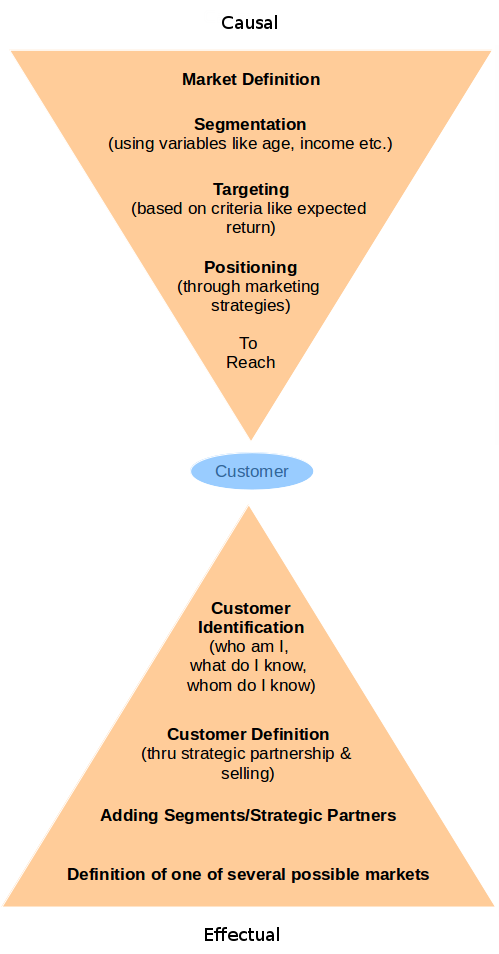
(click on the image to see it larger)
Effectual marketing starts with the causes and ends up wit an effect and a market that maybe did not even exist.
Principles
- Bird in hand: You start with who you are, what you know and whom you know.
- Affordable loss: Decide what you're able and willing to lose
- Lemonade: Put surprises to work for you. Both the good and bad (when life throws lemons at you, make lemonade)
- Pilot in the plane: Co-create the future without having to predict it.
- Crazy quilt: Co-operate with parties you can trust. It also limits your affordable loss.
An example
If you refer a recipe for cooking, buy the ingredients and make a dish, it's like the causal marketing model.
But if you open your fridge, see what you have and use all of that to make something, you'd end up making something that you hadn't even expected. A totally new recipe which might taste excellent or awful. But you basically haven't lost much by trying it, because you didn't waste time, money or resources by going out to buy something and you got a chance to try something new instead of sticking to some old recipe. This is how effectual marketing works. If it flops, you haven't lost much.
Prof.Saras was conducting a very interesting session, where she was constantly interacting with the audience and asking them to put their "skin in the game". If they came up with suggestions, they were also asked what they could do to make those suggestions a reality. If they couldn't, they were asked if they could put the professor or the panel in touch with someone who could. If they couldn't, then they were asked if they could bring in at least ten people who could be potential customers for the panel. If you missed Prof. Saras' session, you missed a lot!
Of course, this much interaction also takes up time, which brought down the content disbursement of the session down. So we were given just a few examples of effectual marketing:
1. A carpenter in Karnataka: There are many carpenters who make furniture the customer asks for or is popular. There was also another carpenter who made furniture according to his own imagination and he paid tractor owners to transport his furniture to customers. The genius of his plan was, that he chose tractors which took a round-about route to reach the customers, instead of the usual shortest route.
In the process, many potential customers along the route would see the furniture on the tractor, and were allowed to ask the driver for details and they'd order it.
The carpenter says he got an average of four new orders for each piece of furniture he sent in this manner.
This is marketing and sales combined. You don't make a cheaper product for the customer. You make what you want and say "this is what I have. Are you willing to buy". This way, you get real buyers.
The effectual entrepreneur is also encouraged to make the customer a co-creator by asking "I'm building a produce. What will it take for you to buy it?".
2. Affordable loss: Ask for forgiveness; not permission.
Skis
Prof.Saras gave use the example of a certain ski manufacturing company which when just a startup, distributed rubber balloons in a movie theater, where the balloons had their brand logo imprinted on it. People were encouraged to fill up the balloons with air and release them in the theatre itself, which they did. The theater owners were obviously upset, and the matter went to the press, which gave the ski company a good amount of publicity. It is said that even today, this is discussed as an un-conventional example of effectual marketing.
Nerf
There's also Jill who created Nerf (because children were hurting themselves with real toys, so she created toys out of foam) and distributed it to the fans of TV anchors who were waiting outside a production studio to see their favourite anchors. Normally, the TV anchors walk out and shake hands with fans. This time, the fans were so busy playing with Nerf balls, that they almost completely ignored the celebrities. The anchors soon identified who did this, and Jill was invited on a talk show where she got a good amount of publicity.
Hotelicopter
What do you think the video is about?
Luxury travel? Innovation in helicopters? Vacation?
Since the video revealed nothing, people would follow the link and go to hotelicopter's website. They received millions of visitors who'd reach the website and see a text that says that Hotelicopter is an April fools' joke. Their real intent was to make a search engine that gave results on various hotels, and the hotelicopter video was their marketing stunt to get people's attention.
Amazon using lawsuits as marketing
Amazon announced long back, that it was the world's largest retailer of books. They got sued promptly by another company that was actually the largest retailer, who said that Amazon didn't have a single book in their shops and couldn't claim that they were the largest.
The lawsuit went on for years, and Amazon made sure some news about the lawsuit appeared in prominent journals every one or two weeks, giving them a good amount of publicity.
Lijjat papad
The enterprising women in India who made papads on their terrace, had a plan of expanding their enterprise by making cheaper papads for the poor and costly papads for the rich (somewhat like RubyCup's plan). An experienced entrepreneur though, advised them not to do so, and to make Lijjat papad resonate with quality. They were advised to sell not just the papads but also their story. And this served as a very effective marketing tool, as more people joined in and Lijjat papad became known across the country.
Panel introduction
What followed were a series of discussions where the panel members introduced to us their startups and prof.Saras was asking the audience to come up with suggestions.
Ideas came up for BinBag, and the professor asked Achitra what he'd give the ideator in return. Achitra said he'd give them some green points, to which the professor said that wasn't enough. To be effectual he had to engage the customer. Ask them their name, how they came up with the idea (maybe they are into the same field) and if they would actually help BinBag in doing what was suggested.
The stakeholder helps you put the stake down. Push them to engage and ask how they would do it How do you bring them to co-create and bring them in . How to make them bring more people in.
The founder of Scribie mentioned how they use content marketing by asking people to write blogs about them.
Artflute uses a special business card with a rectangular hole in the middle. People always remember them for it. The noticed that at the 1 MG Road mall in Bangalore, the architecture was such that there were no escalators to the first floor, and retailers were unhappy that customers didn't venture up. So Artflute setup a painting activity on the first floor (they got the space for free, because they were helping retailers get more customers on the first floor), which pulled people up, and in turn, the participants of the painting activity gave Artflute some valuable feedback they wanted to collect, about art. Artflute basically encourages you to buy more art from contemporary artists and to keep your walls more up-to-date with art.
This concluded the first part of the session, and I didn't attend the question-answer session which was after lunch, but this was one of the most interesting sessions I've attended at IIM-B, because there were real-world examples and audience interactions which also formed immediate business contacts. Professor Saras handled the audience and the session with elan!
More on NRecursions
13 December 2014
Getting your head around d3.js [part2]
Continued from part1.
On observing d3 code, and on observing the output of the program, you'll notice the most confusing parts are that of enter(), data(), datum() and exit(). It just doesn't seem to fit into the programming syntax you're familiar with from other languages. Not to worry, it's just a matter of understanding the purpose of the syntax, and you'll be flying along.
If you wanted to draw a few circles with JavaScript, you'd probably do something like this:
<html>

<body>

<script>

var svgHolder = document.createElementNS("http://www.w3.org/2000/svg", "svg");

svgHolder.setAttribute("height",500);

svgHolder.setAttribute("width",700);

document.body.appendChild(svgHolder);


for(var i = 0; i < 10; i++)

{
  var circles = document.createElementNS("http://www.w3.org/2000/svg", "circle");
  circles.setAttribute("id", "c"+i)
  circles.setAttribute("cx", (i+1)*50)
  circles.setAttribute("cy", 100)
  circles.setAttribute("r", (i+1)*10)
  circles.setAttribute("stroke", "black")
  circles.setAttribute("stroke-width", "3")
  circles.setAttribute("fill", "red");
  svgHolder.appendChild(circles);

}

</script>

</body>

</html>

To do the same thing in d3:
<html>

<head>

<script type="text/javascript" src="http://d3js.org/d3.v3.min.js"></script>

</head>

<body>

<script>

var cir = ["c1", "c2", "c3", "c4", "c5", "c6", "c7", "c8", "c9", "c10"];

var svgHolder = d3.select("body") //select the body tag

                .append("svg") //add an svg tag to body

                    .attr("width", 700) //specify the svg tag properties

                    .attr("height", 500);


svgHolder.selectAll("circle").data(cir).enter()
         .append("circle") //add an svg circle

                .attr("id", function(d) {return d;})
                .attr("cx", function(d,i) {return (i+1)*50;})

                .attr("cy", 110)

                .attr("r", function(d,i) {return (i+1)*10;})

                .attr("stroke", "black")

                .attr("stroke-width", "3")

                .attr("fill", "red");


</script>

</body>

</html>
I know what you're thinking:
"Hey, where did the for loop go? What does data() and enter() do? How did you manage to select all circles when none of them were yet created? What is d and i in those functions?"We are just touching on the tip of the iceberg of the beautifully designed d3 syntax.
SelectAll
The cir array, basically acts as our specification of the loop limit. When you selectAll circle elements in the DOM (if they don't exist yet, d3 will create placeholders for them), you're also feeding each circle with data from the cir array using the data command.
What happens is, that for every circle that is created, d3 will assign the array values from cir to the placeholders one by one. So placeholder 1 will get the value "c1", placeholder 2 gets the value "c2" etc.
Enter and Data
The enter command tells d3 to take whatever commands come after enter, and attach them one by one to the placeholders. So the svg circles that get created with append("circle") will get attached to the placeholders that were created with selectAll("circle"). The number of placeholders to create is determined by the number of array elements in cir.
If you're dealing with only one element, you can use datum() instead of data().
It's that simple.
Anonymous functions and parameters d, i
Now, while specifying attributes for the circle with attr, you'd want to know something about which element of the array you're dealing with, right?
d3 allows you to use anonymous functions which accept zero to three parameters. If you specify the parameter as function(d), the value of d will be the array value of that particular placeholder.
Eg: For the first circle, d will be "c1" , for the second circle, d will be "c2" etc.
The second parameter is i as in function(d, i), which tells you whether the circle is the first one or the second one or third one etc. Similar to the i we use in for loops.
There's also a third parameter that you can get, which gives you data from a parent node, but let's not get into that for now.
Remove
In case you want to remove some of the circles, see how this works:
<html>

<head>

<script type="text/javascript" src="http://d3js.org/d3.v3.min.js"></script>

</head>

<body>

<script>


var cir = ["c1", "c2", "c3", "c4", "c5", "c6", "c7", "c8", "c9", "c10"];

var svgHolder = d3.select("body") //select the body tag

                .append("svg") //add an svg tag to body

                    .attr("width", 700) //specify the svg tag properties

                    .attr("height", 500);


svgHolder.selectAll("circle").data(cir).enter()

         .append("circle") //add an svg circle

                .attr("id", function(d) {return d;})

                .attr("cx", function(d,i) {return (i+1)*50;})

                .attr("cy", 110)

                .attr("r", function(d,i) {return (i+1)*10;})

                .attr("stroke", "black")

                .attr("stroke-width", "3")

                .attr("fill", "red");


var removethese = ["c1", "c2", "c3", "c4", "c5", "c9", "c10"];

svgHolder.selectAll("circle").data(removethese).remove();


</script>

</body>

</html>

You supply the array that you want to remove using data(), and d3 removes them from the DOM. But there's something wrong with how they got removed. Read on to find out.
btw, you could have also been specific, by typing
svgHolder.selectAll("circle").data(removethese).remove("circle");Exit
The opposite of enter() though, is exit(). You can use it like this:
<html>

<head>

<script type="text/javascript" src="http://d3js.org/d3.v3.min.js"></script>

</head>

<body>

<script>


var cir = ["c1", "c2", "c3", "c4", "c5", "c6", "c7", "c8", "c9", "c10"];

var svgHolder = d3.select("body") //select the body tag

                .append("svg") //add an svg tag to body

                    .attr("width", 700) //specify the svg tag properties

                    .attr("height", 500);


svgHolder.selectAll("circle").data(cir).enter()

         .append("circle") //add an svg circle

                .attr("id", function(d) {return d;})

                .attr("cx", function(d,i) {return (i+1)*50;})

                .attr("cy", 110)

                .attr("r", function(d,i) {return (i+1)*10;})

                .attr("stroke", "black")

                .attr("stroke-width", "3")

                .attr("fill", "red");


var newcir = ["c1", "c2", "c3", "c4", "c5", "c9", "c10"];

svgHolder.selectAll("circle").data(newcir).exit().remove("circle");


</script>

</body>

</html>

A more accurate exit()
Noticed something else? When using just remove(), the first 7 circles got removed. When using it with exit(), the last 3 circles got removed. Both functions were not able to recognize that we had actually removed circles in-between. ie: circles "c6", "c7" and "c8".
To make d3 recognize which array value changed, you just have to supply an extra identity parameter to data().
<html>

<head>

<script type="text/javascript" src="http://d3js.org/d3.v3.min.js"></script>

</head>

<body>

<script>


var cir = ["c1", "c2", "c3", "c4", "c5", "c6", "c7", "c8", "c9", "c10"];

var svgHolder = d3.select("body") //select the body tag

                .append("svg") //add an svg tag to body

                    .attr("width", 700) //specify the svg tag properties

                    .attr("height", 500);


svgHolder.selectAll("circle").data(cir, function(d) {return d;}).enter()

         .append("circle") //add an svg circle

                .attr("id", function(d) {return d;})

                .attr("cx", function(d,i) {return (i+1)*50;})

                .attr("cy", 110)

                .attr("r", function(d,i) {return (i+1)*10;})

                .attr("stroke", "black")

                .attr("stroke-width", "3")

                .attr("fill", "red");


var newcir = ["c1", "c2", "c3", "c4", "c5", "c9", "c10"];

svgHolder.selectAll("circle").data(newcir, function(d) {return d;}).exit().remove("circle");


</script>

</body>

</html>

...and viola! enter() and exit() recognize the placeholders by the second parameter we supplied to data().
To conclude
D3.js is a splendid library which allows dynamic creation, removal and modification of DOM elements. It's initially difficult to understand the enter(), exit() and data() syntax, which is why I thought I'd add my own tutorial on the internet to help newbies. Hope this was helpful, and do make use of plenty of anonymous functions and avoid using for loops, because data(), enter() and exit() offer far more powerful ways of dealing with data, than any for loop can. You'll realize it only when you get into more complex ways of representing information on a page, so it's better to start correctly, and use this syntax right from the beginning to make full use of the power of d3.
All the best!


01 December 2014
What a Virtual SIM is
How would you like it if you had to use one computer for accessing your GMail account, another computer for accessing your Facebook account and yet another computer to do your internet banking? Sounds silly, doesn't it? But that's basically what you're doing with your phone.
To use a mobile number, you have a SIM card. To use another number, you have another SIM placed in a separate mobile phone. Dual SIM phones have eased that problem a bit, but what if somebody allowed you to pick up any mobile phone and log-in to the phone with your mobile number, make a call (the billing will be done to your mobile number) and logout of the phone?
Sounds impossible? Futuristic? Well, the future is already here!
In 2008, some brilliant people at Comviva, an Indian company (now owned by Mahindra) and recently, another UK-based company called Movirtu (now acquired by BlackBerry) created the Virtual SIM technology.
 What it is
Virtual SIM (I'll be calling it VSIM from now on) is just an imaginary SIM that your mobile phone operator (Airtel, Vodafone, Tata Docomo) will keep in one of their computer databases. Think of it like your Facebook account that's stored on Facebook's database or your GMail account stored in Google's database.
So basically with VSIM, a mobile phone would have a real SIM in it, and an operator like Airtel would be able to allow even a Vodafone VSIM number to login to the Airtel real SIM, by dynamically assigning the Vodafone number to the real Airtel SIM. This technology even keeps track of your missed calls when you're logged out.
With smart-phones, it wouldn't be difficult to keep multiple virtual numbers logged in at the same time. The implementation is dependent on the phone manufacturers and operators.
Another way of looking at VSIM
Yet another company, Implementa provides Virtual SIM technology in a slightly different way:
Here, the real SIM cards are retained by the mobile phone operator at a SIM storage facility and a SIM emulation adapter is placed in the mobile phone instead of the real SIM card. Using the software interface of the mobile phone, you'll be able to assign one of the real SIM's to the SIM emulation adapter in the phone.
Benefits to mobile operators
Market penetration being crucial for companies, VSIM's have the potential to reach people who do not have the money to afford mobile phones. If one among a community of people has a phone, the others can login to it and use it. Their only expense will be their talk-time.
Another market segment is that of companies which allow BYOD and COPE policies. An employee can use their own number for personal calls and log back into the company number to make official calls. Hopefully this would improve the privacy aspect of smart-phone monitoring too, if the phone gets monitored only when it uses the company VSIM.
I love it when innovative ideas hit the market!
To use a mobile number, you have a SIM card. To use another number, you have another SIM placed in a separate mobile phone. Dual SIM phones have eased that problem a bit, but what if somebody allowed you to pick up any mobile phone and log-in to the phone with your mobile number, make a call (the billing will be done to your mobile number) and logout of the phone?
Sounds impossible? Futuristic? Well, the future is already here!
In 2008, some brilliant people at Comviva, an Indian company (now owned by Mahindra) and recently, another UK-based company called Movirtu (now acquired by BlackBerry) created the Virtual SIM technology.
Virtual SIM (I'll be calling it VSIM from now on) is just an imaginary SIM that your mobile phone operator (Airtel, Vodafone, Tata Docomo) will keep in one of their computer databases. Think of it like your Facebook account that's stored on Facebook's database or your GMail account stored in Google's database.
- To use a mobile number, you first purchase a Virtual SIM mobile number (which will be owned by an operator like Airtel etc. and you would probably also have the option of getting a real SIM card with it).
- Then either simply borrow somebody's phone (you can use any ordinary phone for this) or use a phone at a phone-booth, enter your VSIM's USSD code (which looks like this: *101# or *139*1*1234567890#) which is how you 'log-in' to your Virtual mobile number.
- The mobile network will identify that the phone is now using a different number, and make a note of it in its VLR (Visitor Location Register) database and it will allow you to make calls using your mobile number and will bill you accordingly.
- Type the same USSD code again, and you'll be logged out.
So basically with VSIM, a mobile phone would have a real SIM in it, and an operator like Airtel would be able to allow even a Vodafone VSIM number to login to the Airtel real SIM, by dynamically assigning the Vodafone number to the real Airtel SIM. This technology even keeps track of your missed calls when you're logged out.
With smart-phones, it wouldn't be difficult to keep multiple virtual numbers logged in at the same time. The implementation is dependent on the phone manufacturers and operators.
Another way of looking at VSIM
Yet another company, Implementa provides Virtual SIM technology in a slightly different way:
Here, the real SIM cards are retained by the mobile phone operator at a SIM storage facility and a SIM emulation adapter is placed in the mobile phone instead of the real SIM card. Using the software interface of the mobile phone, you'll be able to assign one of the real SIM's to the SIM emulation adapter in the phone.
Benefits to mobile operators
Market penetration being crucial for companies, VSIM's have the potential to reach people who do not have the money to afford mobile phones. If one among a community of people has a phone, the others can login to it and use it. Their only expense will be their talk-time.
Another market segment is that of companies which allow BYOD and COPE policies. An employee can use their own number for personal calls and log back into the company number to make official calls. Hopefully this would improve the privacy aspect of smart-phone monitoring too, if the phone gets monitored only when it uses the company VSIM.
I love it when innovative ideas hit the market!
30 November 2014
Corporate smartphone monitoring
First, let me get you up-to-speed on some terminology:
Smartphone monitoring
Long back (and even today), even the garbage a person threw out of their house was examined by detectives who wanted to find out personal details of someone they were investigating (don't believe it? Have a look at what you throw into the garbage everyday).
Then came GMail and Facebook which have their algorithms for monitoring and analyzing your pictures and data and finding out intimate details about you.
But even these technologies are no match for what your smart-phone can reveal about you. Even Blackberry phone technologies have been cracked by the government.
BYOD
People are worried about BYOD because they think the company can monitor them. But an article on CIO says that not everything can be monitored. An employer will have much more important things to do (such as running their business), than monitoring personal information of their employees. It's like how Dan Brown's Digital Fortress mentioned that women needn't be worried that the NSA is going to spy on their emails and discover their secret recipe for preparing fruit jam.
However, certain surveys as mentioned in CIO, say that employees would be more comfortable if the employer clearly specified what they can and cannot monitor, and why they need to view that information. Some want it in writing, that their employer won't look at personal information.
BYOD is said to have resulted in data breaches in cases where an employee loses a phone and someone else accesses company information stored in the phone or if the employee leaves and company data is still in the phone.
Intellectual Property loss, litigations from employees about their private data and reimbursements are some of the hidden costs that an organization might incur because of a BYOD policy.
A survey also says that 44% of job seekers are more positive about an organization if it supports their mobile device.
COPE
It's a more secure and flexible alternative to BYOD, because it's a nightmare for a usually under-staffed IT department to monitor, keep track of and protect the mobile devices of employees (it's easier to impose company-wide policies). It also allows them to specify a limited set of permitted devices, which makes management easier.
The device being company-owned, the company can impose any restriction on which apps are allowed and can wipe data from a phone.
EMM solutions for COPE introduces the concept of "containerization" which enables organizations to create a separate partition which keeps corporate data isolated from personal data on mobile devices. This way, a data-wipe can be focussed on only erasing corporate information.
An organization should have a catalogue of allowed devices and app's, since allowing just about any device into the company network can be catastrophic.
Spy softwares
With softwares like MobileSpy (compatible with Android, iOS and Blackberry) on the other hand, a lot more can be monitored:
Remotely controlling the phone
The person monitoring your phone won't be able to remotely activate the phone's microphone or camera. They won't be able to remotely switch-on your phone either, so nothing to be concerned about on this front. Your phone getting hacked or having a virus in it is a totally different situation though, where the hacker can control your phone. An employer obviously won't do such things, but an organization's IT department has to be on its toes when it comes to security updates and anti-viruses for the employee's phones.
Privacy
If you're concerned about privacy, the better and simpler option is to use the company smartphone only when you're working, and use a dual-SIM personal phone when you're not working. The dual-SIM feature will help you take work-related calls too, by transferring your company SIM to your personal phone temporarily.
Be aware though, that even though your company isn't able to track your personal information because you're not using the company phone, there are plenty of other companies that monitor your personal phone to collect details about you. If you don't want them to track you, turn off WiFi on your phone.
- Bring Your Own Device (BYOD) : It's a policy in a company or institution which allows people to bring personally owned mobile devices (phone/laptop/tablet) and to use it to access company/institute applications/information.
- Corporate Owned Personally Enabled (COPE): It's a policy which companies use to give employees mobile devices (phone/laptop/tablet) and can monitor and control the employee's activity to a large extent. Employees are also allowed to use the device for their personal use.
- SIM: It's basically just an IC embedded in a plastic card (which you call SIM card) and it stores data used to identify and authenticate those who subscribe to mobile telephony (that's why it's called Subscriber Identification Module).
- IT: The department of brilliant & hard-working people in companies/institutions, who setup and monitor the electronic and software infrastructure while at the same time, quickly identifying and fixing hardware and software problems that are reported.
Smartphone monitoring
Long back (and even today), even the garbage a person threw out of their house was examined by detectives who wanted to find out personal details of someone they were investigating (don't believe it? Have a look at what you throw into the garbage everyday).
Then came GMail and Facebook which have their algorithms for monitoring and analyzing your pictures and data and finding out intimate details about you.
But even these technologies are no match for what your smart-phone can reveal about you. Even Blackberry phone technologies have been cracked by the government.
BYOD
People are worried about BYOD because they think the company can monitor them. But an article on CIO says that not everything can be monitored. An employer will have much more important things to do (such as running their business), than monitoring personal information of their employees. It's like how Dan Brown's Digital Fortress mentioned that women needn't be worried that the NSA is going to spy on their emails and discover their secret recipe for preparing fruit jam.
However, certain surveys as mentioned in CIO, say that employees would be more comfortable if the employer clearly specified what they can and cannot monitor, and why they need to view that information. Some want it in writing, that their employer won't look at personal information.
BYOD is said to have resulted in data breaches in cases where an employee loses a phone and someone else accesses company information stored in the phone or if the employee leaves and company data is still in the phone.
Intellectual Property loss, litigations from employees about their private data and reimbursements are some of the hidden costs that an organization might incur because of a BYOD policy.
A survey also says that 44% of job seekers are more positive about an organization if it supports their mobile device.
COPE
It's a more secure and flexible alternative to BYOD, because it's a nightmare for a usually under-staffed IT department to monitor, keep track of and protect the mobile devices of employees (it's easier to impose company-wide policies). It also allows them to specify a limited set of permitted devices, which makes management easier.
The device being company-owned, the company can impose any restriction on which apps are allowed and can wipe data from a phone.
EMM solutions for COPE introduces the concept of "containerization" which enables organizations to create a separate partition which keeps corporate data isolated from personal data on mobile devices. This way, a data-wipe can be focussed on only erasing corporate information.
An organization should have a catalogue of allowed devices and app's, since allowing just about any device into the company network can be catastrophic.
Spy softwares
With softwares like MobileSpy (compatible with Android, iOS and Blackberry) on the other hand, a lot more can be monitored:
- Screen: Viewing the actual phone's screen with a 90 second update rate.
- Location: Locate the phone's position with GPS (the use of this feature takes up a good amount of battery, so it's almost never used, except for example, in cases where a company needs to monitor its truck-driver locations).
- SIM info: Retrieve latest SIM information if the device is stolen or lost.
- Wipe data & lock device: Can be done just by sending an SMS to the phone.
- Text and messenger message logging: Every message is logged, even if deleted from the phone.
- Social networking logs: Activity from Facebook and WhatsApp can be logged.
- Youtube videos: Log which videos are watched.
- Apps installed: Lets you see which apps are installed.
- Web activity: All website URL's are logged.
- App blocking: Access to certain apps can be blocked.
- Photo log: All photos taken by the phone are logged and viewable.
- Phone call info: Incoming and outgoing numbers are logged with duration and timestamp.
- Email: All incoming and outgoing emails are saved.
- Alerts: The person monitoring the device will be alerted when prohibited actions happen.
- Contacts: Every existing and new contact is logged and saved.
- Calendar events: Every event, date, time and location is saved.
- Keylogger: MobileSpy is said to have it.
- Location monitoring
- Blackberry messenger log
- Text message and email log
- Contact details
- Call details
Remotely controlling the phone
The person monitoring your phone won't be able to remotely activate the phone's microphone or camera. They won't be able to remotely switch-on your phone either, so nothing to be concerned about on this front. Your phone getting hacked or having a virus in it is a totally different situation though, where the hacker can control your phone. An employer obviously won't do such things, but an organization's IT department has to be on its toes when it comes to security updates and anti-viruses for the employee's phones.
Privacy
If you're concerned about privacy, the better and simpler option is to use the company smartphone only when you're working, and use a dual-SIM personal phone when you're not working. The dual-SIM feature will help you take work-related calls too, by transferring your company SIM to your personal phone temporarily.
Be aware though, that even though your company isn't able to track your personal information because you're not using the company phone, there are plenty of other companies that monitor your personal phone to collect details about you. If you don't want them to track you, turn off WiFi on your phone.
Subscribe to:
Posts (Atom)