18 August 2015


17 August 2015
Transfer data between two local PC's using an Ethernet (LAN) cable
Some people recommend buying a USB data transfer cable to transfer data between two computers.
No need.
A LAN cable can transfer data at a much higher rate. Let's assume you want to transfer data from your desktop PC to your laptop.
On your PC
To start, disconnect your PC's LAN cable from the modem's ethernet port and connect it to the laptop's ethernet port.
Now when you open up a command prompt on your PC and type "ipconfig" (without the quotes), you'll see a strange autoconfig IP. Ignore that.
Restart the PC, and you'll get a proper IP assigned.

Note down this IP address. ie: the one you see in the pic: "192.168.1.x". You'll have to enter this IP address into your laptop.
On your laptop
Open up Control Panel > Network and Sharing Center.
Click on "Ethernet"

Click "Properties"
 Select "Internet Protocol Version 4"

Specify the IP address you noted down from the PC.

Now create a new folder on the laptop and name it whatever you like. I named it "shared".
Right click on the folder, goto "Properties" and select the "Sharing" tab.
Choose the people to share the folder with, and add "Everyone" to it (just for now).
Give "Everyone" read and write permission.

You'll be shown a message that the folder is shared, and you'll be shown a path through which you can access the folder too (the part that I've shown smudged below, which is "\\computerName\shared".

Now all you have to do is open up Windows Explorer on your PC and in the address bar, type the path you saw on the laptop:
\\ComputerName\shared
...and you'll be able to see the contents of the laptop's folder. Now you can cut/copy/paste files in the shared folder and you'll be able to access it from the PC as well as the laptop.
Enjoy your high speed data transfer. I think I remember having got around 300MB/s on a LAN cable that could support 1GB/s.
When you're finished, go back to the laptop's Internet Protocol Version 4 settings and set it to "Obtain an IP address automatically" after disconnecting the laptop from the PC.
No need.
A LAN cable can transfer data at a much higher rate. Let's assume you want to transfer data from your desktop PC to your laptop.
On your PC
To start, disconnect your PC's LAN cable from the modem's ethernet port and connect it to the laptop's ethernet port.
Now when you open up a command prompt on your PC and type "ipconfig" (without the quotes), you'll see a strange autoconfig IP. Ignore that.
Restart the PC, and you'll get a proper IP assigned.

Note down this IP address. ie: the one you see in the pic: "192.168.1.x". You'll have to enter this IP address into your laptop.
On your laptop
Open up Control Panel > Network and Sharing Center.
Click on "Ethernet"

Click "Properties"

Specify the IP address you noted down from the PC.
Now create a new folder on the laptop and name it whatever you like. I named it "shared".
Right click on the folder, goto "Properties" and select the "Sharing" tab.
Choose the people to share the folder with, and add "Everyone" to it (just for now).
Give "Everyone" read and write permission.
You'll be shown a message that the folder is shared, and you'll be shown a path through which you can access the folder too (the part that I've shown smudged below, which is "\\computerName\shared".
Now all you have to do is open up Windows Explorer on your PC and in the address bar, type the path you saw on the laptop:
\\ComputerName\shared
...and you'll be able to see the contents of the laptop's folder. Now you can cut/copy/paste files in the shared folder and you'll be able to access it from the PC as well as the laptop.
Enjoy your high speed data transfer. I think I remember having got around 300MB/s on a LAN cable that could support 1GB/s.
When you're finished, go back to the laptop's Internet Protocol Version 4 settings and set it to "Obtain an IP address automatically" after disconnecting the laptop from the PC.

29 July 2015
The Android Stagefright vulnerability frightens the actors and the audience!
Android's BroadAnywhere threat was mistaken by many, and NRecursions clarified it for them. Now there's a surprising new bug called "Stagefright". Here are the details that matter:
Why is Stagefright dangerous?
Normally, if your computer or phone gets infected or hacked, it happens when you perform an action. Inserting an infected pen drive or clicking on a phishing link or visiting malicious websites.
Stagefright on the other hand, needs you to do nothing. A hacker just has to know your mobile number, and they can send you an MMS which will deliver a media file to your phone, which will also contain a mechanism through which the hacker can execute software code remotely. All this happens automatically. Even without you touching your phone. The hacker can then compromise your phone's security (allowing them to cause integer overflows, underflows, access files in the phone's external storage, access the phone's camera, audio and even execute the hackers code) and then delete the MMS. So you won't even know that your phone has been hacked.
Could your phone have been attacked already?
Unlikely. The bug was found by Joshua J Drake, a person at Zimperium mobile security, while he was searching for potential bugs. Zimperium informed Google about the bug and gave Google patches too.
News about the bug was made public on 21st July 2015, and now that people know of the bug, it's better to protect your phone ASAP. Full details of the bug will be revealed only on August 5th and 7th 2015 at the US Computer Security Conference and Defcon respectively.
Android versions 2.2 to version 5.1.1 are vulnerable. Cyanogen too.
How to protect your phone?
Open up your messaging service (the one you send SMS'es with), go to the Settings, scroll to the "Multimedia message (MMS) settings" and un-select the Auto-retrieve option and the Roaming auto-retrieve option. Do the same for Google Hangouts.
This will prevent the malicious MMS from getting automatically retrieved and loaded into Android's Stagefright module.
Of course the other way to protect yourself is to receive Google's Android updates.
Why is it called Stagefright?
Ever since version 2.2 (Froyo), Android has a native media playback engine called "Stagefright". The bug happens to exist in a few places in this software module.
This is a screenshot from Stagefright's page:

For programmers:
Would you have been able to spot such a bug?
See the patches for Stagefright below:
The integer underflow patch:
Bounty
Google offers a bounty of upto $20000 (which is less, in my opinion) to people who find and report vulnerabilities in Google's codebase.
Update: In response to the comment below, I had created some code that I uploaded on Coliru Viewer. Am making that code available below just in case Coliru later decides to remove content that's too old.
#include <stdint.h>
#include <iostream>
int main()
{
uint64_t v = 2*sizeof(uint32_t);
uint64_t vv = 2*(uint64_t)sizeof(uint32_t);
if (v == vv) {std::cout<<"v and vv are equal\n";} else {std::cout<<"v and vv are not equal\n";}
std::cout<<"v = "<<v<<" vv = "<<vv<<"\n";
uint64_t lli = 18446744073709551615;
uint32_t li = 4294967295;
uint32_t li2 = 4294967295*2;
uint64_t li2_64 = 4294967295*2;
std::cout<<"long long int = "<<lli<<"\n";
std::cout<<"long int = "<<li<<"\n";
std::cout<<"long int * 2 = "<<li2<<"\n";
std::cout<<"long int * 2 in long long int = "<<li2_64<<"\n";
uint64_t li3_64 = li * 2 * 4;
uint64_t li4_64 = li * 2;
std::cout<<"li = "<<li<<"\n";
std::cout<<"li4_64 when at li*2 = "<<li4_64<<"\n";
li4_64 = li4_64 * 4;
std::cout<<"li4_64 when at li*2*4 = "<<li4_64<<"\n";
uint64_t li5_64 = li * 2 * (uint64_t)4;
std::cout<< "li3_64 = " << li3_64 << " li4_64 = "<<li4_64<<"\n";
if (li3_64 == li4_64) {std::cout<<"they are equal\n";} else {std::cout<<"they are not equal\n";}
std::cout<<"li5 = "<<li5_64<<"\n";
}
Why is Stagefright dangerous?
Normally, if your computer or phone gets infected or hacked, it happens when you perform an action. Inserting an infected pen drive or clicking on a phishing link or visiting malicious websites.
Stagefright on the other hand, needs you to do nothing. A hacker just has to know your mobile number, and they can send you an MMS which will deliver a media file to your phone, which will also contain a mechanism through which the hacker can execute software code remotely. All this happens automatically. Even without you touching your phone. The hacker can then compromise your phone's security (allowing them to cause integer overflows, underflows, access files in the phone's external storage, access the phone's camera, audio and even execute the hackers code) and then delete the MMS. So you won't even know that your phone has been hacked.
Could your phone have been attacked already?
Unlikely. The bug was found by Joshua J Drake, a person at Zimperium mobile security, while he was searching for potential bugs. Zimperium informed Google about the bug and gave Google patches too.
News about the bug was made public on 21st July 2015, and now that people know of the bug, it's better to protect your phone ASAP. Full details of the bug will be revealed only on August 5th and 7th 2015 at the US Computer Security Conference and Defcon respectively.
Android versions 2.2 to version 5.1.1 are vulnerable. Cyanogen too.
Zimperium
zLabs VP of Platform Research and Exploitation - See more at:
http://blog.zimperium.com/experts-found-a-unicorn-in-the-heart-of-android/#sthash.5SWieNLS.dpuf
Zimperium
zLabs VP of Platform Research and Exploitation - See more at:
http://blog.zimperium.com/experts-found-a-unicorn-in-the-heart-of-android/#sthash.5SWieNLS.dpuf
Zimperium
zLabs VP of Platform Research and Exploitation - See more at:
http://blog.zimperium.com/experts-found-a-unicorn-in-the-heart-of-android/#sthash.5SWieNLS.dpuf
Zimperium
zLabs VP of Platform Research and Exploitation - See more at:
http://blog.zimperium.com/experts-found-a-unicorn-in-the-heart-of-android/#sthash.5SWieNLS.dpuf
How to protect your phone?
Open up your messaging service (the one you send SMS'es with), go to the Settings, scroll to the "Multimedia message (MMS) settings" and un-select the Auto-retrieve option and the Roaming auto-retrieve option. Do the same for Google Hangouts.
This will prevent the malicious MMS from getting automatically retrieved and loaded into Android's Stagefright module.
Of course the other way to protect yourself is to receive Google's Android updates.
Why is it called Stagefright?
Ever since version 2.2 (Froyo), Android has a native media playback engine called "Stagefright". The bug happens to exist in a few places in this software module.
This is a screenshot from Stagefright's page:

For programmers:
Would you have been able to spot such a bug?
See the patches for Stagefright below:
The integer underflow patch:
     if (streamDependenceFlag) {
+        if (size < 2)
+            return ERROR_MALFORMED;
         offset += 2;
         size -= 2;
     }
@@ -145,11 +147,15 @@
             return ERROR_MALFORMED;
         }
         unsigned URLlength = mData[offset];
+        if (URLlength >= size)
+            return ERROR_MALFORMED;
         offset += URLlength + 1;
         size -= URLlength + 1;
     }

     if (OCRstreamFlag) {
+        if (size < 2)
+            return ERROR_MALFORMED;
         offset += 2;
         size -= 2;
The integer overflow patch:
     mTimeToSampleCount = U32_AT(&header[4]);
-    uint64_t allocSize = mTimeToSampleCount * 2 * sizeof(uint32_t);
+    uint64_t allocSize = mTimeToSampleCount * 2 * (uint64_t)sizeof(uint32_t);
     if (allocSize > SIZE_MAX) {
         return ERROR_OUT_OF_RANGE;
     }
@@ -376,7 +376,7 @@
     }

     mNumCompositionTimeDeltaEntries = numEntries;
-    uint64_t allocSize = numEntries * 2 * sizeof(uint32_t);
+    uint64_t allocSize = numEntries * 2 * (uint64_t)sizeof(uint32_t);
     if (allocSize > SIZE_MAX) {
         return ERROR_OUT_OF_RANGE;
     }
@@ -426,7 +426,7 @@
         ALOGV("Table of sync samples is empty or has only a single entry!");
     }

-    uint64_t allocSize = mNumSyncSamples * sizeof(uint32_t);
+    uint64_t allocSize = mNumSyncSamples * (uint64_t)sizeof(uint32_t);
     if (allocSize > SIZE_MAX) {
         return ERROR_OUT_OF_RANGE;
     }
Bounty
Google offers a bounty of upto $20000 (which is less, in my opinion) to people who find and report vulnerabilities in Google's codebase.
___________________________________________
Update: In response to the comment below, I had created some code that I uploaded on Coliru Viewer. Am making that code available below just in case Coliru later decides to remove content that's too old.
#include <stdint.h>
#include <iostream>
int main()
{
uint64_t v = 2*sizeof(uint32_t);
uint64_t vv = 2*(uint64_t)sizeof(uint32_t);
if (v == vv) {std::cout<<"v and vv are equal\n";} else {std::cout<<"v and vv are not equal\n";}
std::cout<<"v = "<<v<<" vv = "<<vv<<"\n";
uint64_t lli = 18446744073709551615;
uint32_t li = 4294967295;
uint32_t li2 = 4294967295*2;
uint64_t li2_64 = 4294967295*2;
std::cout<<"long long int = "<<lli<<"\n";
std::cout<<"long int = "<<li<<"\n";
std::cout<<"long int * 2 = "<<li2<<"\n";
std::cout<<"long int * 2 in long long int = "<<li2_64<<"\n";
uint64_t li3_64 = li * 2 * 4;
uint64_t li4_64 = li * 2;
std::cout<<"li = "<<li<<"\n";
std::cout<<"li4_64 when at li*2 = "<<li4_64<<"\n";
li4_64 = li4_64 * 4;
std::cout<<"li4_64 when at li*2*4 = "<<li4_64<<"\n";
uint64_t li5_64 = li * 2 * (uint64_t)4;
std::cout<< "li3_64 = " << li3_64 << " li4_64 = "<<li4_64<<"\n";
if (li3_64 == li4_64) {std::cout<<"they are equal\n";} else {std::cout<<"they are not equal\n";}
std::cout<<"li5 = "<<li5_64<<"\n";
}
15 July 2015
Configuring NTP between two linux machines
I have two virtual boxes at home. One that maintains system time accurately and another that always shows the time of some other country. I let the one with the correct time be considered the server and the other one be the client which polls the server using NTP (which is installed by default in Linux).
On the server side, use "su" to become the root user.
vi /etc/ntp.conf
Set these values in the ntp.conf file:
server 127.127.1.0
fudge 127.127.1.0 stratum 10
Save and exit the vi editor.
service ntpd start
The 127.127.1.0 basically refers to the same computer. Something like the localhost URL.
Stratum is the level of confidence you have in the time of your server. Stratum 0 would mean you have the highest confidence in it. So here we set it to 10, just-like-that. After you configure the client system, you'll see that the stratum of the client will be 11. i.e. lower than the trust you have on the server time.
On the client side:
Get into root mode.
vi /etc/ntp.conf
Comment out all other server address lines and add your server systems address.
server 192.20.220.220
Save and exit vi.
service ntpd restart
ntpq -p will show you a table of the network jitter, polling time, server address and other useful data. If you see an asterisk just before the server address, it means that the server is synchronized with your client machine. The offset value shown is the difference in time between the client and server. To convert the value to seconds, shift the decimal thrice to the left.
You can also use ntpdate -d 192.20.220.220 to debug and see what is going on. This command will also show you the time difference between client and server.
Configuring polling time
Well frankly, don't try to configure it.
NTP will automatically choose between a polling value of 64 seconds to 1024 seconds. So don't be surprised if it takes 17 minutes for time to be synchronised. As time elapses, the clock time will drift away from the correct time and NTP will set it right. You have to allow a few days for NTP to select the right polling value based on network jitter and other parameters. NTP does not immediately trust the time it receives from the server. If you set a low polling time using the minpoll command, the scope for erroneous synchronization increases. So the best thing to do is to just ensure your configuration settings have synchronized the client and server and leave it at that. NTP will handle the polling automatically and optimally.
On the server side, use "su" to become the root user.
vi /etc/ntp.conf
Set these values in the ntp.conf file:
server 127.127.1.0
fudge 127.127.1.0 stratum 10
Save and exit the vi editor.
service ntpd start
The 127.127.1.0 basically refers to the same computer. Something like the localhost URL.
Stratum is the level of confidence you have in the time of your server. Stratum 0 would mean you have the highest confidence in it. So here we set it to 10, just-like-that. After you configure the client system, you'll see that the stratum of the client will be 11. i.e. lower than the trust you have on the server time.
On the client side:
Get into root mode.
vi /etc/ntp.conf
Comment out all other server address lines and add your server systems address.
server 192.20.220.220
Save and exit vi.
service ntpd restart
ntpq -p will show you a table of the network jitter, polling time, server address and other useful data. If you see an asterisk just before the server address, it means that the server is synchronized with your client machine. The offset value shown is the difference in time between the client and server. To convert the value to seconds, shift the decimal thrice to the left.
You can also use ntpdate -d 192.20.220.220 to debug and see what is going on. This command will also show you the time difference between client and server.
Configuring polling time
Well frankly, don't try to configure it.
NTP will automatically choose between a polling value of 64 seconds to 1024 seconds. So don't be surprised if it takes 17 minutes for time to be synchronised. As time elapses, the clock time will drift away from the correct time and NTP will set it right. You have to allow a few days for NTP to select the right polling value based on network jitter and other parameters. NTP does not immediately trust the time it receives from the server. If you set a low polling time using the minpoll command, the scope for erroneous synchronization increases. So the best thing to do is to just ensure your configuration settings have synchronized the client and server and leave it at that. NTP will handle the polling automatically and optimally.
13 July 2015
Recursions
This is the hundredth post of NRecursions and is a little moment of celebration for me, as not only has NRecursions grown to help people worldwide (the mutex tutorial, d3.js tutorial, Jenkins tutorial, Broadanywhere clarification), it has also brought a welcome burst of fun and sunshine via the monthly LOL pages.
More than ten thousand unique visitors and more than thirty thousand 'non-unique' visitors :-) (bots included). An audience from across the globe, but primarily from USA and India.


This blog was named as such because these are Nav's Recursions and also because it is one among the N number of recursions happening in this universe. Similar to recursive functions in computer programming.
Everything in the universe follows a pattern. Even when all you see is chaos, there is a pattern when you see the bigger picture. This pattern is part of a very similar or exactly similar pattern happening elsewhere. Like a Mandelbrot. We very well know how tiny we are in the universe. A spec on a spec on a spec on a spec and so on. The galaxy we live in, may just be a small dot in a Mandelbrot of galaxies just like ours...with some minor tweaks. Perhaps home to humans who live life exactly like us.
We exist pretty much like protozoans in a drop of water. They don't have a clue why they exist. But we know they perform an important ecological function. Given the way society and the ecosystem itself is built for a balance of creation and dissipation, it is obvious we exist for a purpose. Individuals by themselves might have lesser meaning than a collective society. Of course, given that the universe consists of majorly vacuum than anything else, it is a matter of wonder why Earth exists as a patch of life in an ocean of void. If you look at it as a recursion, You could see us as being like a cluster of organisms found to be thriving in some pocket of life in a far away area of earth surrounded by kilometers of lifelessness.
Using the concept of recursions, one can deduce that if we travel far enough into the universe, we might not just find planets like ours, but also find unimaginably huge areas of organic existence and varied life forms instead of the vacuum of space. So massive and so vast that we would scold ourselves for not having ventured out of our tiny planet sooner.
Until then, fulfill your purpose in life, for it is why you exist in a society. Search for patterns. Look for Recursions. They are the key to many answers. The gateways to knowledge. But most importantly, think of why we look for recursions. Why patterns? It is in itself a recursion which holds the answer to why we exist.
More than ten thousand unique visitors and more than thirty thousand 'non-unique' visitors :-) (bots included). An audience from across the globe, but primarily from USA and India.
This blog was named as such because these are Nav's Recursions and also because it is one among the N number of recursions happening in this universe. Similar to recursive functions in computer programming.
The real question is not why we exist. The real question is why are we allowed to contemplate our existence
- Nav
Everything in the universe follows a pattern. Even when all you see is chaos, there is a pattern when you see the bigger picture. This pattern is part of a very similar or exactly similar pattern happening elsewhere. Like a Mandelbrot. We very well know how tiny we are in the universe. A spec on a spec on a spec on a spec and so on. The galaxy we live in, may just be a small dot in a Mandelbrot of galaxies just like ours...with some minor tweaks. Perhaps home to humans who live life exactly like us.
We exist pretty much like protozoans in a drop of water. They don't have a clue why they exist. But we know they perform an important ecological function. Given the way society and the ecosystem itself is built for a balance of creation and dissipation, it is obvious we exist for a purpose. Individuals by themselves might have lesser meaning than a collective society. Of course, given that the universe consists of majorly vacuum than anything else, it is a matter of wonder why Earth exists as a patch of life in an ocean of void. If you look at it as a recursion, You could see us as being like a cluster of organisms found to be thriving in some pocket of life in a far away area of earth surrounded by kilometers of lifelessness.
Using the concept of recursions, one can deduce that if we travel far enough into the universe, we might not just find planets like ours, but also find unimaginably huge areas of organic existence and varied life forms instead of the vacuum of space. So massive and so vast that we would scold ourselves for not having ventured out of our tiny planet sooner.
Until then, fulfill your purpose in life, for it is why you exist in a society. Search for patterns. Look for Recursions. They are the key to many answers. The gateways to knowledge. But most importantly, think of why we look for recursions. Why patterns? It is in itself a recursion which holds the answer to why we exist.
02 July 2015

01 July 2015
How to start volunteering or how to start a volunteering team?
If you are a person who does not have much patience or does not like going into details or wants to achieve fame or have been forced to volunteer or been ordered/forced to setup a team by someone, then stop. Do not become a volunteer. Do not start a volunteering team. Not yet. Not until you are aware of some facts.
Why?
Because volunteering is not pure fun and entertainment. It takes hard-work, knowledge building, cooperation and coordination with people who are already volunteering. Most importantly, it requires the willingness to do all this happily without hopes of becoming a hero and without hopes of receiving appreciation for what you did.
If you've seen people volunteering and feel it's fun and easy, you either missed out on a lot of details or you found a team of people who are actually non-volunteers.
Now, if you have what it takes to be a volunteer...
Step 1: Identify what you want to do and for how long you want to do it. Also, about how much time you will be able to dedicate for it in a month. Avoid the temptation to copy what everyone else is doing. Many of them don't have a clue of what and why they are doing it. Instead, look around you. What social problems do you see? Write it down on a piece of paper.
Instead of doing something on your own, if you want to help someone who is already doing something worthwhile, use an internet search engine to search for volunteering opportunities near your house. Take a bike and go around your neighborhood and beyond, to find places. Once you find one place where people usually volunteer, you can ask those people if they know of any other opportunities. One hint will lead you to another and you'll finally find what you want.
Another way is to email CSR teams and ask them what they know. Search for blogs or social networking or professional networking websites where people have written about the volunteering they do, and contact them. Some of them will actually take the time to help. Else you can also contact NGO's who are into the particular field of work. People are generally very helpful.
If you don't know what you want to do, but have spare time to volunteer, use an internet search engine to find out about the various volunteering opportunities. OR, see this post on Mr.Somebody Else. Be careful to not choose something you're not really interested in. Don't choose to do something just for the namesake or to become a hero. Choose it because you really want to improve the situation.
Step 2: You need knowledge. Record the information you gather. You have 2 options:
Option expert: Search for an expert who is already volunteering. Eg: If you want to teach children, you first need to learn how to teach them. There are people who can teach you. If you want to plant saplings, contact the forest department. If you want to do blood donation, contact an NGO which does it. If you see a destitute on the road, contact the Missonaries of Charity. The advantage of contacting an expert is that they will already know what mistakes not to commit; they will know exactly what areas need improvement and they will be able to address all your questions. It's very important at this stage to avoid the temptation to become a hero and try doing everything by yourself (a very immature thing to do) instead of consulting with an expert. If the expert needs helping hands, then you can inform them about your timings and comfort level and they will be happy to accommodate you. If it doesn't work out, find someone else. Even if the expert is not doing exactly what you want to do, it helps to assist them for a while to understand more about the field. You can openly tell them that you are there only for a short while to learn.
Option self: If there are no experts or if the experts are not solving exactly the kind of social problem that you are trying to address, then start again, with the internet. Find out as much as you can about the subject matter. You will need to use your imagination to vary your search terms a lot for this. The more knowledge you gain, the more confidence you will have. The sad part is, many volunteers do not take that extra step in educating themselves.
Step 3: Understand the root cause of the problem. If you are trying to address homelessness, then first find out why homelessness exists. Instead of individualizing a homeless person and theorizing why 'this person is like this', a Social Entrepreneurship teacher once suggested going out on the streets and living as a homeless person for a few days (obviously it is not to be done in unsafe environments). See how you'd be able to survive without a credit card and keys to your warm home. The Ugly Indian group did something similar; they spent a night and a morning near a garbage dump, wrapped up in blankets, just because they wanted to find out exactly who was littering the place everyday.
Don't jump into a problem and try to solve it because it's cool. Take the time to understand it with your stomach. Find out more about it. Talk to people to get information about the problem. Ask about what anyone else has already tried to solve it. Write to people, get in touch with authorities who can help. Don't worry if some people won't help. Persistence will ensure that you find people who will help.
Step 4: Make a plan. One of the biggest reasons people stop volunteering too early or give up is because they didn't feel it was necessary to create a plan. A plan is not just about what you are going to do and how long it will take. The plan should have...
Step 5: Be the first one measure and critically evaluate your work. You have to maintain data of what you did, so that you will be able to measure what you achieved, what is remaining to be achieved and how far you have progressed. One small example is what a team did for evaluating data on blood donation. Ask others to evaluate your work too. If there are experts who can do it for you for free, you are even more lucky. Once you evaluate, you either go to step 3 or to step 6.
Step 6: Hibernate. You need rest once in a while or you'll burn out.
It is of course possible to volunteer without going into so much detail. You won't achieve much by doing that, but if you choose to do so, then at least have the decency to do it with a basic sense of responsibility.
Also, do check what you score on the Nav test < click this
Happy volunteering! :-)
More on Volunteering
Why?
Because volunteering is not pure fun and entertainment. It takes hard-work, knowledge building, cooperation and coordination with people who are already volunteering. Most importantly, it requires the willingness to do all this happily without hopes of becoming a hero and without hopes of receiving appreciation for what you did.
If you've seen people volunteering and feel it's fun and easy, you either missed out on a lot of details or you found a team of people who are actually non-volunteers.
Now, if you have what it takes to be a volunteer...
Step 1: Identify what you want to do and for how long you want to do it. Also, about how much time you will be able to dedicate for it in a month. Avoid the temptation to copy what everyone else is doing. Many of them don't have a clue of what and why they are doing it. Instead, look around you. What social problems do you see? Write it down on a piece of paper.
Instead of doing something on your own, if you want to help someone who is already doing something worthwhile, use an internet search engine to search for volunteering opportunities near your house. Take a bike and go around your neighborhood and beyond, to find places. Once you find one place where people usually volunteer, you can ask those people if they know of any other opportunities. One hint will lead you to another and you'll finally find what you want.
Another way is to email CSR teams and ask them what they know. Search for blogs or social networking or professional networking websites where people have written about the volunteering they do, and contact them. Some of them will actually take the time to help. Else you can also contact NGO's who are into the particular field of work. People are generally very helpful.
If you don't know what you want to do, but have spare time to volunteer, use an internet search engine to find out about the various volunteering opportunities. OR, see this post on Mr.Somebody Else. Be careful to not choose something you're not really interested in. Don't choose to do something just for the namesake or to become a hero. Choose it because you really want to improve the situation.
Step 2: You need knowledge. Record the information you gather. You have 2 options:
Option expert: Search for an expert who is already volunteering. Eg: If you want to teach children, you first need to learn how to teach them. There are people who can teach you. If you want to plant saplings, contact the forest department. If you want to do blood donation, contact an NGO which does it. If you see a destitute on the road, contact the Missonaries of Charity. The advantage of contacting an expert is that they will already know what mistakes not to commit; they will know exactly what areas need improvement and they will be able to address all your questions. It's very important at this stage to avoid the temptation to become a hero and try doing everything by yourself (a very immature thing to do) instead of consulting with an expert. If the expert needs helping hands, then you can inform them about your timings and comfort level and they will be happy to accommodate you. If it doesn't work out, find someone else. Even if the expert is not doing exactly what you want to do, it helps to assist them for a while to understand more about the field. You can openly tell them that you are there only for a short while to learn.
Option self: If there are no experts or if the experts are not solving exactly the kind of social problem that you are trying to address, then start again, with the internet. Find out as much as you can about the subject matter. You will need to use your imagination to vary your search terms a lot for this. The more knowledge you gain, the more confidence you will have. The sad part is, many volunteers do not take that extra step in educating themselves.
Step 3: Understand the root cause of the problem. If you are trying to address homelessness, then first find out why homelessness exists. Instead of individualizing a homeless person and theorizing why 'this person is like this', a Social Entrepreneurship teacher once suggested going out on the streets and living as a homeless person for a few days (obviously it is not to be done in unsafe environments). See how you'd be able to survive without a credit card and keys to your warm home. The Ugly Indian group did something similar; they spent a night and a morning near a garbage dump, wrapped up in blankets, just because they wanted to find out exactly who was littering the place everyday.
Don't jump into a problem and try to solve it because it's cool. Take the time to understand it with your stomach. Find out more about it. Talk to people to get information about the problem. Ask about what anyone else has already tried to solve it. Write to people, get in touch with authorities who can help. Don't worry if some people won't help. Persistence will ensure that you find people who will help.
Step 4: Make a plan. One of the biggest reasons people stop volunteering too early or give up is because they didn't feel it was necessary to create a plan. A plan is not just about what you are going to do and how long it will take. The plan should have...
- What creates most value to the person or area of society you are trying to help?
- What are the main activities you will do to create that value?
- What are the main resources you will need?
- Which people will partner with you?
- What kind of a relationship will you have with the people or area of society you are helping? Personal assistance? Self-service? Automated services? Community creation? Co-creation?
- Channels of help? How will you raise awareness? How will you deliver the help?
- Target group? Are you targeting a small area or is it more widespread or do you intend to start small and scale up once you've built a certain level of quality?
- What are your costs going to be?
- If you are creating products, what is your revenue going to be?
- How will you handle disruptive volunteers?
- How often are you going to take some rest from volunteering?
Step 5: Be the first one measure and critically evaluate your work. You have to maintain data of what you did, so that you will be able to measure what you achieved, what is remaining to be achieved and how far you have progressed. One small example is what a team did for evaluating data on blood donation. Ask others to evaluate your work too. If there are experts who can do it for you for free, you are even more lucky. Once you evaluate, you either go to step 3 or to step 6.
Step 6: Hibernate. You need rest once in a while or you'll burn out.
It is of course possible to volunteer without going into so much detail. You won't achieve much by doing that, but if you choose to do so, then at least have the decency to do it with a basic sense of responsibility.
Also, do check what you score on the Nav test < click this
Happy volunteering! :-)
___________________________________
More on Volunteering
19 June 2015
Volunteering: The Nav test
The 'Volunteer Navigation' test is designed to have a measurable technique of evaluating whether volunteering teams are headed in the right direction in our mission to create a better world.
The Nav Test
You start with a score of zero and add or subtract points according to the bulleted list.
A very good team would score 6.
An average team would score 4.
An exceptional team would score 8.
Don't be surprised if the score of many teams go to negative numbers :-) It's good if it does, because now that they know it, they also know exactly where to improve.
Why the Nav test was created
Real volunteering is difficult & boring. Really. But it's the best way to help society.
Some creative volunteer leaders try removing some of that boredom by introducing fun activities for volunteers. It's one of the hallmarks of good leadership; but the leader also ensures that the objective of helping society is first met. The fun is brought in as a second layer...as icing on a cake.
Sad part is, that volunteers or anyone else who sees those fun activities, tend to miss out on the cake (the actual work put into helping society). So when these people try conducting a volunteering activity on their own, their first priority is to plan out the fun part, and it doesn't really matter to them if the activity really helps society or not. For some others, it's a short-term activity driven by vanity or pressure from people in authority.
It is saddening to watch people do what they think are 'acts of kindness' and yet be completely apathetic to the real social issue. 'Misguided kindness', as some call it. It's time people become aware of what they are doing and it's time to change the trend, both for volunteers who are just about to start a team and for those who are already volunteering.
What is your score on the Nav test?
To be successful as a score-tool, the Nav test needs to be put through a thorough evaluation by people who are experienced in the field of volunteering/social-work. There will be people who scoff at it, but that's what happens at the beginning of every change that goes in the right direction.
Hoping to hear from you.
This test's parameters were open for review and modification until 1st September 2015, after which it was frozen and used as a score-reference for any volunteering team (non-profits, for-profits, govt. units, corporates or individuals) who would like to improve or have a reference point to start with. Feel free to share your views in the comments section.
The Nav Test
You start with a score of zero and add or subtract points according to the bulleted list.
- Plus 1 if the team has a long-term commitment to improving a certain area of society. (2 minus points if they jump from one activity/area to another in less than 2 years)
- Plus 1 if the team maintains data to measure if their work really helped the beneficiaries and analyze if it could be done better by finding a way to solicit honest feedback. (1 minus point if the only data maintained is a bunch of photos, number of items donated and/or the number of volunteer man-hours. If no data is maintained, 2 minus points)
- Plus 1 if the team consults with experts in the field, for knowledge. (1 additional plus point if the team is the expert and is building knowledge that is freely shared)
- Plus 1 if the team takes pains to actually understand and solve the cause of the social problem, analyzing it from the point of view of the various factors that contributed to the problem.
- Plus 1 if when you join the team, the team informs you of their past, identifies your skills, interests and comfort-level to ensure that you contribute your best when you join them. (1 additional plus point if they educate you further)
- Plus 1 if the team has a mechanism to handle disruptive volunteers.
A very good team would score 6.
An average team would score 4.
An exceptional team would score 8.
Don't be surprised if the score of many teams go to negative numbers :-) It's good if it does, because now that they know it, they also know exactly where to improve.
Why the Nav test was created
Real volunteering is difficult & boring. Really. But it's the best way to help society.
Some creative volunteer leaders try removing some of that boredom by introducing fun activities for volunteers. It's one of the hallmarks of good leadership; but the leader also ensures that the objective of helping society is first met. The fun is brought in as a second layer...as icing on a cake.
Sad part is, that volunteers or anyone else who sees those fun activities, tend to miss out on the cake (the actual work put into helping society). So when these people try conducting a volunteering activity on their own, their first priority is to plan out the fun part, and it doesn't really matter to them if the activity really helps society or not. For some others, it's a short-term activity driven by vanity or pressure from people in authority.
It is saddening to watch people do what they think are 'acts of kindness' and yet be completely apathetic to the real social issue. 'Misguided kindness', as some call it. It's time people become aware of what they are doing and it's time to change the trend, both for volunteers who are just about to start a team and for those who are already volunteering.
What is your score on the Nav test?
To be successful as a score-tool, the Nav test needs to be put through a thorough evaluation by people who are experienced in the field of volunteering/social-work. There will be people who scoff at it, but that's what happens at the beginning of every change that goes in the right direction.
Hoping to hear from you.
The author is the creator of the Nav test, has completed Copenhagen Business School's course on Social Entrepreneurship with distinction, has led two volunteering teams and volunteers actively for social causes.
13 June 2015
LOL
Continued from the previous LOL page
Cars for heroes
Share with this link

Festivals
Share with this link

Will be continued in the next LOL page
Interpreting the disk usage analyzer of Linux
For anyone who has used Windows, it's just a matter of seeing the properties of a drive, and you're shown what percentage of the disk is used and which isn't. In Linux though, the sunburst is a seemingly weird representation of disk usage. It's basically a multi-level pie chart.

Thankfully, Ubuntu has the Windows style representation too...
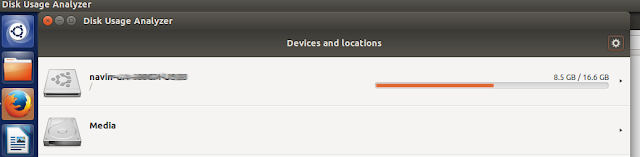
and right-clicking nautilus to see properties also shows you disk usage.

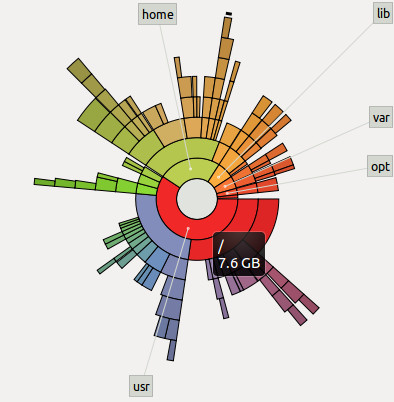
Interpreting the sunburst
This representation isn't much good at showing you how much free space is remaining on your disk. What it's good at showing is which folders are taking up a lot of your space.
The grey circle in the middle represents the root folder of Linux. What you know as "/". The place you reach when you do "cd /". On hovering the mouse pointer over it, it shows me the root folder has 7.6GB of files in it.

The amount of space taken up by the files in root is considered 100%. This does not mean that the disk is 100% full. It means that we are just representing 7.6GB = 100%, so that if any folder in root takes up 4.6GB of space, we can say that the folder is = 4.6/7.6 = 60% of the 100%.
Reds = Folders taking up most space
Purples = Takes up lesser space than reds
Greens = Takes up lesser space than purples
Yellows = Takes up lesser space than greens
Somebody didn't seem to have understood how colour gradients work.

Thankfully, Ubuntu has the Windows style representation too...

and right-clicking nautilus to see properties also shows you disk usage.

Interpreting the sunburst
This representation isn't much good at showing you how much free space is remaining on your disk. What it's good at showing is which folders are taking up a lot of your space.
The grey circle in the middle represents the root folder of Linux. What you know as "/". The place you reach when you do "cd /". On hovering the mouse pointer over it, it shows me the root folder has 7.6GB of files in it.
The amount of space taken up by the files in root is considered 100%. This does not mean that the disk is 100% full. It means that we are just representing 7.6GB = 100%, so that if any folder in root takes up 4.6GB of space, we can say that the folder is = 4.6/7.6 = 60% of the 100%.
Reds = Folders taking up most space
Purples = Takes up lesser space than reds
Greens = Takes up lesser space than purples
Yellows = Takes up lesser space than greens
Somebody didn't seem to have understood how colour gradients work.
You are also shown labels of the next level of folders so that you can narrow down on which of the folders in root is taking up the most space. Hover the mouse pointer over those red spaces (I'll be hovering over the "usr" folder) and you'll see how much of space the folder is taking up.

Let's go deeper than the root folder
Now click on the red "usr" folder, and suddenly, "usr" will be shown as the root folder of the sunburst, and all other coloured semi-circles around "usr", are the child folders of "usr" and the grandchild and great-grandchild and so on....All belonging to "usr" only. No information of the "home" folder or "lib" folder etc. are shown. This is purely for "usr" and the folders contained within it.
But why are only the first few circles forming a full circle? The outer ones are just tiny circle segments. What do they mean?

Notice that the purple folder "share" appears to have 7 folders in it (app-install, pyzy, netbeans etc.) which occupy almost all of the purple space, and there's a bit of empty white space too near the app-install folder. The empty space, is not actually empty. It's full of 342 tiny little files which the disk usage analyzer isn't showing because they are too tiny, and labelling them would clutter up the screen.
Go into "share" which is the subfolder of "usr"
Click on "share", and you'll see some of those files. Also, you'll notice that "doc" is taking up the most space in "share".

See the diagram below to understand the positioning.

Red sector 2 (I'm calling it '2' from now on) is a subfolder of red sector 1 (called as '1' from now on). See how 2 is positioned on top of 1's circumference. 2 only has relevance with respect to 1. Sector 2 is not at all related to the green sector. So the amount of 1's circumference that 2 takes up, shows that 2 takes up approximately 35% space of all the subfolders of 1. The other subfolders of 1 aren't shown because there are plenty of them, but all of them are very tiny compared to 2.
So this is how the disk space usage analyzer (named "Baobab") is interpreted. Hope it's clear to you now. Finally! :-) Phew!
Let's go deeper than the root folder
Now click on the red "usr" folder, and suddenly, "usr" will be shown as the root folder of the sunburst, and all other coloured semi-circles around "usr", are the child folders of "usr" and the grandchild and great-grandchild and so on....All belonging to "usr" only. No information of the "home" folder or "lib" folder etc. are shown. This is purely for "usr" and the folders contained within it.
But why are only the first few circles forming a full circle? The outer ones are just tiny circle segments. What do they mean?
Notice that the purple folder "share" appears to have 7 folders in it (app-install, pyzy, netbeans etc.) which occupy almost all of the purple space, and there's a bit of empty white space too near the app-install folder. The empty space, is not actually empty. It's full of 342 tiny little files which the disk usage analyzer isn't showing because they are too tiny, and labelling them would clutter up the screen.
Go into "share" which is the subfolder of "usr"
Click on "share", and you'll see some of those files. Also, you'll notice that "doc" is taking up the most space in "share".

See the diagram below to understand the positioning.
Red sector 2 (I'm calling it '2' from now on) is a subfolder of red sector 1 (called as '1' from now on). See how 2 is positioned on top of 1's circumference. 2 only has relevance with respect to 1. Sector 2 is not at all related to the green sector. So the amount of 1's circumference that 2 takes up, shows that 2 takes up approximately 35% space of all the subfolders of 1. The other subfolders of 1 aren't shown because there are plenty of them, but all of them are very tiny compared to 2.
So this is how the disk space usage analyzer (named "Baobab") is interpreted. Hope it's clear to you now. Finally! :-) Phew!
07 June 2015
Pass an array to a function when you're allowed to pass only one parameter?
A colleague asked me this, and from my experience, if you pass an array to a function, there's no way for the function to know the array size because it does not know at which point of memory the array ends. So the only way seemed to be to do this:
#include<iostream>
void func(int arr[], int s)
{
for(int i=0; i<s; ++i)
{
std::cout<<arr[i]<<"\n";
}
}
int main()
{
int a[10] = {1,2,3,4,5,6,7,8,9,0};
func(a, 10);
}
You'd ask then how does the compiler know where an array ends when you create:
int* myArray = new myArray[10];
and then delete it with:
delete[] myArray;
Apparently, when the memory is allocated with new myArray[10], the compiler will allocate space to store the size of the array + memory to store the array itself. What is returned, is the position where the array begins.
So when it's time to delete, the compiler searches for the array size in array position - 1. This is one way to implement it.
So for ordinary arrays being passed as parameters to a function, one way is to create an array of size 11 if you actually wanted to create an array of size 10. Then use the first cell to store the array size.
#include<iostream>
void func(int arr[])
{
int s = arr[0];
for(int i=1; i<s+1; ++i)
{
std::cout<<arr[i]<<"\n";
}
}
int main()
{
int a[11] = {10, 1,2,3,4,5,6,7,8,9,0};
func(a);
}
Yet another way I recently found out, is to use a template.
#include<iostream>
template <typename T, int s>
void func(T (&a) [s])
{
for (int i = 0; i < s; ++i)
{
std::cout<< a[i] << "\n";
}
}
int main()
{
int x[10] = {1,2,3,4,5,6,7,8,9,0};
func(x);
}
and this is how you'd do it for multiple arrays
#include<iostream>
template <typename T, int s1, int s2>
void func(T (&a) [s1], T (&b) [s2], int c)
{
std::cout<<"a=";
for (int i = 0; i < s1; ++i) { std::cout<< a[i]; a[i]=56; }
std::cout<<"\nb=";
for (int i = 0; i < s2; ++i) { std::cout<< b[i]; }
std::cout<<"\nc="<<c<<"\n";
}
int main()
{
int x[10] = {1,2,3,4,5,6,7,8,9,0};
int y[5] = {5,4,3,2,1};
func(x,y,6);
std::cout<<"\n\n";
for (int i = 0; i < 10; ++i) { std::cout<< x[i]; }
}
All the best!
#include<iostream>
void func(int arr[], int s)
{
for(int i=0; i<s; ++i)
{
std::cout<<arr[i]<<"\n";
}
}
int main()
{
int a[10] = {1,2,3,4,5,6,7,8,9,0};
func(a, 10);
}
You'd ask then how does the compiler know where an array ends when you create:
int* myArray = new myArray[10];
and then delete it with:
delete[] myArray;
Apparently, when the memory is allocated with new myArray[10], the compiler will allocate space to store the size of the array + memory to store the array itself. What is returned, is the position where the array begins.
So when it's time to delete, the compiler searches for the array size in array position - 1. This is one way to implement it.
So for ordinary arrays being passed as parameters to a function, one way is to create an array of size 11 if you actually wanted to create an array of size 10. Then use the first cell to store the array size.
#include<iostream>
void func(int arr[])
{
int s = arr[0];
for(int i=1; i<s+1; ++i)
{
std::cout<<arr[i]<<"\n";
}
}
int main()
{
int a[11] = {10, 1,2,3,4,5,6,7,8,9,0};
func(a);
}
Yet another way I recently found out, is to use a template.
#include<iostream>
template <typename T, int s>
void func(T (&a) [s])
{
for (int i = 0; i < s; ++i)
{
std::cout<< a[i] << "\n";
}
}
int main()
{
int x[10] = {1,2,3,4,5,6,7,8,9,0};
func(x);
}
and this is how you'd do it for multiple arrays
#include<iostream>
template <typename T, int s1, int s2>
void func(T (&a) [s1], T (&b) [s2], int c)
{
std::cout<<"a=";
for (int i = 0; i < s1; ++i) { std::cout<< a[i]; a[i]=56; }
std::cout<<"\nb=";
for (int i = 0; i < s2; ++i) { std::cout<< b[i]; }
std::cout<<"\nc="<<c<<"\n";
}
int main()
{
int x[10] = {1,2,3,4,5,6,7,8,9,0};
int y[5] = {5,4,3,2,1};
func(x,y,6);
std::cout<<"\n\n";
for (int i = 0; i < 10; ++i) { std::cout<< x[i]; }
}
All the best!
Is there a robust mutex for interprocess locking?
This blog post is not something that shows you how to create a robust mutex for shared memory mutexes.
It tells you that if you're searching for one, then there is currently no reliable way to do it crossplatform.
If you're here, you'd already know that when a process acquires a lock and the process is killed by a user, the lock never gets unlocked and another process which is waiting to acquire the same lock, just keeps waiting.
Timed locks aren't reliable. File locking is not the way to go (but see this and this).
I did an extensive search and found that pthreads has the concept of a robust lock to solve the problem, but on trying it, the ordinary locking between processes itself is not working.
In Boost Interprocess:
Mr.Ion Gaztanaga has tried coming up with a crossplatform implementation for robust locking in Boost Interprocess, but still needs to test it fully on Windows.
If you want to take a hint on implementing it yourself, then Ion's code is the way to go.
In due time, this blog post will be outdated. Please do post the solution to the problem in the comments so that others can find it.
Btw, do you know what happens when a foo walks into a bar? :-)
It tells you that if you're searching for one, then there is currently no reliable way to do it crossplatform.
If you're here, you'd already know that when a process acquires a lock and the process is killed by a user, the lock never gets unlocked and another process which is waiting to acquire the same lock, just keeps waiting.
Timed locks aren't reliable. File locking is not the way to go (but see this and this).
I did an extensive search and found that pthreads has the concept of a robust lock to solve the problem, but on trying it, the ordinary locking between processes itself is not working.
In Boost Interprocess:
Mr.Ion Gaztanaga has tried coming up with a crossplatform implementation for robust locking in Boost Interprocess, but still needs to test it fully on Windows.
If you want to take a hint on implementing it yourself, then Ion's code is the way to go.
In due time, this blog post will be outdated. Please do post the solution to the problem in the comments so that others can find it.
Btw, do you know what happens when a foo walks into a bar? :-)
So why do we need virtual functions anyway?
For most of us, something makes sense only when we know the reason behind it.
So when our textbooks and tutorials show us something like...
class Animal {
public:
virtual void sound() = 0;
};
class Dog : public Animal {
public:
void sound() { std::cout<<"bark\n"; }
};
It just doesn't make sense. Why would I want to use such an animal class when I can simply create a separate Dog class and a Cat class? Even if the base class was a Shape and derived classes were Rectangle and Triangle, I can override the base class function without using virtual. Then why virtual?
Before proceeding, I'd like to introduce you to Initialization lists.
In C++, you are allowed to initialize values to member variables using the initialization list syntax. See this:
class Abc {
int a;
SomeClass* s;
Abc() : a(10), s(new SomeClass())
{
//constructor body
}
};
The value of a becomes 10 and the pointer to the newly created SomeClass is initialized into s. Note that they are not assigned to a and s. They are initialized into the member variables.
Who needs virtual?
If you're a beginner programmer, you don't really need to worry much about virtual functions. It's unlikely you'd be using much of it anyway. But if you're an intermediate or advanced programmer who has come to realize that creating software takes just 10% of your time and 90% of time will be spent in altering the code and maintaining the software through its lifecycle, then you definitely need to understand why virtual functions can help you write de-coupled, flexible, encapsulated, maintainable code.
An example:
Let's say you've written a very complex Battlefield Software which is being used on a defence truck. The software is capable of monitoring devices on the truck, communicating with the army command control center situated far away and is also capable of doing a lot of other things.
One other function of Battlefield Software is to issue a command to a gun mounted on the truck to fire ammunition. Normally, you'd create a Gun1.fire() function in Battlefield Software which directly invokes the gun's fire() function.

But what will you do when this gun is removed and a missile launcher or a gun from some other company is fitted? Those weapons have different functions for shooting, and those companies refused to change their function names to fire().

You'd have to go into Battlefield Software and change Gun1.fire() to Gun2.shoot() or MissileLauncher.launch(). Then compile everything again and test it all over again.
So what's the problem?
You tell me: "Hey no problem. I don't mind changing the function. It's just one function after all".
But you don't see the full picture here. Gun1.fire() might not be the only command that Battlefield Software uses. There might be many other places in the software where the Gun1 object instance is being invoked. There might be Gun1.calibrateGun() command, Gun1.positionGun() command, Gun1.reload() command and so many more.
Are you going to change all of them? In real-world softwares, the code becomes so complex, that it wastes a huge amount of time making corrections like these. Once such corrections are made, they have to be tested too, because you might have un-knowingly made some change and introduced a bug.
The first part of the solution...
... is to create a separate software module named WeaponController which will purely be in charge of interfacing with the weapon mounted on the truck.

Now, BattlefieldSoftware can be programmed to contain an instance of WeaponController, and to shoot a target, BattlefieldSoftware just has to call WeaponController.shootTarget().
The WeaponController class will decide whether to call fire() or launch() or shoot(). So even if a gun from a new company is brought in, the changes only have to be made to the small WeaponController program. The compilation will be faster and the testing can also be done quickly, because you are only modifying WeaponController, so you are sure there won't be any bugs introduced into the big BattlefieldSoftware program.
Implementation
Now comes the interesting part. How do you propose to implement WeaponController?
One way you'd suggest is this (it's a simple implementation just to keep it short):
class BattlefieldSoftware {
private:
WeaponController* wc;
public:
BattlefieldSoftware() : wc(new WeaponController()) {} //initialization list for constructor
So when our textbooks and tutorials show us something like...
class Animal {
public:
virtual void sound() = 0;
};
class Dog : public Animal {
public:
void sound() { std::cout<<"bark\n"; }
};
It just doesn't make sense. Why would I want to use such an animal class when I can simply create a separate Dog class and a Cat class? Even if the base class was a Shape and derived classes were Rectangle and Triangle, I can override the base class function without using virtual. Then why virtual?
Before proceeding, I'd like to introduce you to Initialization lists.
In C++, you are allowed to initialize values to member variables using the initialization list syntax. See this:
class Abc {
int a;
SomeClass* s;
Abc() : a(10), s(new SomeClass())
{
//constructor body
}
};
The value of a becomes 10 and the pointer to the newly created SomeClass is initialized into s. Note that they are not assigned to a and s. They are initialized into the member variables.
Who needs virtual?
If you're a beginner programmer, you don't really need to worry much about virtual functions. It's unlikely you'd be using much of it anyway. But if you're an intermediate or advanced programmer who has come to realize that creating software takes just 10% of your time and 90% of time will be spent in altering the code and maintaining the software through its lifecycle, then you definitely need to understand why virtual functions can help you write de-coupled, flexible, encapsulated, maintainable code.
An example:
Let's say you've written a very complex Battlefield Software which is being used on a defence truck. The software is capable of monitoring devices on the truck, communicating with the army command control center situated far away and is also capable of doing a lot of other things.
One other function of Battlefield Software is to issue a command to a gun mounted on the truck to fire ammunition. Normally, you'd create a Gun1.fire() function in Battlefield Software which directly invokes the gun's fire() function.
But what will you do when this gun is removed and a missile launcher or a gun from some other company is fitted? Those weapons have different functions for shooting, and those companies refused to change their function names to fire().
You'd have to go into Battlefield Software and change Gun1.fire() to Gun2.shoot() or MissileLauncher.launch(). Then compile everything again and test it all over again.
So what's the problem?
You tell me: "Hey no problem. I don't mind changing the function. It's just one function after all".
But you don't see the full picture here. Gun1.fire() might not be the only command that Battlefield Software uses. There might be many other places in the software where the Gun1 object instance is being invoked. There might be Gun1.calibrateGun() command, Gun1.positionGun() command, Gun1.reload() command and so many more.
Are you going to change all of them? In real-world softwares, the code becomes so complex, that it wastes a huge amount of time making corrections like these. Once such corrections are made, they have to be tested too, because you might have un-knowingly made some change and introduced a bug.
The first part of the solution...
... is to create a separate software module named WeaponController which will purely be in charge of interfacing with the weapon mounted on the truck.
The WeaponController class will decide whether to call fire() or launch() or shoot(). So even if a gun from a new company is brought in, the changes only have to be made to the small WeaponController program. The compilation will be faster and the testing can also be done quickly, because you are only modifying WeaponController, so you are sure there won't be any bugs introduced into the big BattlefieldSoftware program.
Implementation
Now comes the interesting part. How do you propose to implement WeaponController?
One way you'd suggest is this (it's a simple implementation just to keep it short):
class BattlefieldSoftware {
private:
WeaponController* wc;
public:
BattlefieldSoftware() : wc(new WeaponController()) {} //initialization list for constructor
~BattlefieldSoftware() { delete wc; }
void shootTarget() { wc->shootTarget(); }
};
class WeaponController {
private:
Gun1* g1;
//Gun2* g2;
//MissileLauncher* ml;
WeaponController() : g1(new Gun1()) /*, g2(new Gun2), ml(new MissileLauncher) */
{}
~WeaponController() { delete g1; /*delete g2; delete ml*/ }
public:
void shootTarget() {
if (g1 != NULL) { g1->fire(); }
//if (g2 != NULL) { g2->shoot(); }
//if (ml != NULL) { ml->launch(); }
}
};
So this is what you propose to do? Have a bunch of if conditions or switch statements which will decide which weapon to fire? Or to comment out the irrelevant weapons and re-compile?
Well, there's nothing wrong in doing it this way. It'll work without virtual functions and will work a little faster than virtual functions too, because the program won't have to refer a virtual table during runtime to decide which function it should invoke.
But notice that again, you're creating more scope for bugs and will have to repeatedly test your program because the actual program might be much much bigger than this and you can't guarantee that you have commented out all relevant lines or not unknowingly introduced some new bug.
A better way...
The better way to do it, is to create wrapper classes (WeaponGun1, WeaponLauncher, WeaponGun2) for every weapon and interface them with WeaponController.
The wrapper classes help behave like translators. When WeaponController says shootTarget(), the WeaponGun2 wrapper class will help call the shoot() function of Gun2.
Why does that help?
Because when we attach a particular gun or missile launcher to the weapon controller (we can attach only one at a time in this example), we want WeaponController to simply be able to invoke shootTarget(). If we didn't have wrapper functions, WeaponController would have to be re-programmed to invoke shoot(), launch() or fire(), everytime we attach a new weapon. We want to avoid the hassle of re-programming and re-compiling whenever we make a change.

Virtual functions to the rescue
Have a look at the new code first.
#include "iostream"
//This class is created by Gun1's company
class Gun1 {public: void fire() {std::cout<<"gun1 firing now\n";}};
//This class is created by Gun2's company
class Gun2 {public: void shoot() {std::cout<<"gun2 shooting now\n";}};
//We create an abstract class to interface with WeaponController
class WeaponsInterface {
public:
virtual void shootTarget() = 0;
};
//A wrapper class to encapsulate Gun1's shooting function
class WeaponGun1 : public WeaponsInterface {
private:
Gun1* g;
public:
WeaponGun1(): g(new Gun1()) {}
~WeaponGun1() { delete g;}
virtual void shootTarget() { g->fire(); }
};
//A wrapper class to encapsulate Gun2's shooting function
class WeaponGun2 : public WeaponsInterface {
private:
Gun2* g;
public:
WeaponGun2(): g(new Gun2()) {}
~WeaponGun2() { delete g;}
virtual void shootTarget() { g->shoot(); }
};
class WeaponController {
private:
WeaponsInterface* w;
WeaponGun1* g1;
WeaponGun2* g2;
public:
WeaponController() {g1 = new WeaponGun1(); g2 = new WeaponGun2(); w = g1;}
~WeaponController() {delete g1; delete g2;}
void shootTarget() { w->shootTarget();}
void changeGunTo(int gunNumber) {//Virtual functions makes it easy to change guns dynamically
switch(gunNumber) {
case 1: w = g1; break;
case 2: w = g2; break;
}
}
};
class BattlefieldSoftware {
private:
WeaponController* wc;
public:
BattlefieldSoftware() : wc(new WeaponController()) {}
~BattlefieldSoftware() { delete wc; }
void shootTarget() { wc->shootTarget(); }
void changeGunTo(int gunNumber) {wc->changeGunTo(gunNumber); }
};
int main() {
BattlefieldSoftware* bf = new BattlefieldSoftware();
bf->shootTarget();
for(int i = 2; i > 0; i--) {
bf->changeGunTo(i);
bf->shootTarget();
}
delete bf;
}
The advantage
Phew! Lengthy way of doing it, right? But see...now that I've created class WeaponGun1, I've completely separated the handling of Gun1 into the class. Whatever changes you do to Gun1, you'll only have to make changes in WeaponGun1, and have the confidence that no other class is affected.
Because of WeaponsInterface class, I can now assign any derived class to the base class pointer WeaponsInterface and because it's functions are virtual, when I call WeaponsInterface's shootTarget, the derived class shootTarget gets invoked.
So no more necessity to comment out code in various places when changing guns. It's now a simple and clean procedure, and adding more gun classes is also easier because we just have to create a new WeaponGun3 or WeaponGun4 class and we can be confident that it won't mess up BattlefieldSoftware's code or WeaponGun1/WeaponGun2's code.
WeaponsInterface class is the equivalent of Animal class.
WeaponGun1 class is the equivalent of Dog class.
Makes more sense as weapons class, doesn't it? :-)
One more big help:
One more little thing. In this tutorial, did you notice how you learnt something new and useful about how to structure your code so that it will be more maintainable? Well, software architects have identified many such situations and created absolutely awesome ideas for structuring code. These ideas are completely worth learning. You'll actually be impressed about how effective they are. Once you've matured a bit in programming, make sure you get a good book on Design Patterns and learn them. In real-life even if you try to use design patterns, code can get messed up due to tight deadlines, but it still helps to know those concepts.
void shootTarget() { wc->shootTarget(); }
};
class WeaponController {
private:
Gun1* g1;
//Gun2* g2;
//MissileLauncher* ml;
WeaponController() : g1(new Gun1()) /*, g2(new Gun2), ml(new MissileLauncher) */
{}
~WeaponController() { delete g1; /*delete g2; delete ml*/ }
public:
void shootTarget() {
if (g1 != NULL) { g1->fire(); }
//if (g2 != NULL) { g2->shoot(); }
//if (ml != NULL) { ml->launch(); }
}
};
So this is what you propose to do? Have a bunch of if conditions or switch statements which will decide which weapon to fire? Or to comment out the irrelevant weapons and re-compile?
Well, there's nothing wrong in doing it this way. It'll work without virtual functions and will work a little faster than virtual functions too, because the program won't have to refer a virtual table during runtime to decide which function it should invoke.
But notice that again, you're creating more scope for bugs and will have to repeatedly test your program because the actual program might be much much bigger than this and you can't guarantee that you have commented out all relevant lines or not unknowingly introduced some new bug.
A better way...
The better way to do it, is to create wrapper classes (WeaponGun1, WeaponLauncher, WeaponGun2) for every weapon and interface them with WeaponController.
The wrapper classes help behave like translators. When WeaponController says shootTarget(), the WeaponGun2 wrapper class will help call the shoot() function of Gun2.
Why does that help?
Because when we attach a particular gun or missile launcher to the weapon controller (we can attach only one at a time in this example), we want WeaponController to simply be able to invoke shootTarget(). If we didn't have wrapper functions, WeaponController would have to be re-programmed to invoke shoot(), launch() or fire(), everytime we attach a new weapon. We want to avoid the hassle of re-programming and re-compiling whenever we make a change.
Virtual functions to the rescue
Have a look at the new code first.
#include "iostream"
//This class is created by Gun1's company
class Gun1 {public: void fire() {std::cout<<"gun1 firing now\n";}};
//This class is created by Gun2's company
class Gun2 {public: void shoot() {std::cout<<"gun2 shooting now\n";}};
//We create an abstract class to interface with WeaponController
class WeaponsInterface {
public:
virtual void shootTarget() = 0;
};
//A wrapper class to encapsulate Gun1's shooting function
class WeaponGun1 : public WeaponsInterface {
private:
Gun1* g;
public:
WeaponGun1(): g(new Gun1()) {}
~WeaponGun1() { delete g;}
virtual void shootTarget() { g->fire(); }
};
//A wrapper class to encapsulate Gun2's shooting function
class WeaponGun2 : public WeaponsInterface {
private:
Gun2* g;
public:
WeaponGun2(): g(new Gun2()) {}
~WeaponGun2() { delete g;}
virtual void shootTarget() { g->shoot(); }
};
class WeaponController {
private:
WeaponsInterface* w;
WeaponGun1* g1;
WeaponGun2* g2;
public:
WeaponController() {g1 = new WeaponGun1(); g2 = new WeaponGun2(); w = g1;}
~WeaponController() {delete g1; delete g2;}
void shootTarget() { w->shootTarget();}
void changeGunTo(int gunNumber) {//Virtual functions makes it easy to change guns dynamically
switch(gunNumber) {
case 1: w = g1; break;
case 2: w = g2; break;
}
}
};
class BattlefieldSoftware {
private:
WeaponController* wc;
public:
BattlefieldSoftware() : wc(new WeaponController()) {}
~BattlefieldSoftware() { delete wc; }
void shootTarget() { wc->shootTarget(); }
void changeGunTo(int gunNumber) {wc->changeGunTo(gunNumber); }
};
int main() {
BattlefieldSoftware* bf = new BattlefieldSoftware();
bf->shootTarget();
for(int i = 2; i > 0; i--) {
bf->changeGunTo(i);
bf->shootTarget();
}
delete bf;
}
The advantage
Phew! Lengthy way of doing it, right? But see...now that I've created class WeaponGun1, I've completely separated the handling of Gun1 into the class. Whatever changes you do to Gun1, you'll only have to make changes in WeaponGun1, and have the confidence that no other class is affected.
Because of WeaponsInterface class, I can now assign any derived class to the base class pointer WeaponsInterface and because it's functions are virtual, when I call WeaponsInterface's shootTarget, the derived class shootTarget gets invoked.
Best part is, I can change guns during runtime (the code in green). This is the main advantage of virtual functions and this is why we need virtual functions.
So no more necessity to comment out code in various places when changing guns. It's now a simple and clean procedure, and adding more gun classes is also easier because we just have to create a new WeaponGun3 or WeaponGun4 class and we can be confident that it won't mess up BattlefieldSoftware's code or WeaponGun1/WeaponGun2's code.
WeaponsInterface class is the equivalent of Animal class.
WeaponGun1 class is the equivalent of Dog class.
Makes more sense as weapons class, doesn't it? :-)
One more big help:
One more little thing. In this tutorial, did you notice how you learnt something new and useful about how to structure your code so that it will be more maintainable? Well, software architects have identified many such situations and created absolutely awesome ideas for structuring code. These ideas are completely worth learning. You'll actually be impressed about how effective they are. Once you've matured a bit in programming, make sure you get a good book on Design Patterns and learn them. In real-life even if you try to use design patterns, code can get messed up due to tight deadlines, but it still helps to know those concepts.
28 May 2015
Thinking differently
Everything in this universe has a property, a behaviour of its own. We identify these and use it to our advantage. Invention.
Mostly, if something works fine, we continue using it that way. If you want to think differently, all you got to do is search for the properties and behaviours of what you deal with, analyze the environment in which it resides and think of how else it could be used.
Its that simple and that challenging. Nothing beats the thrill of having discovered a new way to do something!
Mostly, if something works fine, we continue using it that way. If you want to think differently, all you got to do is search for the properties and behaviours of what you deal with, analyze the environment in which it resides and think of how else it could be used.
Its that simple and that challenging. Nothing beats the thrill of having discovered a new way to do something!
10 May 2015

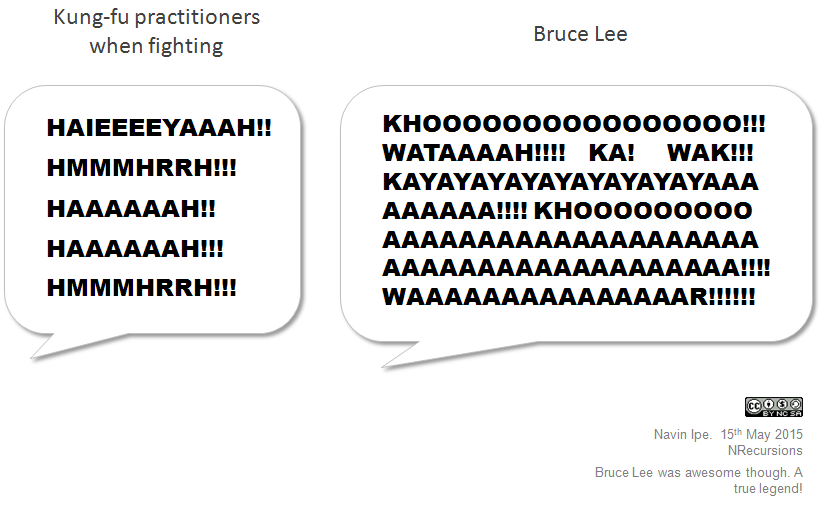

Subscribe to:
Posts (Atom)